

Internet users rely on proxies for privacy, security, and improved control over their online activities. Among the available proxy protocols, SOCKS5 remains one of the most versatile options because it can handle different types of internet traffic while maintaining performance. Whether you are managing multiple accounts, conducting research, automating tasks, or simply looking for greater online flexibility, understanding how to use a SOCKS5 proxy is an essential skill.
This guide explains everything you need to know about SOCKS5 proxies, from understanding their working to setting them up on your device.
What is a SOCKS5 Proxy?
A SOCKS5 proxy is an intermediary server that routes internet traffic between your device and the targeted website or application. Instead of connecting directly to a website, your request first passes through the proxy server, which then forwards the request on your behalf. As a result, the destination server sees the proxy’s IP address rather than your actual IP address.
SOCKS5 is based on the SOCKS protocol and is the most recent version available. Unlike HTTP proxies, which are primarily designed for web browsing, SOCKS5 can handle a wider variety of traffic types and applications. This flexibility is one of the key differences discussed when comparing SOCKS vs HTTPS proxy solutions.
Because of its flexibility, performance, and broad compatibility, SOCKS5 remains one of the most popular proxy protocols for both individual users and businesses. When paired with a reliable provider like Proxying, a SOCKS5 proxy can offer stable connections, improved privacy, and greater control over how the internet is routed.
What is the SOCKS5 Protocol?
Before learning how to use a proxy, it helps to understand what the SOCKS5 protocol is and why it has become so widely adopted.
SOCKS5 is the latest version of the Socket Secure Protocol. Unlike traditional HTTP proxies that are designed primarily for web traffic, SOCKS5 operates at a lower network level and can forward many types of traffic.
One of the biggest advantages of SOCKS5 is its support for authentication. Users can secure access with a username and password, helping prevent unauthorized use of proxy resources. The protocol also supports both TCP and UDP traffic, making it suitable for a broader range of applications than many alternative proxy types.
For a technical overview of the SOCKS protocol, the official documentation published by the Internet Engineering Task Force (IETF) provides detailed specifications and protocol standards.
Why Use a SOCKS5 Protocol?
The popularity of SOCKS5 proxies comes from their flexibility and efficiency. Many users prefer them because they introduce minimal overhead while still providing reliable traffic routing.
A SOCKS5 proxy can help:
- Route internet traffic through a different IP address
- Access geo-targeted content and services
- Improve privacy and web data collection projects
- Support automation and web data collection projects
- Handle applications beyond standard web browsers
- Reduce restrictions based on location or network policies.
Depending on your use case, SOCKS5 proxies can be combined with rotation technology to automatically change IP addresses. This approach is commonly used in environments where rotating proxies help distribute requests across multiple connections.
What You Need Before Starting
Before beginning your SOCKS5 configuration, gather the information provided by your proxy service.
You will typically need:
- Proxy IP address
- Port number
- Username
- Password
These credentials are usually available inside your provider dashboard or SOCKS5 login portal. Make sure you have access to these details before proceeding.
If you are using a Proxying’s SOCKS5 proxy, you can retrieve all required connection information directly from your account dashboard.
Step 1: Access Your SOCKS5 Login Details
The first step is obtaining your connection credentials.
Log in to your provider account and locate the proxy management section. Most providers display the server address, authentication credentials, supported ports, and connection instructions within the user dashboard.
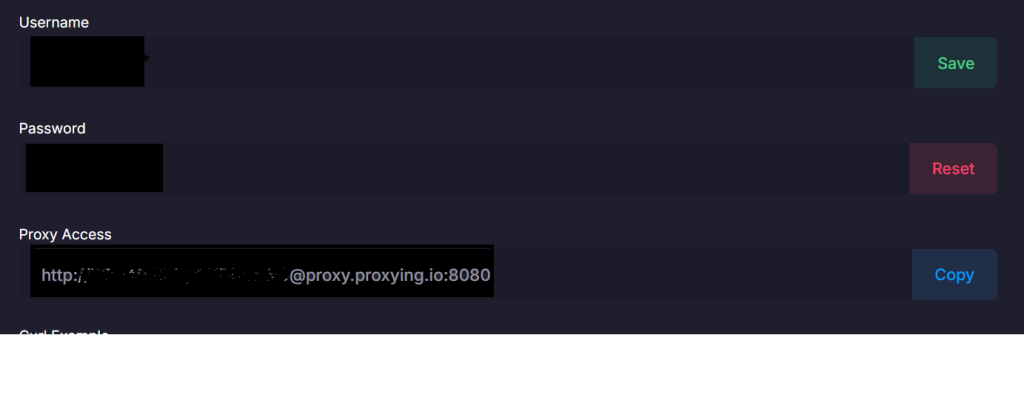
Review the information carefully and verify that your subscription is active. Incorrect credentials are one of the most common causes of connection failures during setups.
Step 2: Choose a SOCKS5 Configurator
Windows doesn’t provide complete support for authenticated SOCKS5 connections across all applications, as mentioned by Microsoft here.
Because of this limitation, many users rely on a dedicated SOCKS5 configurator.
A SOCKS5 configurator is software that routes application traffic through your proxy server while managing authentication and connection settings automatically.
Popular options include:
- Proxifier
- ProxyCap
- SocksCap64
These tools simplify proxy management and allow you to create custom routing rules for specific applications.
Step 3: Install and Launch the SOCKS5 Configurator
Download and install your preferred SOCKS5 configurator. Once installed, launch the application and navigate to the proxy configuration section. Most tool providers provide a simple interface for adding new proxy servers.
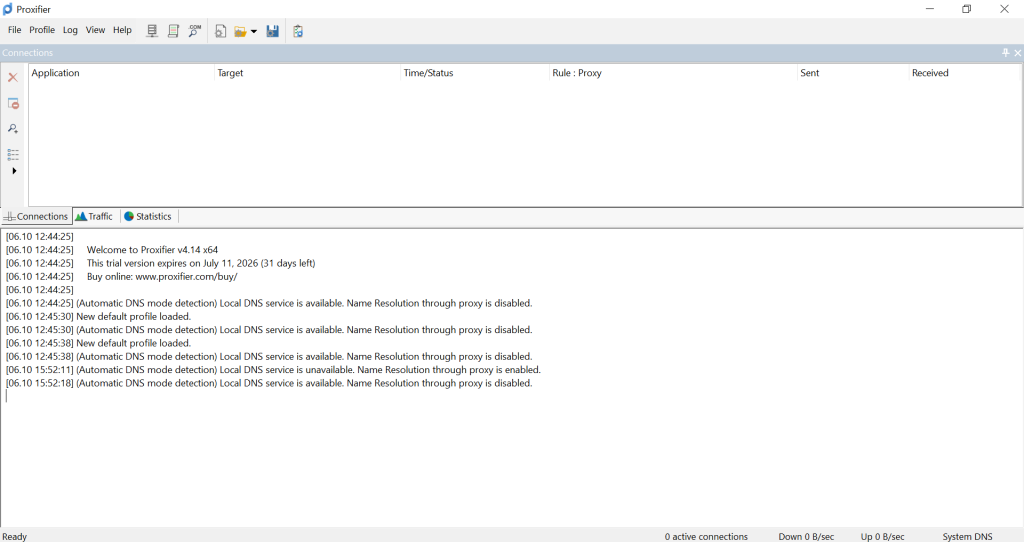
Create a new proxy profile and select SOCKS5 as the protocol type.
You will then be prompted to enter:
- Proxy IP address
- Port number
- Username
- Password
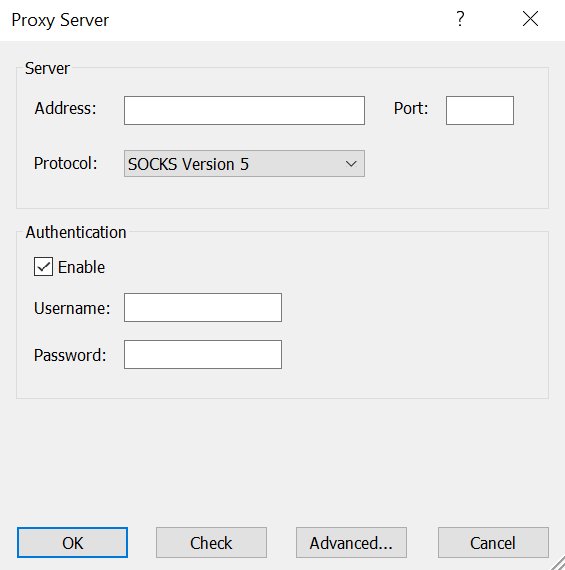
Double-check every value before saving the profile.
Step 4: Complete the SOCKS5 Configuration
After entering your credentials, save the new profile and apply the settings.
Most configurations include a connection test feature that verifies whether the proxy is reachable and whether the authentication is complete.
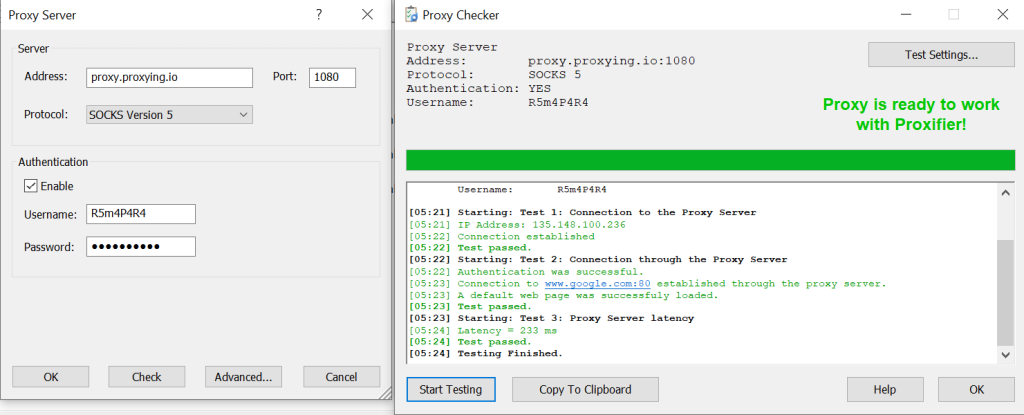
If the test passes, the SOCKS5 configuration is complete. If authentication fails, verify:
- Username spelling
- Password accuracy
- Port number
- IP address
- Subscription status
Even a small typing error can prevent the connection.
Step 5: Route Applications Through the Proxy
Once your proxy server has been added successfully, choose which applications should use the connection.
Many SOCKS5 configurations allow users to create rules that determine how traffic is routed. For example, you may choose to send browser traffic through the proxy while allowing other applications to connect normally.
This level of control makes SOCKS5 especially useful for business workflows, automation tasks, and professional data collection projects.
Common SOCKS5 Configuration Issues
Most setup problems can be resolved quickly once the cause is identified.
Authentication errors usually occur when credentials are entered incorrectly. Connection failures often result from incorrect IP addresses or port numbers. In some cases, local firewalls or antivirus software may block proxy traffic and require additional configuration.
DNS leaks are another issue that occasionally affects proxy users. If DNS requests continue to travel outside the proxy tunnel, websites may still detect your original location. Many SOCKS5 configurations include DNS routing options that help prevent this problem.
Regular testing and monitoring can help maintain a stable connection and reduce interruptions.
Why Choose a Premium SOCKS5 Proxy?
The overall quality of a proxy service is influenced not only by the protocol but also by the underlying IP type. Both residential and datacenter networks can support SOCKS5, though they differ in performance, anonymity, and scalability.
A premium SOCKS5 proxy typically offers:
- Reliable uptime
- Faster connection speeds
- Better authentication security
- Dedicated support
- Larger proxy pools
- Consistent performance
Conclusion
Learning to use a SOCKS5 proxy is straightforward once you understand the required credentials and configuration settings, allowing you to route traffic efficiently, improve privacy, and leverage a flexible connection that supports a wide range of online applications and activities.


