

Walmart is one of the world’s largest online retailers. It offers millions of products across categories like groceries, electronics, home goods, fashion, and more. This makes it a valuable source of public data for businesses, researchers, and developers looking to monitor prices, track inventory, or analyze market trends.
Collecting this information manually can take hours, especially when you need to monitor hundreds or thousands of product pages. Web scraping automates the process of extracting publicly available data quickly and consistently.
In this guide, you will learn which Walmart data you can scrape, the challenges involved, and how to scrape Walmart data using Python while reducing the risk of blocks with the right proxy setup.
Why Businesses Scrape Walmart Data
Walmart’s online marketplace contains a large amount of public product information that changes frequently. Businesses can use this data to make pricing decisions, monitor competitors, and keep track of market trends without manually checking product pages every day.
One of the most common use cases is price monitoring. Retailers can compare Walmart’s prices with their own and adjust their pricing strategies to stay competitive. This is especially useful for products that experience frequent price changes.
Another important use case is competitor analysis. By tracking product listings, brands, promotions, and customer ratings, businesses can better understand how competing products perform in the market and identify opportunities for improvement.
Many companies also scrape Walmart to support product research. Public product descriptions, specifications, ratings, and reviews can help identify popular features, customer preferences, and emerging trends before launching new products.
Inventory tracking is another valuable application. Monitoring product availability allows businesses to detect stock changes, identify high-demand items, and respond more quickly to supply shortages or seasonal demand.
Finally, Walmart data is widely used for market research. Analyzing large volumes of product information helps businesses understand pricing trends, category performance, consumer demand, and changes across different regions, leading to more informed business decisions.
What Data Can You Scrape From Walmart?
Walmart product pages contain a wide range of publicly available information that can be useful for research, price intelligence, and market analysis. The exact data available may vary by product, but most listings include enough details to build a comprehensive dataset.
You can collect product titles to identify items and organize product catalogs. Titles also help match the same product across different retailers for competitive analysis.
Pricing information is one of the most commonly scraped data points. This includes the current price, discounted price, original price, and any promotional offers displayed on the page.
Customer ratings and reviews provide valuable insight into product performance and buyer satisfaction. Businesses often analyze review counts, average ratings, and review content to understand customer sentiment and identify common feedback.
You can also extract product descriptions and specifications, such as dimensions, materials, colors, sizes, and technical features. This information is useful for product comparisons and catalog management.
Many scrapers collect product images and image URLs to build visual product databases or support eCommerce applications. Image data can also help verify product listings across multiple platforms.
Another useful data point is availability status, which indicates whether an item is in stock, out of stock, or available for pickup or delivery. Monitoring stock levels helps businesses track inventory trends and demand.
Product pages also include category information, making it easier to group products by department or niche. This supports market research and category-level analysis.
Finally, you can collect seller information and product identifiers, such as SKUs or item IDs, when available. These details help uniquely identify products and distinguish between items sold directly by Walmart and those offered by third-party sellers.
How to Scrape Walmart Data Using Python
The exact approach depends on the type of Walmart page you want to scrape. For simple pages, Python libraries like requests and BeautifulSoup may be enough to extract data. For pages that rely heavily on JavaScript, you may need a browser automation tool such as Playwright or Selenium.
In this example, we’ll use Python with requests and BeautifulSoup to demonstrate the basic scraping workflow.
Step 1: Install Required Libraries
Before writing any code, install Python and the libraries needed for sending, parsing HTML, and saving the extracted data.
pip install requests beautifulsoup4 pandas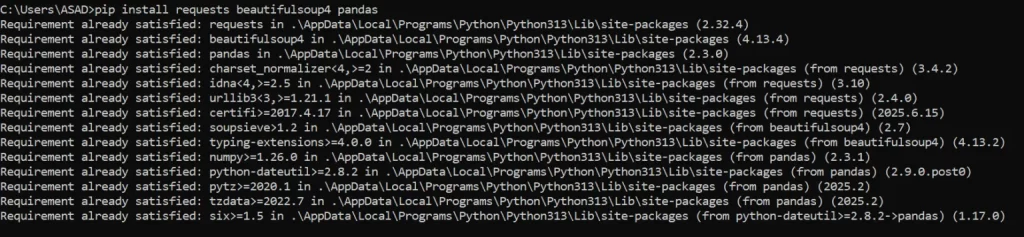
Here’s what each library does:
- requests sends HTTP requests to Walmart’s web pages.
- BeautifulSoup parses HTML, making it easier to locate specific elements.
- pandas stores the extracted information and exports it to formats like CSV or Excel.
Once the installation is complete, create a new Python file and import the required modules:
import requests
from bs4 import BeautifulSoup
import pandas as pdWith the environment ready, the next step is to inspect the Walmart page and identify the HTML elements that contain the data you want to scrape.
Step 2: Inspect the Walmart Page
Before you can extract any data, you need to understand how the page is structured. Walmart’s product pages contain many HTML elements, and each piece of information, such as the product title, price, or rating, is stored inside specific tags and attributes.
Open a Walmart product page in your browser, right-click on the element you want to scrape, and select Inspect. This opens the browser’s Developer Tools, where you can examine the page’s HTML and locate the elements containing the data you need.
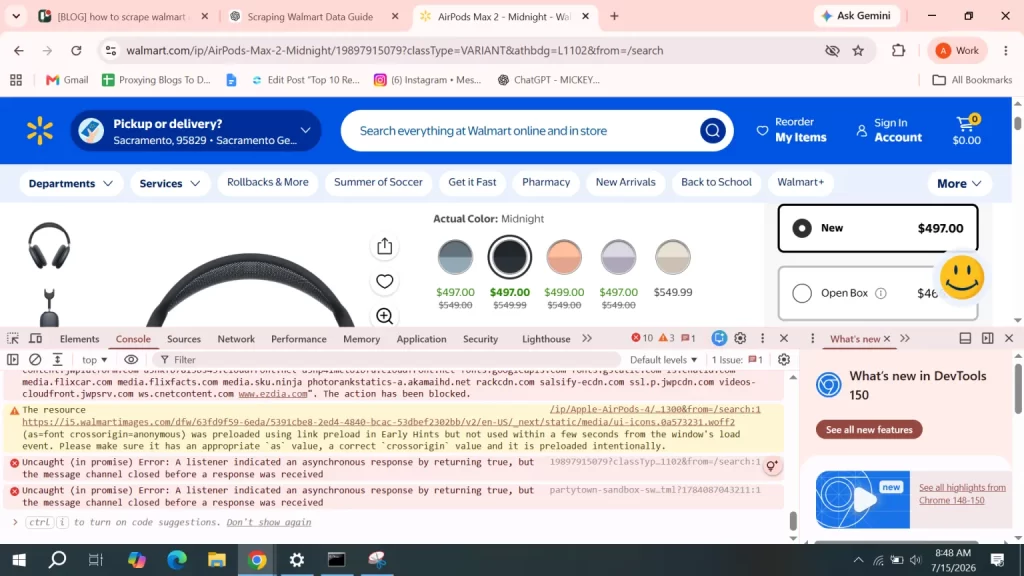
As you inspect the page, remember that Walmart updates its website regularly. Class names and HTML structures can change over time, so avoid relying on automatically generated class names.
Once you’ve identified the elements you need, you’re ready to send a request to the product page and retrieve its HTML for parsing.
Step 3: Send the Request
Once you’ve identified the data you want to extract, the next step is to send an HTTP request to the Walmart product page. The requests library downloads the page’s HTML, which you can later parse with BeautifulSoup.
Start by defining the product URL and adding request headers. Including a User-Agent helps your requests appear more like it is coming from a regular web browser.
import requests
url = "https://www.walmart.com/ip/AirPods-Max-2-Midnight/19897915079"
headers = {
"User-Agent": (
"Mozilla/5.0 (Windows NT 10.0; Win64; x64) "
"AppleWebKit/537.36 (KHTML, like Gecko) "
"Chrome/138.0.0.0 Safari/537.36"
),
"Accept-Language": "en-US,en;q=0.9"
}
response = requests.get(url, headers=headers, timeout=30)
print(response.status_code)
If the request is successful, the script should return.
200
You can also save or preview the downloaded HTML to verify that the request worked correctly.
print(response.text[:1000])After retrieving the page successfully, the next step is to parse the HTML and extract the product information you need.
Note: Walmart uses advanced anti-bot protections, including JavaScript rendering, rate limiting, and IP-based detection. As a result, a simple request call may return incomplete HTML, a CAPTCHA page, or an access denied response instead of the product content. For larger scraping projects, developers often use browser automation tools like Playwright or Selenium along with rotating residential proxies to improve success rates.
Step 4: Parse the Data
After downloading the page, you can use BeautifulSoup to parse the HTML and locate the product information you identified earlier. This makes it easier to extract specific elements, such as the product title, price, and rating.
First, create a BeautifulSoup object from the response:
from bs4 import BeautifulSoup
soup = BeautifulSoup(response.text, "html.parser")Next, inspect the HTML and extract the elements you need. For example:
title = soup.find("h1")
print(title.text.strip() if title else "Title not found")You can follow th same approach for other product details. A typical Walmart scraper may extract:
- Product title
- Current price
- Original price
- Customer rating
- Number of reviews
- Availability status
title = soup.find("h1")
price = soup.find("span", attrs={"itemprop": "price"})
rating = soup.find("span", attrs={"itemprop": "ratingValue"})
print("Title:", title.get_text(strip=True) if title else "N/A")
print("Price:", price.get_text(strip=True) if price else "N/A")
print("Rating:", rating.get_text(strip=True) if rating else "N/A")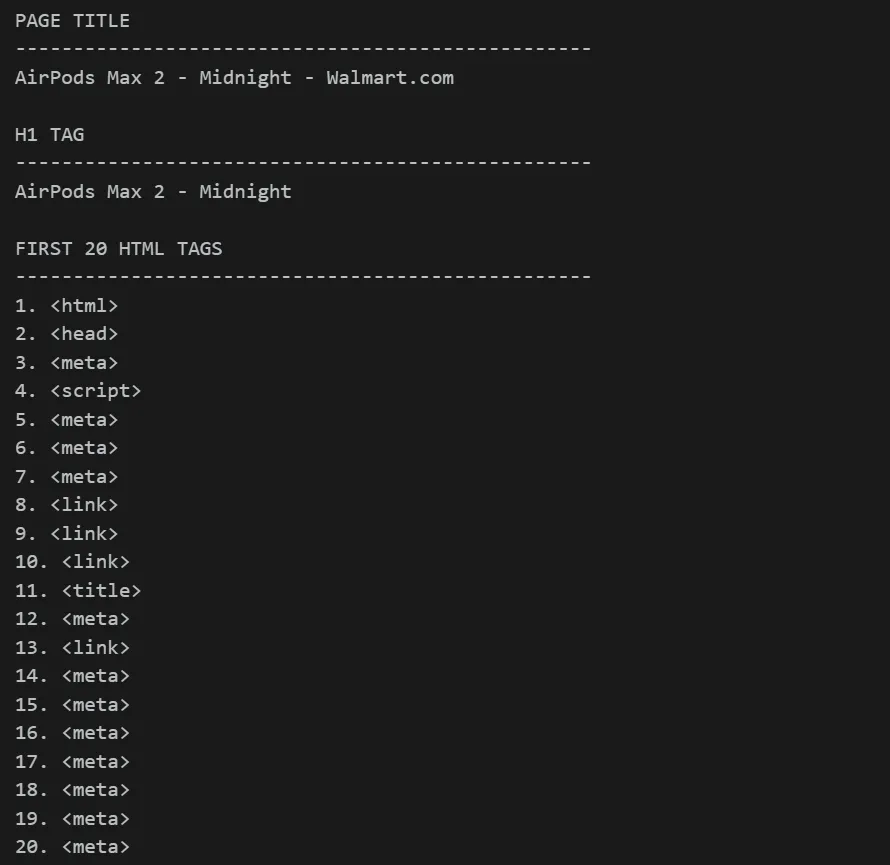
Once you’ve extracted the required information, the final step is to store the data in a format such as CSV, JSON, or Excel for further analysis.
Step 5: Save Results
Once you’ve extracted the information you need, the final step is to save it in a structured format. This makes the data easier to analyze, share, or import into other tools.
One of the most common formats is CSV, which can be opened in spreadsheet applications like Microsoft Excel or Google Sheets. You can also save the data as JSON if you’re building applications or working with APIs.
First, store the extracted values in a Python dictionary.
data = {
"Title": title.get_text(strip=True) if title else "N/A",
"Price": price.get_text(strip=True) if price else "N/A",
"Rating": rating.get_text(strip=True) if rating else "N/A"
}Next, convert the dictionary into a Pandas DataFrame and export it as a CSV file.
import pandas as pd
df = pd.DataFrame([data])
df.to_csv("walmart_products.csv", index=False)
print("Data saved successfully!")If everything runs correctly, the data will be saved in a CSV file.

You can also save the same data as a JSON file.
df.to_json("walmart_products.json", orient="records", indent=4)Both formats are widely used in data analysis workflows. CSV files are ideal for spreadsheets and reporting, while JSON is better suited for applications and data pipelines.
Full Working Code
import requests
from bs4 import BeautifulSoup
import pandas as pd
# Walmart product URL
url = "https://www.walmart.com/ip/AirPods-Max-2-Midnight/19897915079"
# Browser-like headers
headers = {
"User-Agent": (
"Mozilla/5.0 (Windows NT 10.0; Win64; x64) "
"AppleWebKit/537.36 (KHTML, like Gecko) "
"Chrome/138.0.0.0 Safari/537.36"
),
"Accept-Language": "en-US,en;q=0.9",
}
try:
# Send request
response = requests.get(url, headers=headers, timeout=30)
response.raise_for_status()
print(f"Status Code: {response.status_code}")
# Parse HTML
soup = BeautifulSoup(response.text, "html.parser")
# -------------------------
# Extract product details
# -------------------------
# Product title
title = soup.find("h1")
product_title = title.get_text(strip=True) if title else "N/A"
# Price (may not work if page structure changes)
price = soup.find("span", attrs={"itemprop": "price"})
product_price = price.get_text(strip=True) if price else "N/A"
# Rating
rating = soup.find("span", attrs={"itemprop": "ratingValue"})
product_rating = rating.get_text(strip=True) if rating else "N/A"
# Availability
availability = soup.find(attrs={"itemprop": "availability"})
stock = availability.get("content", "N/A") if availability else "N/A"
# Print extracted data
print("\nExtracted Data")
print("-" * 40)
print("Title:", product_title)
print("Price:", product_price)
print("Rating:", product_rating)
print("Availability:", stock)
# -------------------------
# Save HTML
# -------------------------
with open("walmart_page.html", "w", encoding="utf-8") as file:
file.write(soup.prettify())
print("\nHTML saved as walmart_page.html")
# -------------------------
# Save CSV
# -------------------------
data = {
"Title": product_title,
"Price": product_price,
"Rating": product_rating,
"Availability": stock
}
df = pd.DataFrame([data])
df.to_csv("walmart_products.csv", index=False)
print("CSV saved as walmart_products.csv")
# -------------------------
# Save JSON
# -------------------------
df.to_json(
"walmart_products.json",
orient="records",
indent=4
)
print("JSON saved as walmart_products.json")
except requests.exceptions.RequestException as e:
print("Request failed:", e)Scale Walmart Scraping With Proxies
If you’re scraping only a few Walmart pages for testing, a simple Python script may be enough. However, as your scraping project grows, you’ll likely encounter rate limits, CAPTCHAs, or blocked requests. This is where Proxying’s proxies become essential.
A proxy routes your requests through a different IP address before they reach Walmart’s servers. Instead of sending every request from a single location, proxies distribute traffic across multiple IP addresses, making your scraping activity appear more like that of regular users.
Reduce the Risk of IP Bans
Sending hundreds of requests from the same IP address can quickly trigger Walmart’s anti-bot systems. Rotating residential proxies assign a new IP address at regular intervals, helping distribute requests and reducing the likelihood of your scraper being blocked.
Scrape at a Larger Scale
Large scraping projects often involve thousands of product pages. Using multiple proxy IPs allows you to spread requests across different addresses instead of relying on a single connection. This improves reliability and makes long-running scraping jobs more stable.
Access Region-Specific Products
Some Walmart products, prices, promotions, and availability vary by location. Geo-targeted proxies let you send requests from different cities or states, allowing you to collect location-specific product information for more accurate market analysis.
Improve Request Success Rates
Temporary blocks, connection failures, and rate limits are common during web scraping. A reliable proxy network helps maintain consistent access by routing requests through healthy IP addresses, resulting in fewer failed requests and smoother data collection.
By combining well-written scraping scripts with high-quality proxies, you can build a more reliable Walmart scraper that performs consistently even as your data collection needs grow.
Conclusion
Scraping Walmart data can provide valuable insights into product pricing, inventory, customer reviews, and market trends. While Python libraries like request and BeautifulSoup are a great starting point for learning the scraping process, Walmart’s dynamic content and anti-bot measures often require more advanced tools and a reliable proxy infrastructure for large-scale data collection.
By following responsible scraping practices and using the right tools, you can build a more efficient and dependable Walmart scraper for your business or research needs.


