

I had a scraper running clean for three weeks straight. Then one Tuesday morning, every request came back with a 200 status and an empty body. No error, no block message, nothing to grep for in the logs. Just silence where the data used to be.
That’s anti-scraping working exactly as designed. Not a wall you crash into, a system that quietly decides you’re not welcome and gives you just enough rope to waste your own time. I’ve spent years on both sides of this fight, building scrapers and occasionally getting paid to help sites defend against them, and the shape of it doesn’t really change. Detection first, friction second, enforcement last. Once you can see those three stages, the rest of this stops feeling like a black box.
What Is Anti-Scraping?
Anti-scraping is the set of technologies a site uses to spot automated traffic and slow it down, degrade it, or cut it off. Not a single tool. A stack: something watching request patterns, something checking your browser environment, something scoring how human your session looks. You rarely see all of it. You just feel the effects when your success rate drops for no obvious reason.
Anti-Scraping vs Web Scraping
These sit on opposite sides of the same table. Scraping extracts data from a page, whether that’s pricing, listings, or reviews. Anti-scraping exists to make that extraction harder, slower, or more expensive than it’s worth. Neither one “wins” outright. Sites raise the cost of scraping, scrapers adapt, and the cycle repeats. I’ve watched this play out on the same target site over a two-year stretch and it never fully settles.
Anti-Scraping vs Anti-Bot Protection
People use these interchangeably and it causes confusion. Anti-bot protection is the broader category, covering credential stuffing, ad fraud, fake account creation, anything automated that isn’t a human clicking around. Anti-scraping is narrower. It’s specifically about stopping data extraction. A site can have strong anti-bot defenses and weak anti-scraping rules, or the reverse. Worth knowing which one you’re actually up against before you assume a fix.
Why Websites Use Anti-Scraping Protection
Three reasons come up constantly, and honestly, they’re all pretty reasonable from the site’s side of the table.
Protecting proprietary data. Product catalogs, pricing tables, user reviews, these took real money to build. A site that spent years collecting reviews doesn’t love watching a competitor pull them overnight.
Preventing content theft. Republished articles, mirrored listings, scraped images reused elsewhere without credit. This one’s less about infrastructure and more about who gets the traffic and the SEO value.
Reducing abusive automation. Aggressive scraping at high volume looks a lot like a denial-of-service attack from the server’s point of view, even when that’s not the intent. It skews analytics too. A spike of bot traffic can make a marketing team think a campaign worked when it just triggered a scraper run somewhere.
How Anti-Scraping Works
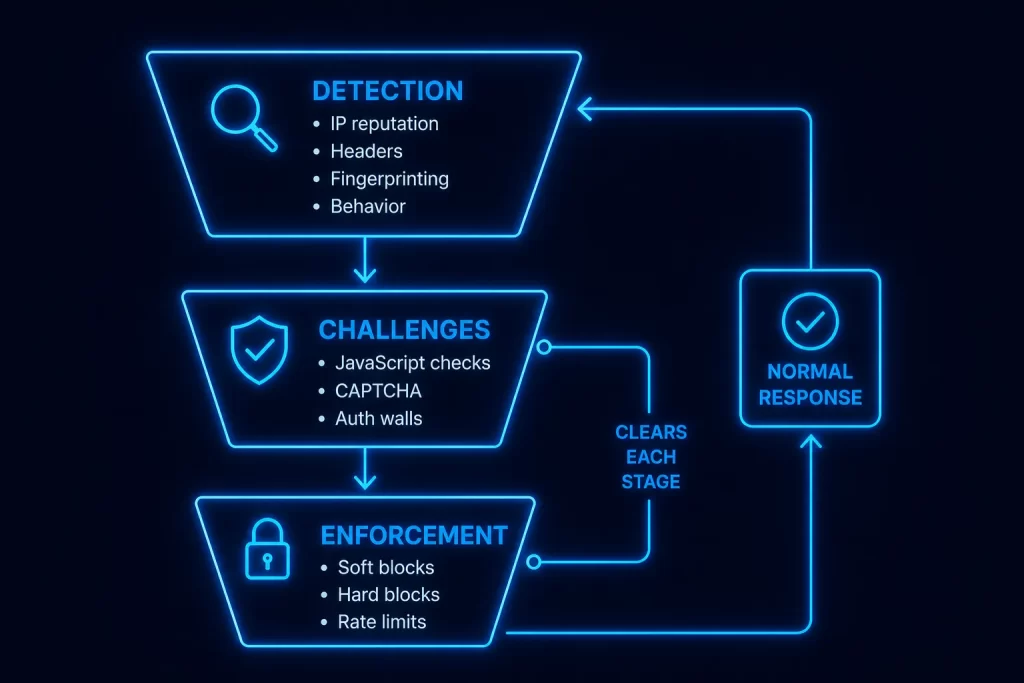
Three stages, roughly in order. I think of it as a funnel, and most of what people call “getting blocked” is really just falling out at whichever stage your setup can’t clear.
Detection. This is where the site decides whether you look automated. IP reputation and request velocity get checked first, since that’s cheap and fast. Then HTTP headers get validated, browser fingerprinting kicks in (screen size, installed fonts, WebGL output, canvas rendering), and session and cookie behavior gets analyzed alongside mouse movement, click timing, and scroll patterns if JavaScript is running.
Challenges. If detection flags you as suspicious but not confirmed, you get a challenge instead of an outright block. JavaScript execution requirements, CAPTCHAs, login walls, or risk-based step-up verification. The point isn’t to stop you cold, it’s to make you prove you can do things a simple script can’t.
Enforcement. Fail the challenge, or trip enough detection signals at once, and enforcement kicks in. Soft blocks first, usually: empty responses, partial data, artificial throttling. Hard blocks come next, HTTP 403s, outright IP bans, account suspension if you’re authenticated. Rate limiting can show up at any stage, not just the end.
Main Types of Anti-Scraping Techniques
Nine categories, and most production sites run several of these at once rather than picking one.
| Technique | What It Detects | Common Counter |
|---|---|---|
| IP-Based Controls | Geo/ASN filtering, reputation scoring, per-IP rate limits | Rotating through a wider proxy pool |
| Header & Protocol Validation | TLS fingerprints, missing or inconsistent HTTP headers | Matching real browser header sets |
| Browser Fingerprinting | Screen resolution, fonts, GPU renderer, timezone, hardware concurrency | Consistent, realistic fingerprint per session |
| JavaScript Challenges | Whether a real JS engine executed the page | Headless browser automation |
| CAPTCHA Systems | Image or puzzle-solving friction | Solving services or avoiding the trigger entirely |
| Behavioral Analysis | Click intervals, mouse paths, scroll patterns, tab focus | Slower, human-paced request timing |
| Honeypots & Hidden Traps | Invisible form fields, fake links, trap endpoints | Careful DOM parsing, ignoring hidden elements |
| Auth & Session Controls | Token expiry, MFA, session rotation | Persistent, valid session handling |
| API-Specific Protections | Signed requests, device IDs, per-key quotas | Respecting quotas, valid signing logic |
I used to think IP-based controls were the whole game. They’re the first line, not the last one. Fingerprinting and behavioral analysis catch a lot of what clean IPs let through.
How Anti-Scraping Affects Web Scrapers
Five things you’ll run into, usually in this order as a project scales up.
IP blocks and rate limiting. The most visible symptom, and the easiest to misdiagnose as the only problem.
Session loss. Cookies or tokens get invalidated mid-run, and suddenly requests that worked five minutes ago start failing.
CAPTCHA interruptions. Even occasional CAPTCHAs eat into throughput fast if you’re not set up to handle them automatically.
Rising costs. Proxies, solving services, more compute for headless browsers. None of this is free, and it adds up faster than people expect going in.
Infrastructure that has to be resilient. Retry logic, rotation logic, fingerprint management. What started as a fifteen-line script turns into an actual system.
How Scrapers Reduce Anti-Scraping Blocks
Six strategies, and in my experience they work best layered rather than picked individually.
Proxy rotation. Spreading requests across many IPs so no single address trips a rate limit or reputation flag.
Choosing the right proxy type. Residential proxies route through real ISP-assigned addresses, which tend to clear IP reputation checks that flag datacenter ranges outright. For scraping at scale where budget matters more than stealth, ISP proxies split the difference, datacenter speed with an ISP-registered address.
Headless browser automation. Tools that render JavaScript the way a real browser would, since plenty of anti-scraping systems specifically check for that.
Fingerprint consistency. Keeping the same fingerprint stable across a session instead of randomizing every request, since wildly changing fingerprints from the “same” browser look more suspicious than a static one.
Human-paced request timing. Adding realistic delays and jitter between requests instead of hammering an endpoint as fast as the connection allows.
Session persistence. Reusing cookies properly across a run instead of starting fresh every request, which is itself a signal that gets flagged.
Here’s what proxy rotation actually looks like with a basic Python setup. Same request logic, different proxy scheme depending on what the target and your provider support.
HTTP proxy:
import requests
proxies = {"http": "http://proxy_host:port"}
response = requests.get("https://example.com", proxies=proxies, timeout=15)
print(response.status_code)HTTPS proxy:
proxies = {"https": "https://proxy_host:port"}
response = requests.get("https://example.com", proxies=proxies, timeout=15)SOCKS4 proxy:
proxies = {"http": "socks4://proxy_host:port", "https": "socks4://proxy_host:port"}
response = requests.get("https://example.com", proxies=proxies, timeout=15)SOCKS5 proxy:
proxies = {"http": "socks5://proxy_host:port", "https": "socks5://proxy_host:port"}
response = requests.get("https://example.com", proxies=proxies, timeout=15)Authenticated proxy:
proxies = {
    "http": "http://username:password@proxy_host:port",
    "https": "http://username:password@proxy_host:port",
}
response = requests.get("https://example.com", proxies=proxies, timeout=15)
None of this is a silver bullet on its own. Rotating clean IPs while your fingerprint stays static and your click timing looks robotic just moves the detection to a different stage. It’s the layering that gets you through, not any single trick. IP rotation handles the network layer, but pair it with a headless browser for the fingerprint layer if the target is checking for JavaScript execution.
If CAPTCHAs are the recurring blocker rather than IP flags, that’s a separate problem with its own tooling, our rundown of top CAPTCHA solving services covers what’s actually worth paying for. And if fingerprinting specifically is what’s catching you, an anti-detect browser manages that consistency for you instead of you hand-rolling it.
Troubleshooting Common Issues
A few problems that tend to show up once the basics are working but the setup still isn’t clean.
Getting blocked despite rotating proxies. Usually means the block isn’t IP-based at all. Check whether your fingerprint or header set is static across requests while your IP changes, that mismatch itself is a signal.
CAPTCHA on nearly every request. Often means you’ve already been flagged as suspicious before the CAPTCHA even loads. Rotating in a cleaner IP pool sometimes fixes this faster than trying to solve your way through it.
Session or cookie invalidation mid-run. Confirm you’re actually persisting cookies between requests rather than instantiating a fresh session object each time. This one trips people up constantly, myself included, early on.
Auth failures. A 401 or 403 immediately after login usually points to a missing or expired token rather than a proxy issue. Don’t chase the wrong layer.
Connection timeouts through a proxy. Confirm the proxy itself is live before assuming the target site is throttling you. A dead proxy and a rate-limited request look identical from the outside.
For deeper background on the standards side of this, OWASP’s Automated Threats to Web Applications project catalogs the threat categories anti-bot systems are built to catch. If you want to see what your own browser exposes to fingerprinting scripts, EFF’s Cover Your Tracks tool is a genuinely useful way to check.
Anti-scraping isn’t going away, and honestly, it shouldn’t. Sites have real reasons to protect what they’ve built, same as you have real reasons to want the data. What I’ve found over the years is that the setups that hold up longest aren’t the cleverest ones, they’re the ones that treat detection as layered from the start instead of patching one signal at a time after getting blocked. Get the basics right, check what a proxy actually does if you’re newer to this, and build outward from there. If you’re comparing providers for the proxy side of this, Proxying breaks its pools down by exactly this kind of use case, residential IPs when a target fingerprints aggressively, ISP IPs when you want datacenter speed without getting filtered by residential-only allowlists.


