


If you’re banned from 4chan, you may be interrupted while browsing, particularly if you are browsing from a location that is blocked. Using a proxy will enable you to choose another IP address and connect, but it may cause you to face the same restriction if you select the wrong address.
You’ll find how to install a 4chan proxy for Windows, Android, and your browser in this guide. You’ll also learn how to test your connection and select proxies that are functional on 4chan.
Why You Need a Proxy to Access 4chan
Spam, automated activity, or abuse reported from a shared network may lead to a restriction on the use of certain IP addresses on 4chan. If you get an error when attempting to open a board or post a reply, your IP could be blocked.
When you use a proxy, 4chan reads the server’s IP address instead of your own. In some cases this may be helpful; however, this does not ensure access. The proxy’s IP can also be blocked by 4chan.
Bypass an IP Ban
If you are unable to access 4chan via your IP address, try accessing it from a different proxy IP address. This isn’t supposed to happen if the restriction was due to the user being blacklisted or if 4chan already blacklists the new IP.
Make sure that the restriction applies to all of your connections or just a particular action before selecting this approach. You can also read our guide on How to Bypass an IP Ban for other options.
Access 4chan on Restricted Networks
Access to imageboards like 4chan is blocked by some school, workplace, or public networks. A proxy can pass the connection through another proxy server, but network administrators will also be able to block or limit access using other means.
If you use a proxy, be sure to adhere to the network’s rules! Restricted activities are not automatically allowed by changing the IP address.
Protect Your Original IP Address
A proxy can mask your IP address from the destination site and give them the IP address of the proxy server. You can use this when you wish to distinguish your regular connection from your browsing of 4chan.
But a proxy is not a way to be entirely anonymous. The proxy provider can view your connection information, and websites can use cookies, browser fingerprints, and other signals to recognize you. HTTPS encrypts data as it travels between the Web browser and the website, but it is important to select a reputable proxy service provider.
If you want to compare other options, read our guide on How to Change Your IP Address: VPNs, Proxies & More.
How to Set Up a Proxy for 4chan
You can set a proxy on your machine so that you use another IP address for 4chan traffic. It depends on your operating system and whether you are going to use it with multiple applications or just your browser.
On Windows
You can set up a proxy in Windows by using the Settings menu. If authentication is required from your provider, you’ll need the proxy server address, port, and username and password.
Follow the steps below to configure a proxy in Windows 10 or Windows 11:
- Open Windows Settings. Hold down the Win key and press I (for “information” on the keyboard).
- Now you’ll need to go to Network & internet. Click on Proxy from the options.
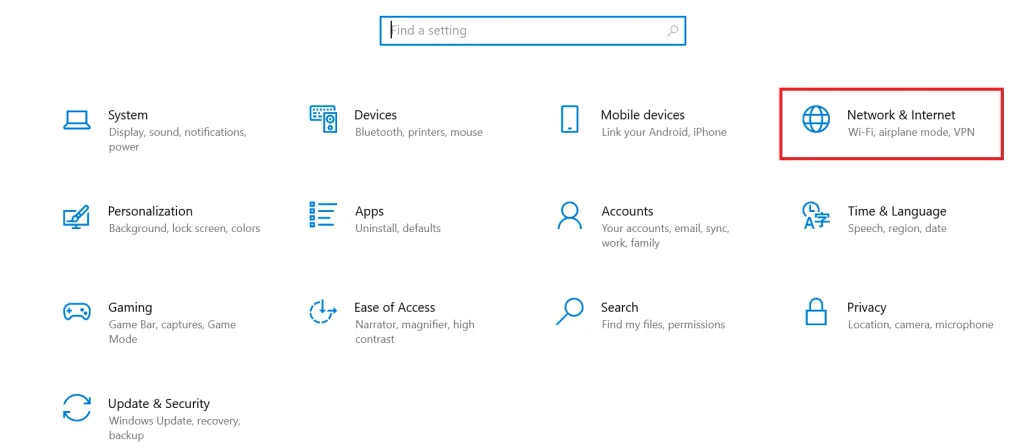
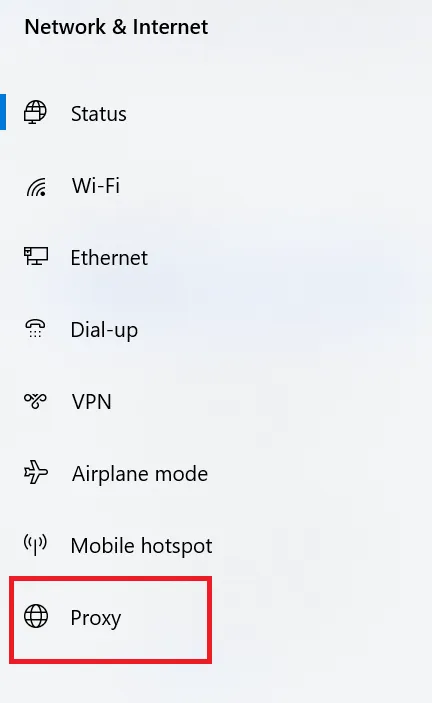
- Find Manual proxy setup. Click on Set up next to “Use a proxy server.”
- Enter the information for your proxy. Enter your proxy server’s IP address and port number that you were given by your proxy provider.
- Save the settings. Check the box and then click Save.
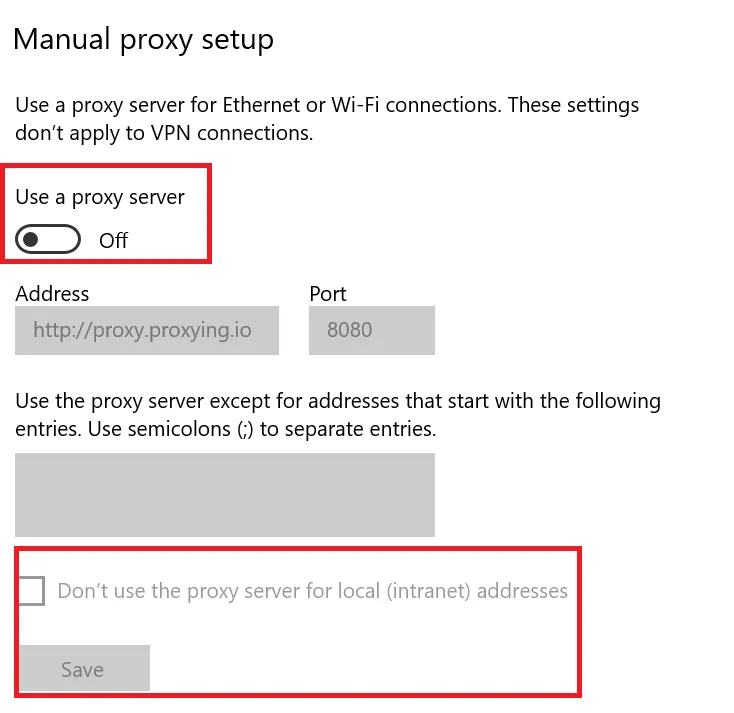
- Open your browser. Visit 4chan to check whether the website loads.
Important: Usually, there is no direct SOCKS5 configuration support in Windows’ built-in manual proxy settings, only HTTP proxies. If your provider provides a SOCKS5 proxy, then use an application or browser that is compatible with it. Some proxy services will also require authentication, which can be set up independently
If 4chan is still showing an IP ban message, the IP of the proxy could also have been banned. If your connection is changed, that does not mean you will have access. You can read our guide on how to bypass an IP ban for more information.
On Your Android Smartphone
On Android, you can set up a proxy in Wi-Fi network settings. This technique is used with Wi-Fi connections, but is not enabled by default for mobile data.
Follow these steps:
- Tap the Settings option on your Android phone.
- Choose Wi-Fi and the network you are connected to.
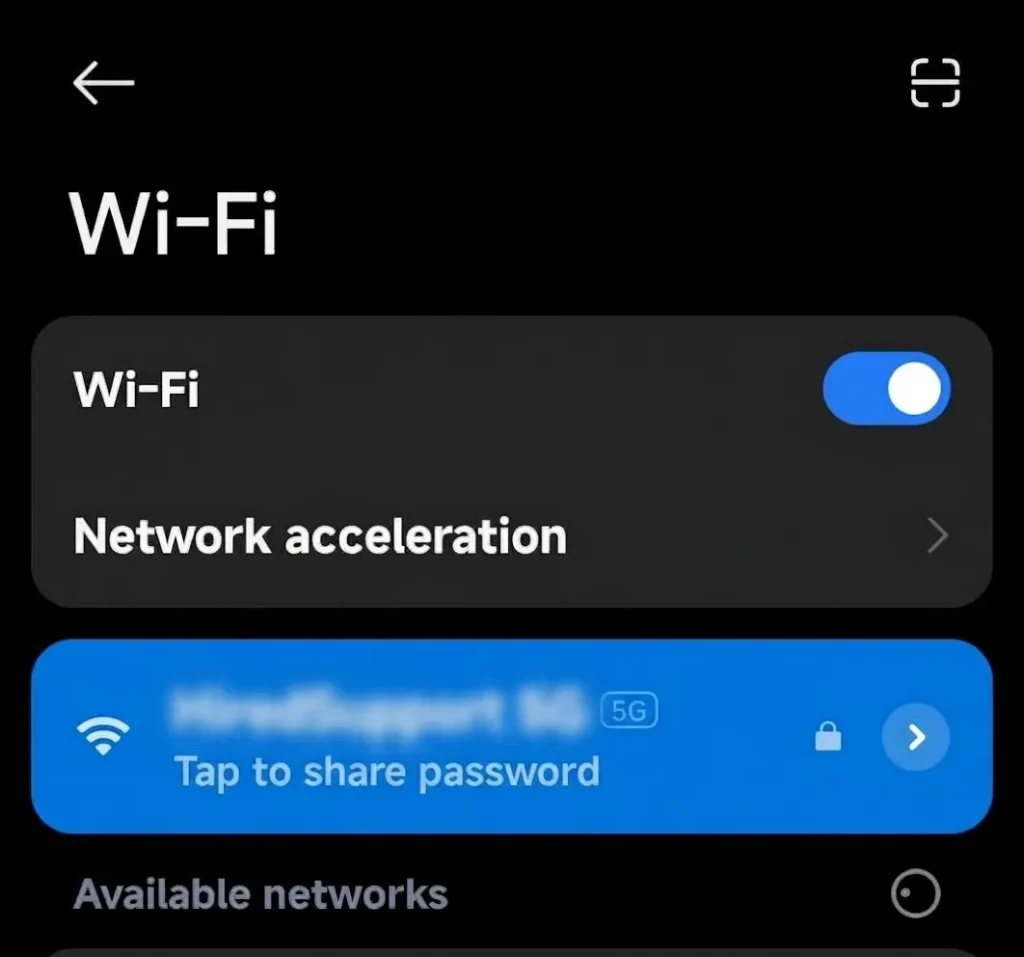
- Tap the gear icon or select Modify network to open the network’s settings.
- If necessary, click on Advanced.
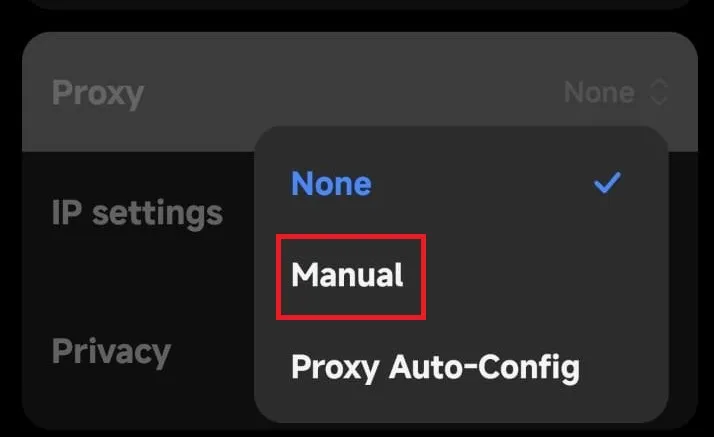
- To do this, under Proxy, choose Manual.
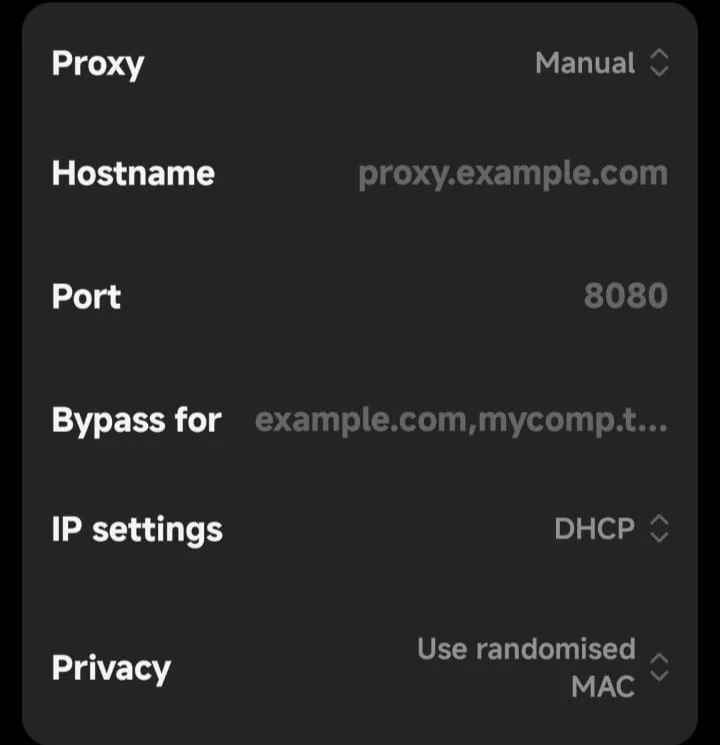
- Enter the proxy hostname or IP address and port that your proxy provider gave you.
- Remember the settings and launch your browser.
Generally, the Wi-Fi proxy settings in Android support HTTP proxy. Your provider might support SOCKS5, which may require you to use a compatible browser or application.
Keep in mind that this will only work for the chosen Wi-Fi network. You might need an alternate configuration if you use mobile data or another Wi-Fi network.
Via Browser Extension
If you want to use a proxy while surfing 4chan without changing your Windows network settings, consider a browser extension. Extensions can let you use a proxy profile and switch between connections directly from the browser toolbar.
How to make one in Google Chrome:
- Go to the Chrome Web Store.
- Look for a trustworthy proxy-management add-on, like FoxyProxy.

- Check its permissions, publisher, and privacy policy before installing it.
- Go to the extension’s settings and add a new proxy profile.
- Provide the address, port, and supported protocol (e.g., HTTP or SOCKS5) of the proxy server.
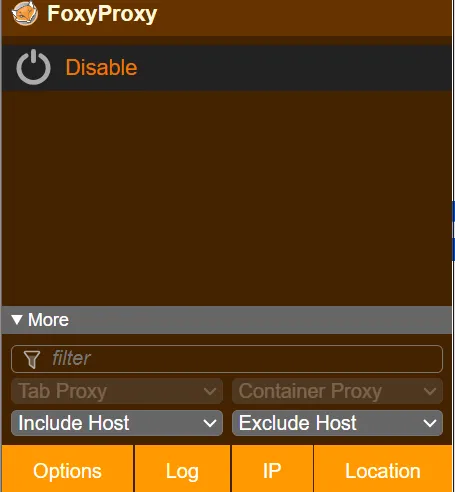
- If the extension is capable of accepting them, and your provider needs them, add authentication details.
Important: Proxy servers are not included with some extensions; these extensions only deal with proxy settings. You need to have details of a proxy from a provider. Also, be mindful of the permissions that browser extensions may have, and don’t install extensions that you don’t know or enter your credentials into untrusted tools.
You can also read our guide on how to set up a proxy for Tor Browser to learn about another proxy configuration method.
Is it Legal to Use 4chan Proxies?
In most countries, using a proxy to access 4chan is legal. The rules, however, depend on your location and how you use the proxy.
A proxy is an IP address changer. It does not mean that illegal activities are legal or that you will be exempt from a website’s rules.
Here are a few things to take into consideration before you use a 4chan proxy:
- Local laws: Find out the rules in your country on proxy use and Internet use.
- 4chan policies: If your IP address or connection is not allowed, then you are not allowed.
- Acceptable use: Never use a proxy to threaten others, share illegal material, or commit any other illegal activity.
- Privacy: The proxy provider may be able to glance at some data regarding your connection, depending upon its settings. Look for a provider that has transparent privacy policies.
If your IP address has been blocked, review the reason for the restriction before trying another connection. Our guide on how to change your IP address explains the available options.
In short, proxy use is generally lawful, but your location, online activity, and the site’s rules all matter.
Are Free Proxies Safe for 4chan?
While there are free proxies available to help you visit 4chan, there are some dangers to consider:
- Shared IP bans: A lot of users share the same IP address. If a user breaks 4chan’s rules, his/her IP address may be blocked.
- Privacy risk: When using a free proxy, your online session could be tracked, and you risk losing your sensitive data.
- Slow connections: If the free server is overwhelmed, it might be slow to load pages and result in disconnections.
- Inconsistent proxies: There are some free proxies that don’t work at all, or they are already banned by 4chan without any warning.
- Limited protocol support: Some proxies only provide support for HTTP and may not be compatible with all browsers and/or applications.
- Poor security: If the proxy is untrusted, it could be possible that your data might be leaked. Do not use sensitive information via untrusted services.
If you are browsing regularly, select a reputable provider with a transparent internet privacy policy and provider support for the protocol you need. For example, Proxying provides residential and ISP proxies to those who require an alternative IP address.


