


Automated web scraping lets you collect structured data from websites at scale, like product prices, reviews, news, or any repeating information, without doing any repetitive manual work.
When this is paired with proxies, automated web scraping becomes much more reliable, scalable, and less likely to be blocked by websites.
In this guide, you will learn how to build an automated scraper in Python using a library called AuroScraper.
Before diving into how to develop an automated scraper, let’s look at what AutoScraper is.
What is AutoScraper?
Autoscraper is a Python library designed to simplify and automate web scraping. It distinguishes itself from traditional web scraping frameworks by minimizing the need for manual HTML inspection and extensive coding to parse content.
What are the Functionalities of AutoScraper?
- Automatic Rule Generation: AutoScraper learns scraping rules automatically based on examples provided by the user. You give it a target URL and a list of desired data points, and it identifies the patterns to extract similar information.
- Easy to use: It is particularly user-friendly and well-suited for beginners in web scraping, as its automatic rule generation reduces the learning curve associated with parsing HTML.
- Handling dynamic websites: AutoScraper can efficiently scrape data from dynamic websites, which often pose challenges for simple methods.
- Lightweight and fast: It is designed to be a lightweight and efficient tool for web data extraction.
- Saving and loading models: You can save the learned scraping rules (models) and load them later to apply to different URLs or reuse them for subsequent scraping tasks.
- Proxy Support: This feature enables the use of proxies to manage requests and potentially circumvent IP blocking during scraping.
Getting Started: Install AutoScraper
Let’s install the AutoScraper library. There are actually several ways to install and use this tutorial. We’re going to use the Python package index repository using the following pip command:
Pip install autoscraper requestsThe output is:
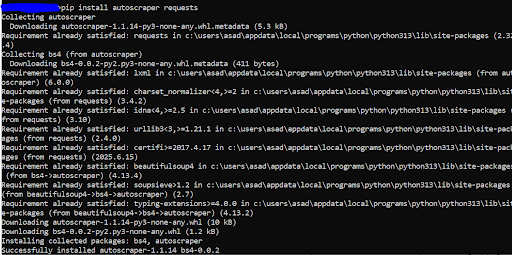
A Simple AutoScraper Example
from autoscraper import AutoScraper
url = "https://example.com/search?q=headphones"
wanted = ["Sony WH-1000XM4"]  # one example value from the page
scraper = AutoScraper()
result = scraper.build(url, wanted)
print(result)
# Save for reuse
scraper.save("my_scraper")So,
- Url: You give the URL of the page you want to scrape
- wanted: In this, you list an example text you want to extract. AutoScraper will automatically find the pattern and extract similar elements.
- scraper = AutoScraper(): Creates a new scraper instance and builds it based on the URL and example data.
- scraper.save(“my_scraper”): Saves the scraper model locally.
- The result will contain values that AutoScraper found that match the given pattern. You can later .load() the saved scraper to reuse it.
Let’s scrape a real website using Autoscraper.
Scraping Books with AutoScrape
This section showcases the example of automated web scraping of public websites using AutoScraper.
The target website has hundreds of book names in different categories, as shown in the screenshot.
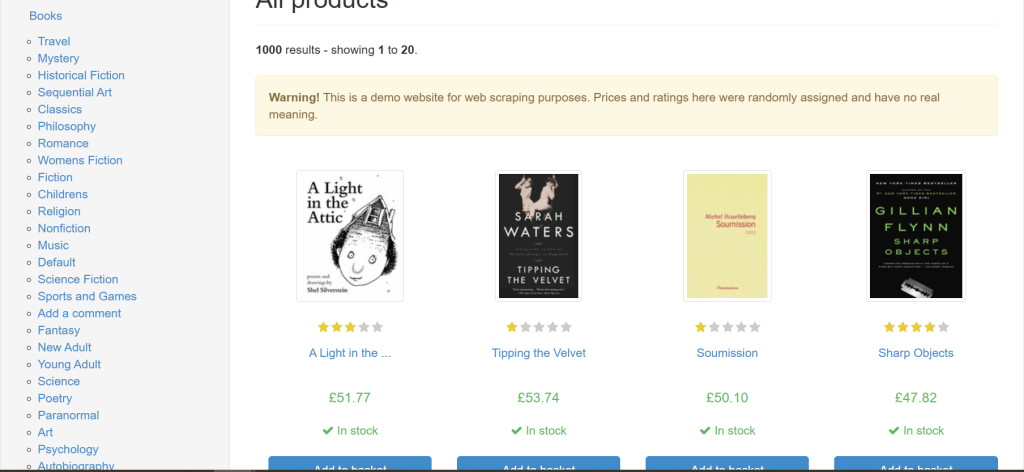
Now, if you want to scrape the book names, you can do it with the following trivial code:
from autoscraper import AutoScraper
url = 'https://books.toscrape.com/'
wanted_list = ['A Light in the Attic']
scraper = AutoScraper()
results = scraper.build(url, wanted_list)
print("Results found:")
print(results)
# If you got results, you can save your model
if results:
    scraper.save('books_scraper')
else:
    print("No results found. Trying alternative method...")
    # Let's try scraping the book URLs instead
    wanted_urls = ['catalogue/a-light-in-the-attic_1000/index.html']
    scraper = AutoScraper()
    results_alt = scraper.build(url, wanted_urls)
    print("Alternative results found:")
print(results_alt)This will scrape all the titles matching in wanted variable.
Adding proxies: Keep your Scraper Alive
When automating scraping at scale, direct requests often get rate-limited or blocked. Use proxies to distribute requests across IP addresses and regions. You should always combine proxies with.
- Rotating user agents
- Respectful rate limiting
- Session persistence when useful
Below is an example using the requests sessions and assigning to AutoScraper.
This lets you attack proxy configurations, timeouts, and retry policies.
import requests
from autoscraper import AutoScraper
# Example proxy dict — replace with your Proxying endpoint/credentials
proxies = {
    "http": "http://username:password@proxy.proxying.io:8000",
    "https": "http://username:password@proxy.proxying.io:8000",
}
session = requests.Session()
session.proxies.update(proxies)
session.headers.update({
    "User-Agent": "Mozilla/5.0 (Windows NT 10.0; Win64; x64) AppleWebKit/537.36 Chrome/117.0 Safari/537.36"
})
session.timeout = 10
scraper = AutoScraper()
# Assign the session so AutoScraper uses your proxy settings
scraper.session = session
url = "https://example.com/search?q=headphones"
wanted = ["Sony WH-1000XM4"]
result = scraper.build(url, wanted)
print(result)So,
- proxies: defined your proxy endpoint.
- session = requests.Session(): creates a request session, which lets you reuse the same TCP connection and configurations.
- session.proxies.update(proxies): Updating it with your proxy dictionary means all your upcoming requests from this session will go through the proxy server.
- Session.headers.update: This sets custom headers, which makes your scraper appear like a normal browser, reducing the chance of being blocked by the target website.
- session.timeout: This limits how long each request will wait before timing out (10 seconds). If a site is slow, this prevents your scripts from hanging forever.
Robustness: Retries, Timouts, Backoff
Automated scrapers must handle transient errors. Use exponential backoff and retries, and never hammer the target site.
import time
from requests.exceptions import RequestExceptionhtml = fetch_with_retries(scraper.session, url)
items = scraper.get_result_similar(html, group_by_alias=True)
def fetch_with_retries(session, url, max_retries=3):
    backoff = 1
    for attempt in range(1, max_retries+1):
        try:
            resp = session.get(url, timeout=10)
            resp.raise_for_status()
            return resp.text
        except RequestException as e:
            if attempt == max_retries:
                raise
            time.sleep(backoff)
backoff *= 2So,
- def fetch_with_retries(session, url, max_retries=3):
- Session: it starts a session.
- Url: the target webpage to fetch.
- max_retries: how many times to retry before giving up.
- Backoff: used for exponential backoff (i.e., wait times double after each failure).
- for attempt in range(1, max_retries + 1):
- This loop ensures the code will try up to max_retries times before throwing an error.
- resp = session.get(url, timeout=10): This attempts to send an HTTP GET request.
- resp.raise_for_status(): If the response is successful (status 200 OK), the page HTML is returned.
- return resp.text: If the server returns a bad status ( like 404 or 500), raise_for_status() triggers an exception and jumps to the expect block.
Feed the HTML to AutoScraper if you want to separate fetching from parsing:
html = fetch_with_retries(scraper.session, url)
items = scraper.get_result_similar(html, group_by_alias=True)Handling Dynamic Content
Autoscraper works best on server-rendered HTML. For JS-heavy pages you have options.
- Use a headless browser behind a proxy, then render the HTML to AutoScraper.
- Use API endpoints if available.
- Use servers that render the page.
If you use Playwright/ Selenium, still route traffic proxies to avoid geolocation or IP blacks.
Antti-bot defenses & CAPTCHA
If you hit CAPTCHA often:
- Rotate IPs and user agents more frequently.
- Slow down and add randomness to request timing.
- Use residential or mobile proxies.
- For an unavoidable CAPTCHA, solve it with a CAPTCHA-solving service or switch tactics.
Scaling and Architecture Suggestions
- Queue system: Use a task queue(Rabbit, Redis + RQ/Celery) to schedule scrapes and distribute to workers.
- Rate limiting component: Shared limiter to enforce per-domain QPS.
- IP health component: Monitor proxy success/failure rates and retire bad proxies automatically.
- Cache & dedupe: Cache previously scraped pages and deduplicate requests to reduce load.
- Observability: Record metrics, request latency, error rates, HTTP status codes, proxy failures.
Politeness & Legality
- Respect robots.txt where appropriate and the website’s terms of service.
- Don’t overwhelm servers; users’ reasonable rate limits and randomized delays.
- Identify yourself via reasonable headers.
- For personal, private, or protected content, ensure you have permission.
When Not to Use AutoScraper
AutoScraper runs when pages are consistent and HTML contains repeated patterns. For complex nested structures, unstable dynamic content, or when you need strict over-parsing logic, tools like BeautifulSoup + XPath or headless browsers may be a better fit.
Conclusion
AutoScraper makes automated web scraping in Python remarkably simple by eliminating the need for manual selectors and letting you extract structured data with just a few examples.
When combined with proxies from Proxying, it becomes a powerful, scalable, and secure tool for collecting data from multiple web pages without triggering IP bans or rate limits.


