

Disclosure: Proxying publishes this comparison. We’re one of the 6 providers ranked in it. Every spec below, ours included, came from the vendor’s own current pricing or product page on the date shown. No provider paid for placement, and this piece has no affiliate links. Full ranking method in “How We Selected These,” near the end.
Key Takeaways
- Price monitoring doesn’t need the biggest IP pool on the market. It needs a cheap, reliable rotating proxy with a real free trial, since checks are frequent but bandwidth per request is low.
- Proxying’s residential proxies start at $3.00/GB pay-as-you-go, the lowest genuine entry rate of the 6 providers compared, with a 100MB free trial and no credit card required.
- Bright Data has the largest pool (400M+ IPs) and the highest published uptime, but its standard rate is $8/GB, well above what a price-monitoring workload typically justifies.
- 4 out of 6, Oxylabs, SOAX, IPRoyal, and Bright Data, offer no genuine free trial. Proxying and Decodo both offer 100MB free trial – with Proxying needing no credit card.
If you’re searching “best proxies for price monitoring,” you likely want a straight answer: which provider, why, and what it costs. Price monitoring doesn’t need enterprise-scale infrastructure or the biggest IP pool on the market. It needs a proxy that survives a few dozen checks a day without tripping a retail site’s bot defense. It needs a price that fits checking products, not scraping an entire catalog. That’s a narrower requirement than most proxy comparisons assume, and it changes which provider actually wins.
We compared 6 residential proxy providers on five factors: entry-level cost, free trial terms, session flexibility, published performance, and geo-targeting depth. IP pool size is included in the table below as supporting context, not as a primary ranking factor. Every figure came from each vendor’s own current pricing page. We’ve disclosed our full ranking method below. Check our math instead of taking our word for it.
Best Proxies for Price Monitoring: Quick Comparison
| Provider | Best For | Starting Price/GB | IP Pool | Free Trial | Sticky Session | Success Rate |
|---|---|---|---|---|---|---|
| Proxying | Overall, price monitoring | $3.00 | 10M+ | 100MB, no card | Configurable | 99.93%+ |
| Decodo | Performance and value | $4.00 | 115M+ | 3-day, 100MB | 30 min | 99.92% |
| Oxylabs | Long sessions, guarantee | $6.00 | 175M+ | None | 24 hours | 99.95% |
| SOAX | Granular geo-targeting | $5.00 | 155M+ | None | Not published | Not published |
| IPRoyal | Longest sticky sessions | $7.00 | 64M+ | None | 7 days | Not published |
| Bright Data | Enterprise scale | $8.00 | 400M+ | Deposit match only | Not clearly published | 99.99% |
A free trial and a refund policy aren’t the same thing. A trial lets you test with real traffic before paying. A refund policy only helps after you’ve already paid. Only Decodo and Proxying offer the former; the rest offer some version of the latter, or nothing at all.
1. Proxying – Best Overall for Price Monitoring
$3.00/GB pay-as-you-go is the lowest genuine entry price of any provider in this comparison, and it comes with a 100MB free trial that doesn’t require a credit card – just join their Discord or Telegram.
That combination matters more for price monitoring than it does for heavier scraping work. You’re checking product pages repeatedly, not pulling gigabytes per session. The per-GB rate and the ability to test before paying carry more weight here than a massive IP pool built for enterprise-scale crawling.
Why it’s great: Residential proxies draw from a 10M+ IP pool across 190+ countries. Published performance backs it up: a 99%+ success rate and under 1 second average response time. Sessions support both rotating and sticky modes with a configurable duration.
Best for: SMB and mid-size retail teams running frequent, budget-conscious price checks who want to test the service before committing to spend.
Key feature: The free trial includes 100MB of real residential proxy traffic, not a sandboxed demo. Run an actual monitoring script against a real target before paying anything.
Choose Proxying if: price and the ability to test before paying matter more to you than raw pool size or enterprise features you won’t use.
Pricing: From $3.00/GB pay-as-you-go, dropping to roughly $2.50/GB at higher volume. See the full pricing breakdown.
2. Decodo – Best for Performance and Value Recognition
Decodo’s strongest claim is the numbers it actually publishes: 99.92% success rate, 99.99% uptime, and under 0.5 second average response time. Decodo provides one of the most complete published performance profiles in this comparison, alongside Bright Data’s.
Why it’s great: The 115M+ IP pool spans 195+ locations, with targeting down to ASN and ZIP code. Pricing drops from $4.00/GB pay-as-you-go to $2.75/GB at 100GB volume.
Best for: Teams that want a documented performance track record before committing, not just a marketing claim.
Key feature: A 14-day money-back guarantee (first purchase only, under 20% traffic used) gives more room to evaluate fit than most competitors’ refund windows. Decodo is also the only other provider in this comparison with a genuine free trial.
Choose Decodo if: you care more about documented performance and a real (if small) trial than the lowest possible entry price.
Pricing: From $4.00/GB pay-as-you-go. A 3-day free trial includes 100MB.
3. Oxylabs – Best for Long-Running Sessions and a Formal Guarantee
Oxylabs has a clearly documented long sticky-session ceiling and a stated, formal refund policy. Most competitors offer one or the other, not both.
Why it’s great: Sticky sessions run up to 24 hours via a documented session parameter. That’s useful if a price check needs to hold the same identity through a multi-step page load. Oxylabs publishes a 99.95% average success rate and a 0.6-second average response time, one of the more complete performance disclosures here after Bright Data. The 175M+ IP pool covers 195 locations with targeting to the ZIP-code level. Built-in CAPTCHA handling also removes a step that trips up most DIY setups.
Best for: Teams monitoring sites that require a longer-held session to load full pricing detail, not just a single request.
Key feature: A published 3-day money-back guarantee (under 20% traffic used) is stated plainly on the pricing page rather than buried in a help article.
Choose Oxylabs if: your target sites need a long-held session to complete a price check. A formal refund window as a safety net is a bonus.
Pricing: Plans start at $30/month for 5GB ($6.00/GB), dropping to $2.50/GB at the 1TB tier.
4. SOAX – Best for Granular Geo-Targeting
SOAX offers more granular geographic targeting than the other providers compared here: country, region, city, ISP, ASN, and ZIP code, all in one plan.
Why it’s great: That precision matters if you’re tracking prices that vary by hyper-local market, not just by country. The 155M+ IP pool spans 195+ countries, and pricing is tiered by geography as well as volume. Common markets have lower rates; less common locations cost more, an unusual structure worth knowing about before you budget.
Best for: Retailers tracking region-specific pricing or promotions down to the city or ZIP level.
Key feature: Geography-tiered pricing means a US-only monitoring setup can cost meaningfully less per GB than a global one, unlike flat-rate competitors.
Choose SOAX if: you need city- or ASN-level targeting and your monitoring is concentrated in specific, known markets.
Pricing: From $5.00/GB for tier-1 locations at the entry plan, scaling down at volume. SOAX does not publish a free trial or a stated success-rate figure on its pricing page.
5. IPRoyal – Best for the Longest Sticky Sessions
IPRoyal’s sticky sessions run up to 7 days, the longest ceiling of any provider in this comparison by a wide margin.
Why it’s great: Some monitoring setups need to hold one identity across an extended tracking window, rather than rotating on every check. That gives IPRoyal a structural advantage for monitoring workflows that need the same identity to persist for days, not hours. Its IP pool is smaller than the other providers compared, at 64M+ IPs. Geo-targeting stops at the city level, with no ASN or ZIP option. Pricing has no monthly minimum, and unused traffic doesn’t expire.
Best for: Setups that benefit from one stable identity over days, not fresh rotation on every request.
Key feature: No long-term contract, so a small team can scale up during a sale season and back down after.
Choose IPRoyal if: you need a session that survives for days, not hours, and you don’t want a monthly minimum.
Pricing: From $7.00/GB at 1GB, dropping to $5.25/GB at the 10GB tier and $1.75/GB at 10TB+. No free trial is offered, and the refund policy is narrow. It applies only within 24 hours for a connection failure, or within 72 hours for an overcharge under 100MB used.
6. Bright Data – Best for Enterprise Scale
Bright Data’s pool is the largest in this comparison by a wide margin: 400M+ residential IPs across 195 countries. It also publishes the highest performance figures of any provider here.
Why it’s great: A published 99.99% success rate and 99.99% uptime lead the field, and geo-targeting reaches down to ASN and ZIP code. For a team running price monitoring alongside broader scraping infrastructure on one vendor, that scale is a genuine advantage.
Best for: Larger teams that need one proxy vendor across multiple data-collection use cases, not just price monitoring alone.
Key feature: Bright Data says its residential network reaches every major city globally, giving it an advantage when targeting highly specific locations.
Choose Bright Data if: you need one vendor to cover price monitoring alongside much larger, unrelated scraping operations.
Pricing: $8.00/GB is the standard pay-as-you-go rate, with a promotional $4.00/GB rate advertised at the time of writing. Check the current promo terms before budgeting off either number. There’s no free trial in the usual sense; new accounts get a matched deposit instead.
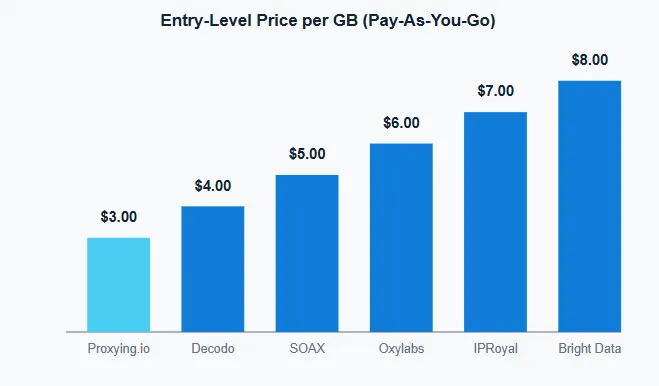
Standard pay-as-you-go rate per provider’s own pricing page, retrieved 2026-08-21. Bright Data’s figure uses its $8/GB standard rate, not its time-limited promotional rate, since that’s the baseline the other 5 providers were compared against.
How to Choose a Proxy for Price Monitoring
The right proxy type and session mode depend more on your target sites and how you check them than on any single spec sheet.
Choose residential proxies when:
- Your target uses real bot protection (Cloudflare, Akamai, PerimeterX, or similar)
- Pricing varies by region, and you need the IP to match the market
- You’re monitoring public retail websites rather than an internal API
Choose datacenter proxies when:
- The target site has weak or no bot protection
- Speed matters more than IP reputation
- You’re doing internal testing or QA, not production monitoring
Datacenter proxies trade some of that reputation for lower cost and higher speed, which is a fair trade on a lightly-defended target and a poor one on a well-defended retail site.
Choose rotating sessions when:
- Each price check is independent of the last
- You’re monitoring many products across many pages
- You want to distribute requests across a wide set of IPs
Choose sticky sessions when:
- Multiple requests need to share one identity
- The price only appears after several steps (cart, login, or a multi-page flow)
- Session or account state has to persist across the check
What a Price-Monitoring Proxy Actually Controls
A proxy routes your request through an IP representing a country, city, ISP, or network type you choose. It doesn’t know which product you’re checking or which store should get the request. It can’t tell whether a banner says “sale” instead of “member price,” or whether two listings are actually the same item. Those decisions live in your monitoring script, not in the proxy.
That gap matters, because price accuracy breaks in more places than the network layer. Five things have to line up before a scraped price is actually trustworthy.
| Layer | What Controls It | A Common Way It Breaks |
|---|---|---|
| Network origin | Proxy country, city, ISP, or ASN | The request exits from the wrong region or network type for the target market |
| Retail context | Store, delivery ZIP, currency, account state | The IP sits in one city, but the site still shows a store or currency set by an earlier cookie |
| Product identity | SKU, GTIN/UPC, variant, pack size | A 6-pack price gets compared against a 12-pack, or two color variants get merged as one item |
| Commercial offer | Seller, fulfillment, promotion, shipping, tax | A marketplace reseller’s used listing gets compared against the retailer’s own new-item price |
| Output validation | Response type, block detection, timestamp | A CAPTCHA page loads with a normal status code and gets logged as a real price |
The proxy only controls the network origin layer, the first row in that table. Our provider rankings above focus on how well each service handles that layer: IP coverage, rotation, targeting, performance, and cost. The other four layers sit in your own scraping logic. A great proxy paired with sloppy validation on top of it still produces bad data.
Two of these are worth calling out on their own, since they trip up new setups more than the rest.
A price is rarely one number. Regular, sale, member, and subscription prices can all sit on the same page, alongside different sellers, fulfillment methods, and shipping terms. $19.99 with free pickup isn’t automatically cheaper than $18.99 plus a shipping fee, and a 20%-off deal on a 3-pack isn’t a universal per-unit discount. Store the specific offer, not just a headline number.
Proxy geography and store selection are two separate settings. An IP in Chicago tells a retailer where the request came from. It doesn’t tell the retailer which store, delivery ZIP, or currency you actually want. Most sites set that through cookies, an entered address, or an account, not through IP alone. Route through the right geography but skip setting the store or destination through the site’s own flow, and you get no error at all. You just end up comparing the wrong store’s price.
Common Price-Monitoring Mistakes
Treating a residential proxy as a complete fix. It solves the network-origin layer. It doesn’t validate the response, match the product, or resolve the correct store, so pair it with the checks above.
Skipping validation on a 200 response. A normal status code can still hide a CAPTCHA page, an empty shell, or a substitute product. Check the response actually contains the price, product, and store you asked for.
Matching products by title instead of identifier. Titles vary across retailers and change over time. Match on GTIN, UPC, SKU, or model number first, and fall back to title only when nothing stronger is available.
Ignoring proxy-to-store mismatch. Getting the right country or city from your proxy doesn’t guarantee the right store, delivery ZIP, or currency. Set those explicitly through the site’s own flow, not just through IP geography.
How We Selected These
We started from the two most-cited public rankings for this exact keyword, pulled every provider they cover, then added proxying.io using the same method: each provider’s own current pricing and product pages, not a secondary summary of them. That gave us 5 competitors to compare alongside Proxying itself, 6 providers in total.
We didn’t run a hidden mathematical scoring model, and we’re not going to pretend we did by inventing percentage weights after the fact. Instead, here’s the actual priority order we ranked against, most important first, since those factors are the most relevant to the price-monitoring workloads this comparison is designed around:
- Genuine entry cost – the standing pay-as-you-go rate on the provider’s own page, not a time-limited promotional rate, since price monitoring is a recurring, budget-sensitive workload
- Real free trial – whether you can test with real traffic before paying, not just a discount or a refund window after the fact
- Session flexibility – whether rotating and sticky modes are both available, since monitoring needs fresh identities more often than long sessions
- Published performance – whether the vendor states a success rate or uptime figure, since an unstated number can’t be verified either way
- Geo-targeting depth – relevant for retailers tracking region-specific pricing, weighted lowest since most price-monitoring setups don’t need ZIP-level precision
Price and trial availability sit at the top because most price-monitoring workloads are bandwidth-light and recurring, not one-time bulk pulls. Getting billed and evaluated fairly on that basis matters more than pool size.
This is a research-only comparison. We did not run our own bandwidth or success-rate benchmark against each provider. Every performance figure above is the vendor’s own published claim, cited to its source page. No provider paid for placement, and this article contains no affiliate links.
The Bottom Line
| If You Need | Choose |
|---|---|
| Lowest entry price, a real free trial, and reliability | Proxying |
| Documented performance track record | Decodo |
| Long-running sessions with a formal guarantee | Oxylabs |
| City- or ASN-level geo-targeting | SOAX |
| The longest sticky sessions (up to 7 days) | IPRoyal |
| Enterprise-scale coverage across use cases | Bright Data |
For straightforward price monitoring, Proxying scores highest on the criteria weighted most for this workload: entry price and trial availability, backed by a 99%+ published success rate. The right choice still depends on your specific setup and priorities. The table above is the fastest way to match yours to a provider.
For a deeper look at implementation, the price monitoring use case covers proxy pool sizing and request pacing. It goes further into common failure points than a comparison post can.


