


Key Takeaways
- No agent framework rotates proxies on its own. You set the proxy once, at the framework or container level. Your provider handles rotation from there.
- IP rotation alone doesn’t beat TLS fingerprinting. A rotated IP with a stable JA3/JA4 signature is still one signature.
- Pool size should track peak concurrency, not total request volume. A formula and worked example are below.
- Computer-use agents have no proxy parameter at the API level. The proxy has to sit at the container’s network layer instead.
Agentic AI traffic is booming. HUMAN Security’s 2026 State of AI Traffic & Cyberthreat Benchmark Report found agentic traffic grew about 7,851% year over year. Automated traffic now grows roughly 8x faster than human traffic. If your agents browse, research, or buy things on the open web, you’re already part of that growth. So is every anti-bot system trying to catch it.
That’s exactly why this guide exists. Getting a proxy working with an AI agent isn’t the same problem as getting one working with a script. Most guides still treat it that way. Here’s the plan. We’ll wire a proxy into three agent patterns people ship in 2026: browser-use, LangChain agents, and computer-use agents. Then we’ll cover what breaks agents but not scrapers. Then we’ll size a proxy pool with real math, not a guess. New to proxy types? Start with our guide to what a proxy actually is first.
Why Do AI Agents Run Into the Same Walls Scrapers Do?
Start with the basics. An agent that browses the web still looks like a bot to the site it visits. It doesn’t matter that an LLM picks what to click next. The site only sees a connection. An IP address. A TLS handshake. Some headers. A request pattern. If any of those looks automated, the site treats the agent like a bot. Because it is one.
What changes with agents isn’t whether they get blocked. It’s how they respond when they do. That’s where things get interesting.
What Makes Agent Traffic Different From a Traditional Scraper
A traditional scraper follows a fixed script.
- Fetch this URL.
- Parse this selector.
- Move to the next item.
An agent works differently. It decides its next move based on what it just saw. That makes its request pattern harder to predict. And easier for a detection system to flag, once it has seen enough of it.
Higher Request Volume, Less Predictable Timing
Here’s what that looks like in practice. A research task can trigger dozens of page loads for one question. The agent might search. Open three results. Follow a link from one of them. Backtrack when a page turns out useless. That’s irregular timing. That’s non-linear navigation. It’s exactly the pattern most bot-detection systems are built to catch. A rate limit built for “one human, one page at a time” gets tripped fast.
Agents Don’t Know They’ve Been Blocked
There’s a bigger problem underneath this, though. A scraper crashes on a block, or throws an error you can catch. An agent often doesn’t. It gets a page back. If that page is a CAPTCHA or a soft-block screen, the agent often treats it as real content anyway. It might summarize a challenge page. It might decide a product is “out of stock,” because that’s what the block page’s generic text implied. You don’t get an error. You get a wrong answer. Delivered with total confidence.
That’s why proxy and detection hygiene matter more for agents than for scripts. A script fails loudly. An agent fails quietly. You might not notice until the data’s already wrong.
Where Agents Actually Get Blocked
So where does this actually happen? A single request can get filtered at any of four layers. Roughly in this order, before it ever reaches a CAPTCHA:
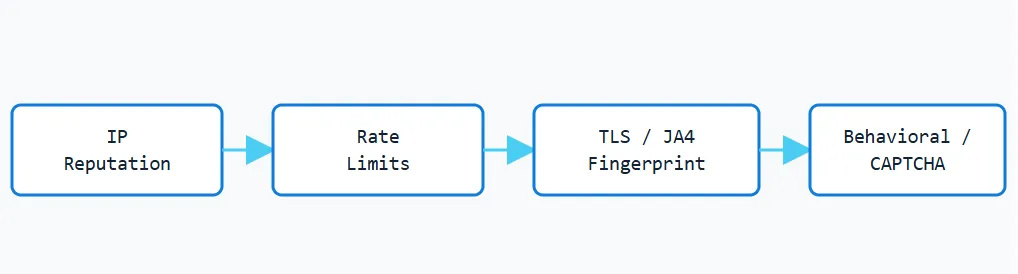
A request that clears IP reputation and rate limits can still get caught at the TLS fingerprint layer. That layer doesn’t care which IP sent the request. Rotating IPs alone only covers the first two. Rate Limits
First up: per-IP request-rate limits. An agent’s bursty, unpredictable timing trips these fast. Faster than a human’s would, even with fewer total requests.
IP Reputation
Next, the IP itself. Datacenter ranges and known proxy subnets carry a bad reputation before your first request even lands. Residential and ISP IPs usually start cleaner. But a burned IP is a burned IP. No matter the type.
Fingerprinting
Then there’s the layer most guides skip. Including an earlier version of this one. Rotating your IP does nothing to change your TLS fingerprint.
Here’s why. Every TLS handshake makes a JA3 or JA4 fingerprint. That’s a signature from the ClientHello message. It’s sent before any HTTP headers. Anti-bot systems like Cloudflare and DataDome check that fingerprint against the browser identity your headers claim. A 2026 academic study on TLS-based bot detection documents exactly this approach. Rotate your IP every request. Keep the same HTTP client underneath. Nothing changes for the detector. You’re still the same signature. Just showing up from a hundred different addresses. That’s a pattern too.
2 things fix this in practice:
- Use a browser-grade TLS stack. Libraries like curl_cffi (Python) or uTLS (Go) copy a real browser’s TLS signature. Your HTTP library’s default won’t do that. A real headless browser, like Playwright, gives you an authentic fingerprint for free. It’s what browser-use runs on. It’s a real browser engine.
- Keep your signals coherent. A spoofed JA4 hash is its own red flag if it doesn’t match your TCP behavior, DNS resolver, or other browser signals. Don’t pair a spoofed fingerprint with headers or timing that contradict it.
If you’re only rotating proxies and still getting flagged, this is very likely why. Jump to Troubleshooting for the short version.
CAPTCHAs and Challenge Pages
A challenge page is a soft block with a way through it. Some agent stacks pair a solving service with the browser layer. At minimum, your agent needs to spot a challenge page as a challenge page. Not parse it as content.
Soft Blocks vs. Hard Blocks
One more distinction worth making. A soft block, like a CAPTCHA, is recoverable. A hard block, like a 403 or a dropped connection, isn’t. Not on that IP. Your retry logic needs to tell these apart. Retrying a hard block on the same IP just wastes requests on a dead proxy.
Configuring Proxies by Agent Framework
With the theory out of the way, let’s get into the setup. None of the three frameworks below rotate proxies for you. You set up the proxy connection once. Your provider’s gateway handles rotation from there. That could be per-request rotation. Or a sticky session held for a set TTL. Every example below uses the credentials format from the Proxying dashboard: a gateway host, a username, a password.
browser-use (Playwright-Based Agents)
Start here if you’re building with browser-use. It’s the most common browser-agent setup right now. It runs on Playwright under the hood. (See our Playwright vs. Puppeteer comparison if you’re still choosing between the two.) So proxy setup goes through Playwright’s own ProxySettings object. That gets passed into a BrowserProfile:
from browser_use import Agent, Browser
from browser_use.browser.profile import BrowserProfile, ProxySettings
proxy = ProxySettings(
    server="http://proxy.proxying.io:8000",
    username="your_username",
    password="your_password",
)
profile = BrowserProfile(proxy=proxy, headless=True)
browser = Browser(browser_profile=profile)
agent = Agent(
    task="Find the current price of a product on example.com",
    browser=browser,
)ProxySettings also takes an optional bypass field. That’s a comma-separated list of hosts that skip the proxy. Handy for excluding localhost during testing. This proxy sits on the BrowserProfile, so it applies to the whole browser context. Every page the agent opens. Every navigation it makes. Not just its first request. That’s different from a scraper, where you might set a proxy per request. Here, you set it once, at the browser level.
Full parameter reference: browser-use’s proxy configuration docs.
LangChain Agents
If you’re working in LangChain instead, the picture looks a little different. LangChain has no dedicated proxy parameter on its agent classes. If your agent scrapes structured data, not just browses, it’s worth comparing this to a dedicated scraper. See our Scrapy vs. BeautifulSoup breakdown for the non-agentic version of the same problem. For LangChain itself, you have two practical options.
Environment variables are the simplest option. This applies to every requests-based tool LangChain wires up for you.
import os
os.environ["HTTP_PROXY"] = "http://your_username:your_password@proxy.proxying.io:8000"
os.environ["HTTPS_PROXY"] = "http://your_username:your_password@proxy.proxying.io:8000"The tradeoff: this sets the proxy for the whole Python process. Your LLM API calls go through it too. Not just the web-browsing calls. That’s often unwanted. It also wastes proxy bandwidth you’re paying for.
Session-scoped proxy is narrower. Worth the extra line for anything beyond a quick test.
import requests
from langchain_community.document_loaders import WebBaseLoader
session = requests.Session()
session.proxies = {
    "http": "http://your_username:your_password@proxy.proxying.io:8000",
    "https": "http://your_username:your_password@proxy.proxying.io:8000",
}
loader = WebBaseLoader("https://example.com", session=session)
docs = loader.load()This keeps the proxy scoped to the loader that fetches web content. Your LLM API traffic stays untouched.
Computer-Use Agents (Anthropic, OpenAI-Style)
Computer-use agents are a different problem entirely. There’s no proxy field in the API call itself. The model isn’t making HTTP requests directly. It’s controlling a desktop environment. Usually a container. Anthropic’s own computer-use reference implementation recommends running the agent in an isolated Docker container or VM. It also advises you to “limit internet access to an allowlist of domains to reduce exposure to malicious content.” The proxy setup follows the same logic. It belongs at the container’s network layer. Not the agent’s config.
docker run \
  -e HTTP_PROXY="http://your_username:your_password@proxy.proxying.io:8000" \
  -e HTTPS_PROXY="http://your_username:your_password@proxy.proxying.io:8000" \
  -p 5900:5900 -p 8501:8501 \
ghcr.io/anthropics/anthropic-quickstarts:computer-use-demo-latestEvery outbound connection from inside that container now routes through the proxy. It doesn’t matter what the agent clicks into. The model never needs to know a proxy exists.
Before you point an agent at the tunnel, test it from the command line first. Here’s the same check across HTTP, HTTPS, SOCKS4, and SOCKS5:
# HTTP proxy
curl -x http://your_username:your_password@proxy.proxying.io:8000 https://httpbin.org/ip
# HTTPS proxy (CONNECT tunnel)
curl -x https://your_username:your_password@proxy.proxying.io:8000 https://httpbin.org/ip
# SOCKS4 proxy (protocol has no password field, only an optional userid)
curl --socks4 proxy.proxying.io:1080 https://httpbin.org/ip
# SOCKS5 proxy (supports full username/password auth)
curl --socks5 your_username:your_password@proxy.proxying.io:1080 https://httpbin.org/ip-x routes the request through an HTTP or HTTPS proxy. –socks4 and –socks5 do the same for SOCKS. Credentials go right in the proxy URL for HTTP/HTTPS and SOCKS5. SOCKS4 is here for completeness. But it can’t carry a password. So most providers, proxying.io included, issue SOCKS5 or HTTP credentials when auth is needed. A working response returns your proxy’s IP. Not your own. That confirms the tunnel is live, before you wire it into an agent.
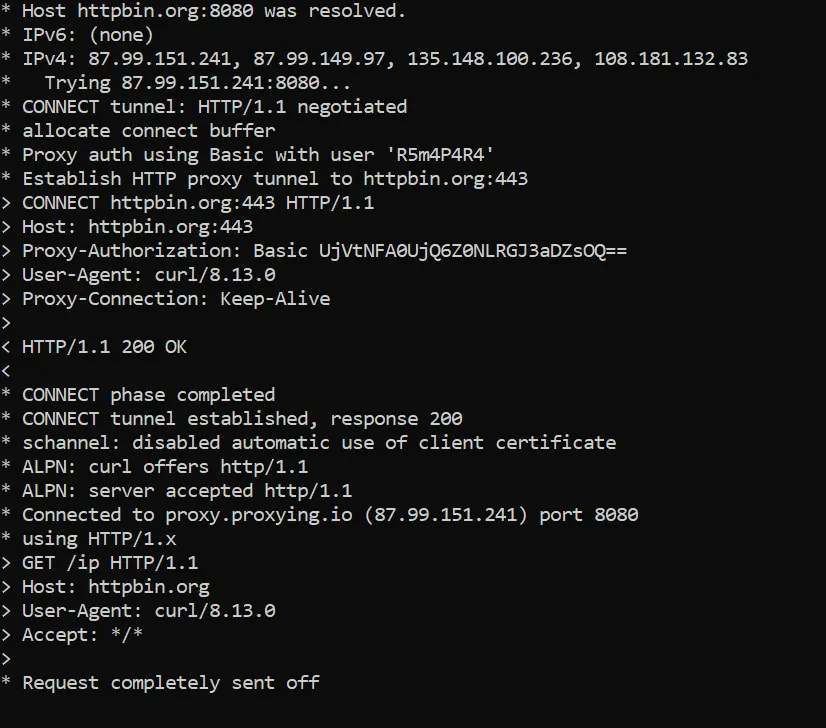
Once the connection works, the next question is which proxy fits your workload.
Rotating Residential Proxies
Best fit for agents making independent, one-off lookups. Price checks. Search results. Anything where each request doesn’t need to look like the same “person” as the last one. Rotation spreads reputation risk across many IPs. Instead of piling it onto one. New to the distinction? See what a residential proxy actually is. For the rotating option itself, see proxying.io’s residential proxies plan.
Sticky Sessions
Best fit for anything stateful. A logged-in session. A multi-step checkout. A task where the site expects the same visitor across several requests. Holding one IP for the session avoids looking like a different visitor mid-task. That switch is its own red flag on session-aware sites. An ISP proxy is static by design, so it’s the other common way to get that same consistency.
Sizing Your Proxy Pool
Once you’ve picked a type, the next question is how many you need. Pool size should track peak concurrency. Not total daily request volume. Two agents running one after another can share one proxy just fine. Fifty agents running at once can’t. Even if the daily request count is the same.
Here’s a practical formula for sizing proxies for AI agents:
proxies needed = ceil(peak concurrent agents ÷ safe concurrent requests per proxy) + 20% reserve“Safe concurrent requests per proxy” isn’t a fixed number. It depends on your target site’s tolerance and your session type. Three is a safe starting guess for mixed rotating traffic. Run a small pilot against your real target to find your actual number. Do this before you commit to a pool size.
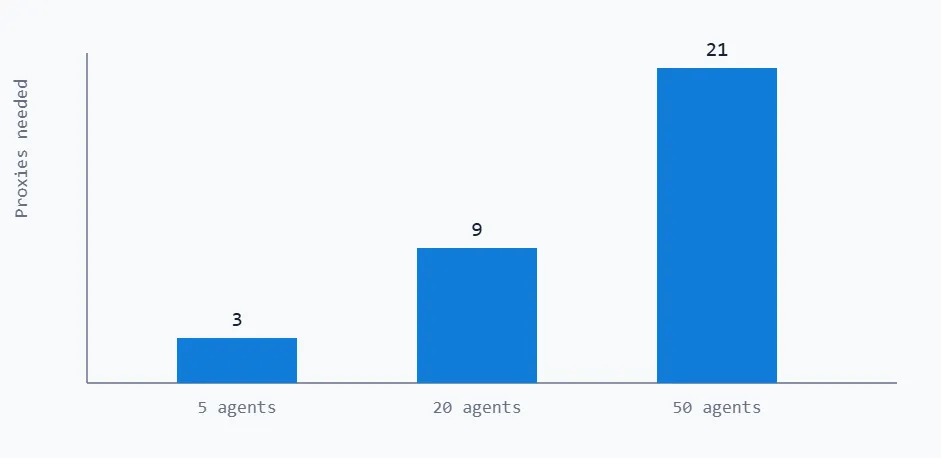
Illustrative example, not a universal rule: proxies needed = ceil(peak concurrent agents ÷ safe concurrent requests per proxy) + 20% reserve, assuming 3 safe concurrent requests per proxy. Pilot your own target to find your real per-proxy concurrency limit. At 5 concurrent agents, that’s roughly 3 proxies. At 50, roughly 21. The relationship isn’t linear once you add the reserve. Don’t take a per-agent ratio from a small pilot. Don’t assume it holds at 10x the scale.
Running Multiple Agents Concurrently [NEW]
Sizing the pool solves half the problem. The other half: make sure your code never sends more concurrent requests than that pool can handle. No matter how many agent tasks you queue up.
An asyncio semaphore is the simplest way to enforce that cap in code:
import asyncio
MAX_CONCURRENT = 9  # matches the 20-concurrent-agent pool size above
semaphore = asyncio.Semaphore(MAX_CONCURRENT)
async def run_agent(task):
    async with semaphore:
        return await agent.run(task)
results = await asyncio.gather(*(run_agent(t) for t in tasks))The semaphore doesn’t limit how many tasks you queue. Only how many run at once. Every task still runs. They just wait their turn. Instead of all firing at once and overwhelming your proxy pool.
Pair that with a basic health check before a proxy goes back into rotation. Send it a light request to a known-good endpoint. The same httpbin.org/ip check from earlier works fine. Use a short timeout. If it fails, move that proxy to a cooldown list. Don’t retry it right away. Retrying a dead proxy just burns time your agent doesn’t have.
Troubleshooting Common Issues
If something’s still not working, here’s where to look first.
Requests fail with a 407 error. Your proxy credentials are missing or wrong. Double-check the username and password sit in the proxy URL itself. Not in separate headers.
Connections work, but the agent still gets flagged after rotating IPs. This is almost always the TLS fingerprinting issue from earlier. Your IP changed. Your HTTP client’s TLS signature didn’t. Switch to a real browser engine, like Playwright. Or use a browser-grade TLS library like curl_cffi. Not your language’s default HTTP client.
The agent “succeeds” but returns wrong or nonsense data. Check whether it got a CAPTCHA or block page and treated it as real content. Log the raw response body for failed-looking tasks. Don’t just trust the agent’s summary.
Everything works in testing, then degrades at higher concurrency. You’re likely past your proxy pool’s safe concurrent-request limit. Revisit the pool sizing math above. Use your real concurrency. Not your test run’s.
SSL/TLS handshake errors specifically with HTTPS proxies. Check you’re using -x https://…. Not -x http://…. Also check any custom CA bundle your environment expects is still loading. A proxy in front of HTTPS traffic needs a valid CONNECT tunnel. Not a plain HTTP one.


