This guide shows how to set up Proxying residential proxies in AdsPower for managing multiple accounts. You’ll learn how to add proxy credentials, configure geo-targeting and sticky sessions, and test the connection. It also covers common proxy issues and best practices for keeping profiles stable and isolated.
Learn how to set up Proxying residential proxies in AdsPower to manage multiple accounts safely and without bans. Use real residential IPs, precise geo-targeting, and stable sessions to run affiliate, e-commerce, and automation workflows without detection.
What is AdsPower?
AdsPower is a multi-login browser that lets you manage multiple accounts without detection. You use it to create isolated browser profiles with unique fingerprints, helping you avoid bans across platforms, like Facebook, Amazon, and Google.
AdsPower works best when paired with high-quality proxies. This allows each profile to use a different IP address that matches its location and fingerprint.
So who uses AdsPower?
Usually, people in affiliate marketing, social media automation, e-commerce account management, and large-scale web scraping.
Step-by-Step: Connect Proxying Residential Proxies to AdsPower
Watch the tutorial below or follow the complete step-by-step guide to configure our Residential Proxies inside AdsPower quickly.
1. Download AdsPower
Start by downloading AdsPower from their official website. Once installed, launch the application. Log in (if you already have an AdsPower account) or create a new account.
2. Create a New Browser Profile
Inside AdsPower:
Click “New Profile”
Fill in basic profile details as needed (name, group, notes, etc.)
Scroll down to the Proxy Settings section.
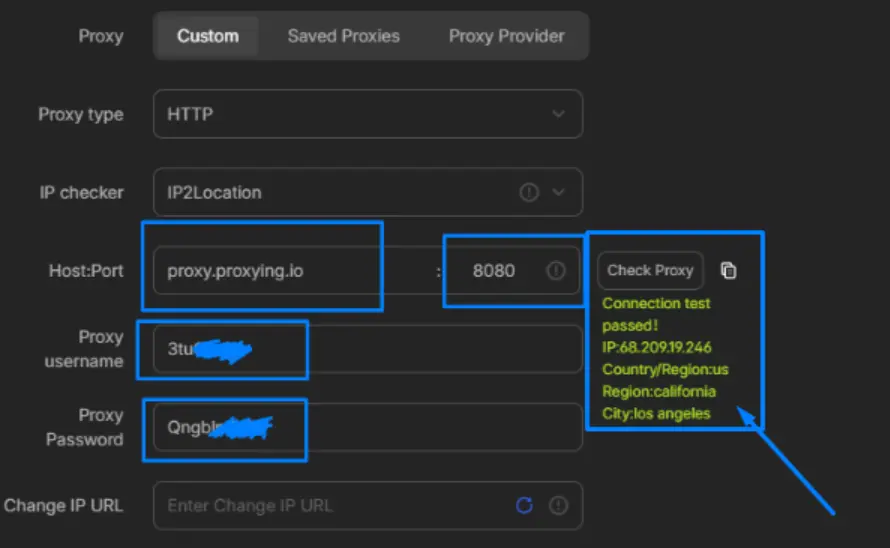
3. Add Proxying Residential Proxies
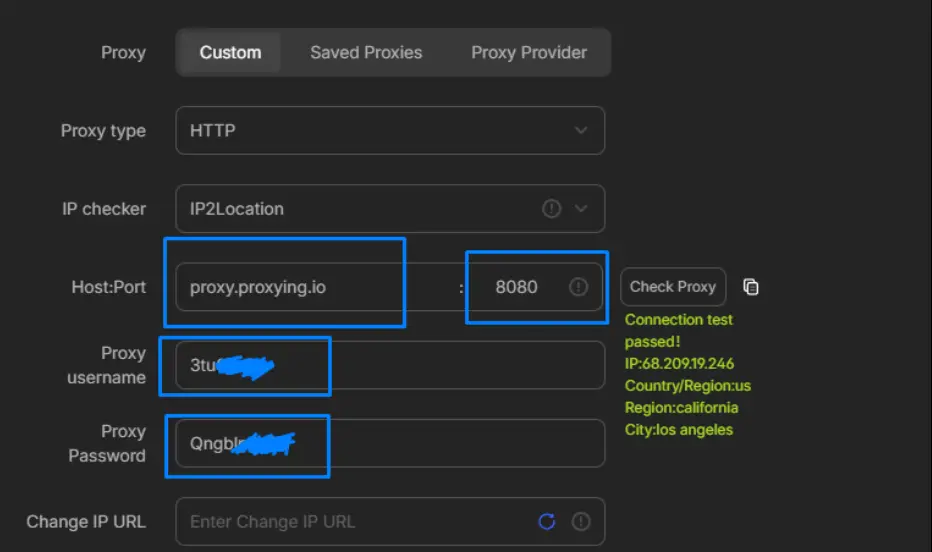
Inside the Proxy settings:
Proxy Type: HTTP or SOCKS5
Host: proxy.proxying.io
Port: 8080
Username Format: Your Proxying username
Password: Your Proxying password
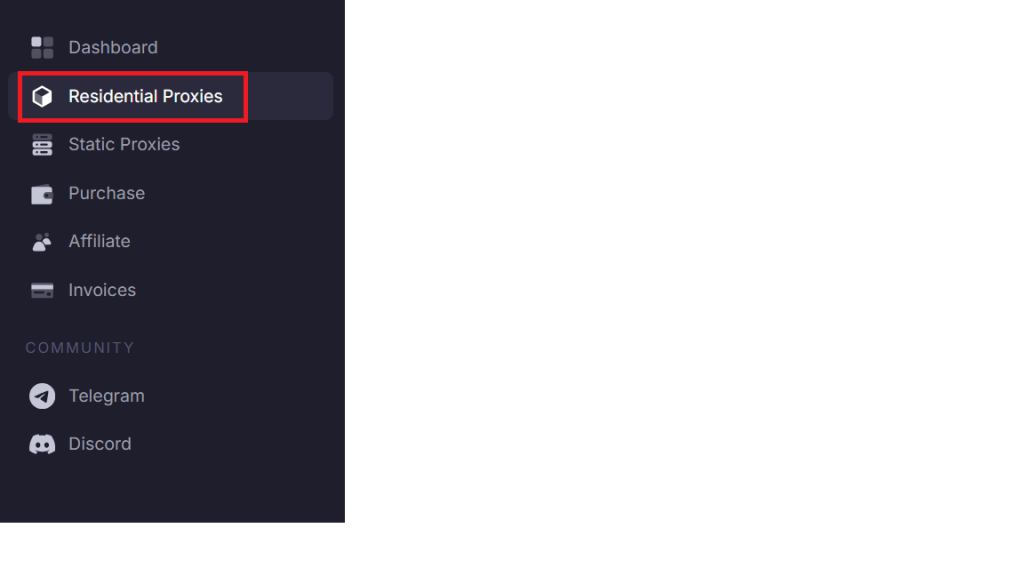
To find your proxy username and proxy password in the Proxying dashboard, click on Residential Proxies in the left panel.
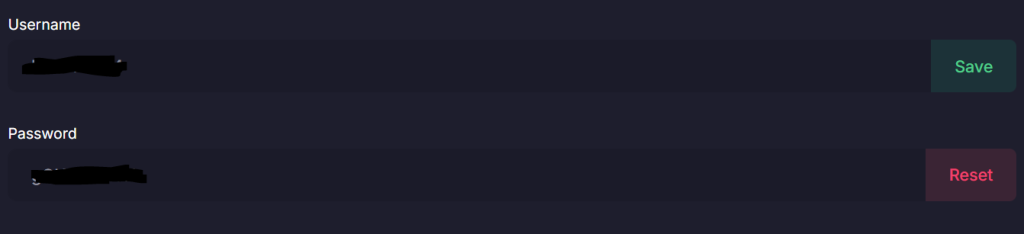
Scroll down to find your username and password.
Note: Make sure your credentials are correct, as this is important for authentication.
Advanced Targeting & Session Control
Proxying Residential Proxies support powerful targeting parameters directly inside the username field. One of the most powerful features of Proxying is its ability to customize behavior directly through the username.
Below is an overview of available parameters:
Country Targeting
To target a specific country, modify your username like this:
customer-password-country-US
This will assign you a US-based IP address.
Session Control
Sticky Session (Up to 10 Minutes)
customer-password-sessionID_lifetime-10
Keeps the same IP for up to 10 minutes.
Extended Session (Up to 24 Hours)
customer-password-sessionID_lifetime-1440
Maintain the same IP for up to 24 hours.
Test Your Proxy Connection
Before using the profile, always test the connection:
Click “Check Proxy”
Wait for the verification result
If everything is configured correctly, you’ll see a success message.
Launch the Profile
Once verified:
Click OK
The profile will appear in the Profiles tab
Click Open to launch the browser with your configured proxy
Your AdsPower profile is now running with Proxying residential proxies.
Why Use Proxying Residential Proxies with AdsPower?
Using AdsPower without residential proxies increases the risk of account bans and detection. Platforms today analyze IP reputation, location consistency, and session behavior, not just browser fingerprints.
This is where Proxying residential proxies comes in. They provide real residential IPs, stable sessions, and precise geo-targeting, all critical for running multiple accounts safely in AdsPower.
1. Mimic Real User Behavior
Modern platforms actively analyze IP reputation, login patterns, and behavioral signals to detect automation or multi-account activity. When you pair Proxying residential proxies with AdsPower’s fingerprint isolation, you create a realistic browsing environment in which each profile appears as a separate real user, reducing the risk of detection or ban.
2. Create a Stable and Consistent Environment
Consistency is one of the most important factors in maintaining account health. Frequent IP changes or mismatches in location can trigger verification checks and disrupt workflows. With Proxying’s session control, you ensure that each account operates within a stable, predictable environment, helping extend account lifespan and reduce verification checks
3. Accurate Geo-Targeting for Better Results
Many platforms tailor content, ads, and access based on geographic location. Proxying residential proxies allows country-level and city-level targeting, so each AdsPower profile appears to operate from a real local user in your target market
4. Maintain True Isolation Between Multiple Accounts
One of the biggest risks in multi-account management is account linkage through shared network signals. If multiple accounts use the same IP, platforms can connect them and trigger chain bans across all accounts. By assigning unique residential IPs to each AdsPower profile, Proxying ensures proper separation between accounts.
Best Practices for Using AdsPower with Residential Proxies
To reduce bans and keep your accounts stable in AdsPower, follow these best practices when using proxies.
Assign a unique proxy to each AdsPower profile. Sharing IPs across accounts increases the risk of being linked and banned. Always match your proxy location with the profile’s timezone, language, and region to maintain consistency and avoid triggering platform checks.
Use sticky sessions or static IPs when logging into accounts. Frequent IP changes during login can trigger verification or suspicious activity flags.
Always test your proxies inside AdsPower before using them. This ensures the connection is stable and reduces failed logins or interruptions.
Avoid switching between multiple accounts too quickly, even with different proxies. Sudden behavior patterns can still raise detection flags.
Common AdsPower Proxy Issues and How to Fix Them
Even with the correct setup, proxy-related issues can still occur in AdsPower. Here are the most common problems and how to fix them.
Proxy Not Connecting
Double-check your proxy credentials (IP, port, username, and password). Make sure you are using the correct proxy type (HTTP, HTTPS, or SOCKS5) supported by your provider.
Frequent Disconnections
Frequent disconnections are often caused by unstable proxies or rotating IPs. Use sticky sessions or static residential IPs to maintain a stable connection within each AdsPower profile.
Accounts Flagging
Accounts may get flagged if multiple profiles share the same IP or if behavior appears unnatural. To avoid this, assign a unique proxy to each account, maintain consistent locations, and avoid rapid switching between regions.
IP Authentication Errors
If your proxy requires IP whitelisting, make sure your current IP is added to the allowed list in your proxy dashboard.
Wrong Proxy Type in AdsPower
Using the wrong proxy protocol (e.g., SOCKS5 instead of HTTP) can prevent connections. Always match the proxy type with your provider’s configuration.
Slow Speeds or Timeouts
Slow speeds can occur with overloaded or low-quality proxies. Using high-quality residential proxies improves connection reliability and performance.
Join the Discord and get a free 100MB along with other perks!
About the author
Tomas Jurgaitis
Tomas Jurgaitis has led PR initiatives at the forefront of tech, blending a sharp eye for storytelling with a deep-rooted curiosity for all things digital. Raised in an environment where innovation was the norm, his passion for the internet and emerging tech came naturally where he regularly crafts how-to tutorials for web scraping.