


I was running a scraper against a client’s site last month when it stopped dead. No data, no timeout. Just a blunt response: HTTP Version Not Supported.
Great.
I’ve seen enough of these to know what’s going on the second they show up. The HTTP 505 error code turns up in scraping, automation, and API work way more than it does in regular browsing. Once you know why, it’s not really a mystery anymore, it’s just a version mismatch you have to hunt down. So let’s get into what causes it, how you check for it, and how to fix it, whether you’re running a bare script or pulling requests through a proxy.
What Does the HTTP 505 Error Code Mean?
The moment I saw it, I ruled out my own code. You can do the same. HTTP itself has changed shape a few times since the 90s. HTTP/1.0, HTTP/1.1, HTTP/2, and HTTP/3 all negotiate connections differently, and no server supports all of them. When your client sends a request in a version the server can’t handle, you get a 505, and the exchange stops right there.
Put simply: the server is telling you it doesn’t speak that dialect.
What made it obvious in my case was that I’d loaded the same site in Chrome minutes before, no problem at all. Browsers quietly negotiate protocol versions and fall back if a newer one gets rejected. Your script doesn’t do that on its own. That gap is basically the whole reason the HTTP 505 error code is common in automation and rare in day-to-day browsing. Annoying? Sure. Complicated? Not really.
What Causes the HTTP 505 Error
In my experience, it almost always comes down to one of 4 things.
Outdated or misconfigured clients. Old HTTP libraries and headless browser setups in particular (Selenium and ChromeDriver show up constantly here), sometimes hardcode one HTTP version instead of negotiating it. The moment the server expects something else, it fails. This is what got my scraper, and it’s where I’d look first in yours. Took me an embarrassingly long time to notice, for what it’s worth.
Server-side version restrictions. Plenty of servers behind modern load balancers only accept HTTP/2, or only accept HTTP/1.1, with nothing in between. Send the wrong one, and you get rejected outright, not downgraded gracefully.
Security software. Firewalls and WAFs occasionally rewrite or strip version headers while filtering traffic, and that alone can trigger a 505 even when your original request was perfectly fine.
Proxy servers. A proxy sits between your client and the destination, and some of them rewrite the protocol version mid-request. I watched one downgrade an HTTP/2 request to HTTP/1.1 on its own, with no warning. If you’re routing traffic through one, don’t cross this off the list too early.
HTTP 505 vs Other Server Errors
Before troubleshooting anything, I check whether I’m actually looking at a 505 and not something that just resembles one in the logs. You should do the same, since the 5xx family covers a lot of different failure modes.
| Status Code | Name | What It Means |
|---|---|---|
| 500 | Internal Server Error | A generic failure with no specific cause given |
| 502 | Bad Gateway | The server got an invalid response from an upstream server |
| 503 | Service Unavailable | The server is overloaded or down for maintenance |
| 504 | Gateway Timeout | The server, acting as a gateway, got no response in time |
| 505 | HTTP Version Not Supported | The server refuses the HTTP version used in the request |
5 codes. One of them, 505, is the odd one out, and it’s the only one on this list that has nothing to do with load or timing.
This matters because the fix is completely different depending on which one you’re dealing with. A 503 or 504 usually means try again later, maybe with backoff. I’ve watched people burn a whole afternoon bolting retry logic onto what was actually a 505, which doesn’t budge no matter how many times you retry. It’s not a timing problem. It’s a “you’re speaking the wrong language” problem.
Worth separating from 4xx errors too, while we’re at it. A 403 or 401 means the server understood your request just fine and denied it on permissions or credentials. A 505 never gets that far. The protocol itself is the blocker.
How To Diagnose an HTTP 505 Error
This is the check I run first, and it takes less time than reading this paragraph. Thirty seconds, tops.
- Open the target URL in Chrome.
- Press F12 to open Developer Tools.
- Click the Network tab.
- Reload the page or resend your request.
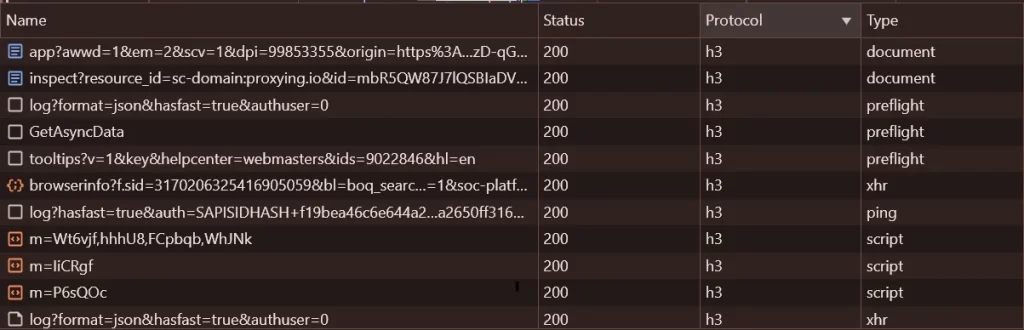
- Look at the Protocol column. Not there? Right-click the column headers and turn it on.
You’ll see values like http/1.1, h2 (HTTP/2), or h3 (HTTP/3) in that column. Whatever shows up for a successful browser request is the version your script needs to match.
How To Fix the HTTP 505 Error
Once you know what the server wants, fixing it is usually one flag or one keyword argument. Nothing dramatic. This is exactly what I changed to get my own scraper running again.
Forcing a Version With cURL
curl --http1.1 https://example.com/"–http1.1 forces cURL to negotiate HTTP/1.1 instead of letting it pick automatically. Start here first. Most servers sitting on older infrastructure only speak HTTP/1.1, and this alone resolves a large share of 505 errors.
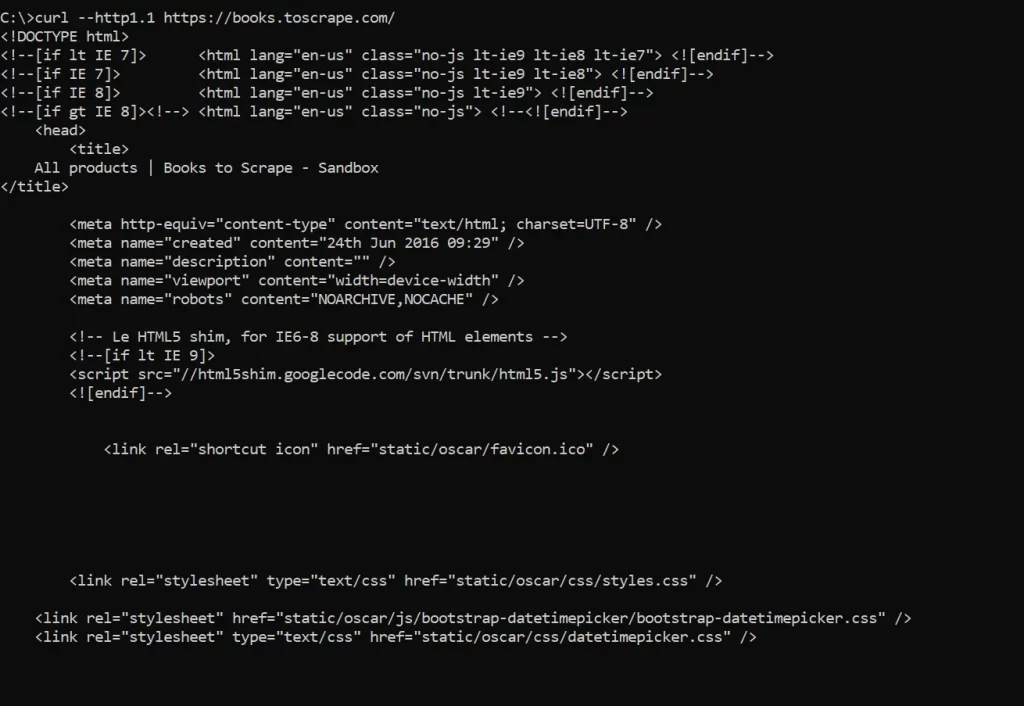
curl --http2 https://example.comThis flips it around, forcing HTTP/2. You’ll need it on the (less common) servers that reject HTTP/1.1 outright and only accept HTTP/2.
Forcing a Version in Python
import httpx
with httpx.Client(http2=False) as client:
    response = client.get("https://example.com")
    print(response.status_code)
A few servers restrict HTTP versions on purpose as a crude anti-bot filter, since most scraping libraries default to HTTP/1.1 while real browser traffic tends to negotiate HTTP/2. Setting the version explicitly at the client level, instead of trusting whatever default your library ships with, gets you much steadier results once you’re sending thousands of requests instead of one.
Fixing HTTP 505 Errors When Using Proxies
This is where I’ve personally lost the most time debugging. Because of course proxies had to complicate things further. They add a whole extra layer where version mismatches can sneak in. Some HTTP proxies quietly rewrite HTTP/2 down to HTTP/1.1 because they don’t support multiplexed streams. SOCKS proxies, on the other hand, work at a lower network layer and don’t touch HTTP data at all. Same script, two proxy types, two different outcomes.
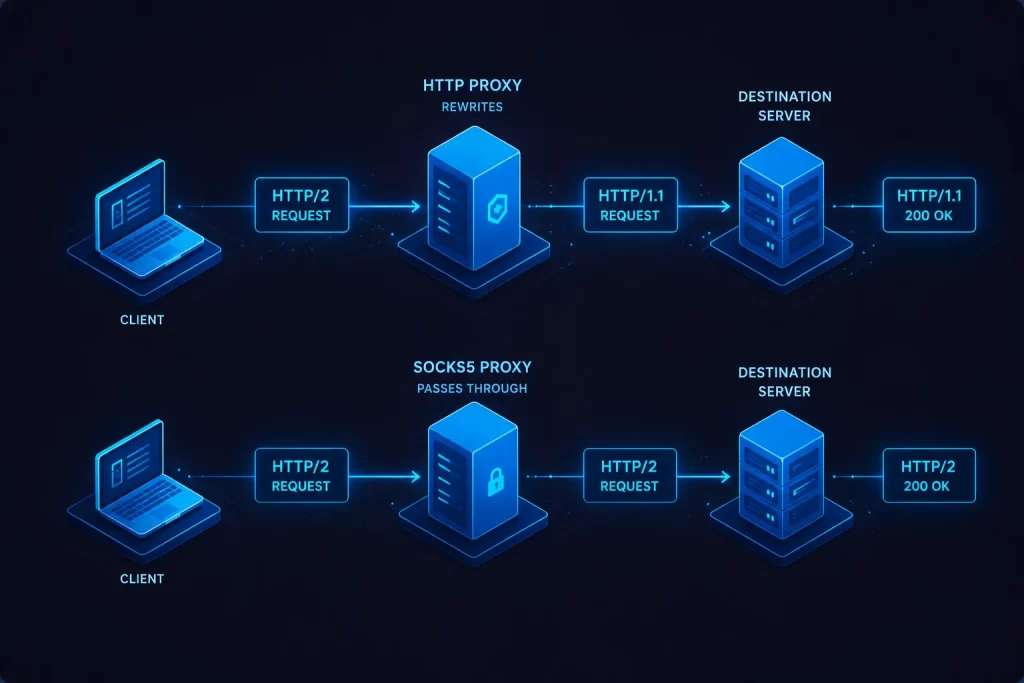
Below are cURL examples for setting the protocol explicitly with each proxy type.
HTTP proxy:
curl -x http://proxy_host:port https://example.comHTTPS proxy:
curl -x https://proxy_host:port https://example.comSOCKS4 proxy:
curl --socks4 proxy_host:port https://example.comSOCKS5 proxy:
curl --socks5 proxy_host:port https://example.com-x routes the request through whichever proxy you specify, and the scheme in front (http:// or https://) tells cURL how to talk to the proxy itself. That’s a separate thing from the protocol used to reach the actual destination server, which trips people up constantly. –socks4 and –socks5 skip HTTP proxying altogether and tunnel the raw connection instead, which is exactly why SOCKS rarely triggers a version-related 505 in the first place.
Authenticated proxy:
curl -x http://username:password@proxy_host:port https://example.comPutting username:password in front of the host authenticates your request against the proxy before anything gets forwarded. It’s the standard format wherever credentials are required, including Residential Proxies and Datacenter Proxies, where every single connection has to check out before it’s allowed through.
One thing that caught me off guard the first time: if you’re cycling through a large pool via IP rotation, individual nodes in that pool can be configured slightly differently from each other. So a request might sail through fine, then the very next one, routed through a different node, throws a 505. I assumed a proxy pool would behave uniformly across the board. Rookie mistake. It doesn’t always. Forcing your HTTP version explicitly rather than trusting default negotiation removes that inconsistency entirely. Worth a look too if you’re comparing providers, Proxying lays out residential, datacenter, and ISP options by use case.
Troubleshooting Common Issues
A handful of other problems tend to surface once the core version mismatch is sorted out.
Authentication failures. A 407 Proxy Authentication Required can look a lot like a 505 at first glance, since both fail immediately, but they’re unrelated. Check that your username and password are URL-encoded if either one has special characters in it.
SSL/HTTPS problems. Pairing an http:// proxy scheme with an HTTPS target sometimes throws a certificate error instead of a clean 505. Make sure your target URL actually uses https:// and that the proxy supports CONNECT tunneling. Ask me how I know.
Timeout errors. Not the same failure as a 505, even though both feel like the request “just didn’t work.” If requests are hanging rather than failing fast, look at the proxy or the network path first. Our proxy error guide goes deeper into timeout-specific fixes.
Proxy connection failures. Can’t reach the proxy at all? Double-check the host and port, and confirm the proxy is actually live. A dead proxy throws a connection error, not a 505.
Common cURL mistakes. Forgetting the scheme in front of the -x flag, or skipping quotes around a URL that has query parameters, causes more mystery errors than people realize. Our guide to using cURL with a proxy has more working examples if you want to compare against your own setup.
For the deeper reference, the official cURL documentation lists every flag and proxy option in full. The MDN entry on the 505 status code is a solid spec-level reference too.


