


Quick Read
You can build a working Python web scraper in under 30 lines of code using requests and BeautifulSoup. Fetch the page, parse the HTML, pull out what you need, save it. That covers most static sites. When you hit JavaScript rendering, you switch to Playwright. When you need to scrape at scale without getting blocked, you add rotating residential proxies. This guide walks through all three layers – with copy-paste code at each step.
What Web Scraping Actually Is
Web scraping is automated data collection from websites. Your script makes HTTP requests, reads the HTML responses, pulls out specific pieces of information, and stores them somewhere useful.
The use cases are wide: price monitoring, job listings aggregation, real estate data, lead generation, market research, training datasets for machine learning. Any time someone is manually copying data from a website into a spreadsheet, there’s a scraper waiting to do it faster.
Python dominates this space. The library ecosystem is mature, the syntax is readable, and you can go from zero to a working scraper in one afternoon.
Choosing the Right Tool Before You Write a Line
The biggest mistake beginners make is jumping straight into code before checking whether the page even needs JavaScript to load its data. Your tool choice depends on the site.
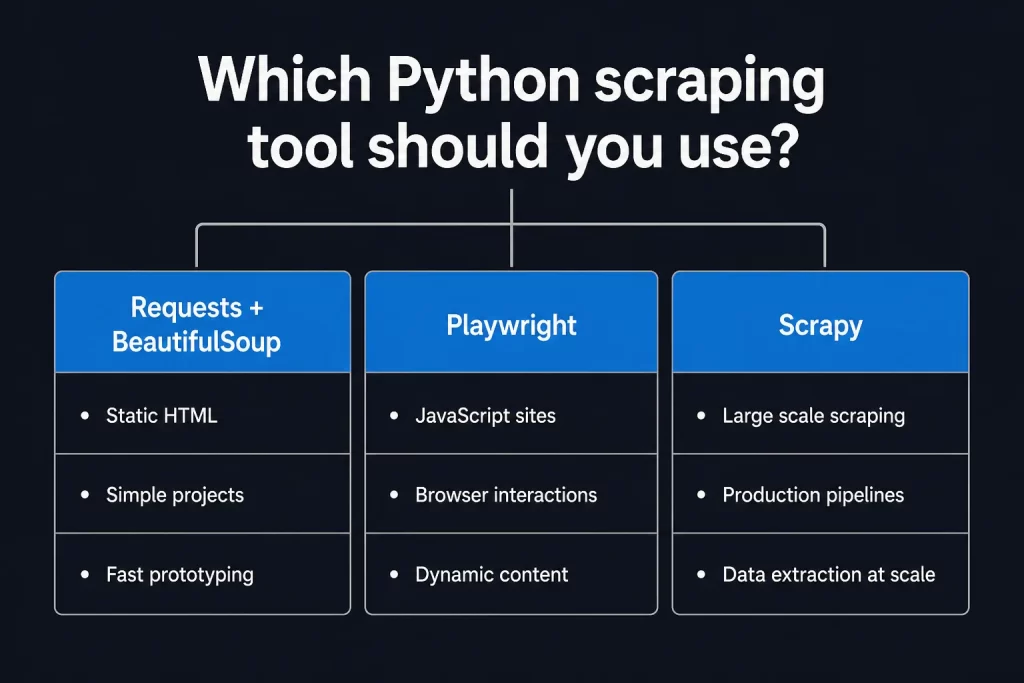
Here’s how to decide:
Use requests + BeautifulSoup when:
- The data you want is in the initial HTML (right-click → View Source, and it’s there)
- You’re learning or prototyping
- You want minimal dependencies and fast execution
Use Playwright when:
- The page loads content via JavaScript after the initial HTML arrives
- You need to click buttons, scroll, or fill out forms
- You’re scraping a single-page application (SPA)
Use Scrapy when:
- You’re crawling many pages (hundreds to millions)
- You need production-grade retry logic, pipelines, and scheduling
- You’re building something that needs to run reliably over time
When in doubt, start with requests + BeautifulSoup. It covers more ground than people expect, and upgrading to Playwright or Scrapy later is straightforward once you know what you need.
Step 1: Set Up Your Environment
Install the two core libraries:
pip install requests beautifulsoup4If you already know you’ll be scraping JavaScript-heavy pages, install Playwright too:
pip install playwright
playwright install # downloads Chromium, Firefox, WebKitStep 2: Fetch the Page
The requests library handles HTTP. A basic GET request looks like this:
import requests
url = "https://books.toscrape.com"
response = requests.get(url)
print(response.status_code)  # 200 = success
print(response.text[:500]) # first 500 chars of HTMLThat works, but you’ll get blocked on real sites faster than you’d like. Add a User-Agent header so your request looks like a browser:
headers = {
    "User-Agent": "Mozilla/5.0 (Windows NT 10.0; Win64; x64) "
                  "AppleWebKit/537.36 (KHTML, like Gecko) "
                  "Chrome/124.0.0.0 Safari/537.36"
}
response = requests.get(url, headers=headers)Check the status code before doing anything with the response. A 403 means the site blocked you. A 429 means you hit a rate limit. Don’t just assume 200 (OK – the request succeeded).
if response.status_code != 200:
print(f"Request failed: {response.status_code}")
else:
# continueStep 3: Parse the HTML
Pass the HTML to BeautifulSoup. The second argument tells it which parser to use – html.parser is built into Python and works fine for most pages.
from bs4 import BeautifulSoup
soup = BeautifulSoup(response.text, "html.parser")Now that you have a parsed tree, you can navigate it. There are three main ways to find elements:
By tag:
title = soup.find("h1")
all_links = soup.find_all("a")By CSS class or ID:
price = soup.find("p", class_="price_color")
header = soup.find(id="main-header")By CSS selector (the most flexible):
products = soup.select("article.product_pod")
first_price = soup.select_one("p.price_color")
To get the text content of an element:
price_text = price.get_text(strip=True) # "$9.99"
#To get an attribute:
link = soup.find("a")
href = link.get["href"]Step 4: Extract What You Need
Here’s a complete example that scrapes product names and prices from Books to Scrape – a sandbox site built for exactly this purpose:
import requests
from bs4 import BeautifulSoup
rl = "https://books.toscrape.com"
headers = {
    "User-Agent": "Mozilla/5.0 (Windows NT 10.0; Win64; x64) "
                  "AppleWebKit/537.36 (KHTML, like Gecko) "
                  "Chrome/124.0.0.0 Safari/537.36"
}
response = requests.get(url, headers=headers)
soup = BeautifulSoup(response.text, "html.parser")
books = []
for article in soup.select("article.product_pod"):
title = article.find("h3").find("a")["title"]
price = article.find("p", class_="price_color").get_text(strip=True)
books.append({"title": title, "price": price})
for book in books[:5]:
print(book)Output:
{'title': 'A Light in the Attic', 'price': '£51.77'}
{'title': 'Tipping the Velvet', 'price': '£53.74'}
...Step 5: Handle Pagination
Most real sites spread data across multiple pages. The pattern is simple: find the “next page” link, follow it, repeat until there isn’t one.
import requests
from bs4 import BeautifulSoup
import time
base_url = "https://books.toscrape.com/catalogue/"
url = "https://books.toscrape.com/catalogue/page-1.html"
headers = {"User-Agent": "Mozilla/5.0 ..."}
all_books = []
while url:
    response = requests.get(url, headers=headers)
    soup = BeautifulSoup(response.text, "html.parser")
    for article in soup.select("article.product_pod"):
        title = article.find("h3").find("a")["title"]
        price = article.find("p", class_="price_color").get_text(strip=True)
        all_books.append({"title": title, "price": price})
    next_btn = soup.select_one("li.next a")
    url = base_url + next_btn["href"] if next_btn else None
    time.sleep(1)  # be polite - don't hammer the server
print(f"Scraped {len(all_books)} books across all pages")The time.sleep(1) line matters. Sending requests as fast as possible is how you get blocked. A one-second delay between pages is a reasonable starting point; bump it up if you’re scraping something sensitive.
Step 6: Save Your Data
Two common formats. CSV for tabular data that might end up in Excel or a database:
import csv
with open("books.csv", "w", newline="", encoding="utf-8") as f:
    writer = csv.DictWriter(f, fieldnames=["title", "price"])
    writer.writeheader()
writer.writerows(all_books)JSON for nested structures or API consumption:
import json
with open("books.json", "w", encoding="utf-8") as f:
json.dump(all_books, f, indent=2, ensure_ascii=False)For anything beyond a one-off script – data you’ll query, update, or join against other sources – a database is worth the setup. SQLite works locally; PostgreSQL for anything production.
The Web Scraping Pipeline
Here’s how the full flow fits together:
Simple in theory. The real challenge is step 1 – getting the request through without getting blocked.
Scraping JavaScript-Heavy Sites with Playwright
If the data you need doesn’t appear in View Source, it’s loaded dynamically via JavaScript. Requests can’t help you here – it only sees the raw HTML the server sends before JavaScript runs.
Playwright launches a real browser, lets JavaScript execute, and then gives you the fully rendered page:
from playwright.sync_api import sync_playwright
from bs4 import BeautifulSoup
with sync_playwright() as p:
    browser = p.chromium.launch(headless=True)
    page = browser.new_page()
    page.goto("https://example.com/dynamic-page")
    page.wait_for_selector(".product-list")  # wait for content to load
    html = page.content()
    soup = BeautifulSoup(html, "html.parser")
    # parse as normal from here
    products = soup.select(".product-item")
browser.close()The wait_for_selector() call is important. Without it, you might grab the HTML before the content finishes rendering. You can also use the page.wait_for_load_state(“networkidle”) to wait until all network requests have settled.
Playwright is slower than requests – it’s running a full browser. But it handles things static scrapers never can: infinite scroll, login flows, CAPTCHAs triggered by interactions, and dynamic content loaded on demand.
The Blocking Problem – and How to Solve It
Once you move past simple examples, you’ll hit blocking. Websites invest in detecting and stopping scrapers, and the countermeasures range from simple to sophisticated.
Rate Limiting
The server notices too many requests from your IP in a short window and starts returning 429 errors. The fix is spacing out your requests:
import time
import random
time.sleep(random.uniform(1.5, 4.0))Randomizing the delay makes your traffic pattern look more human. A perfectly even 1-second gap is its own signal.
IP Bans
If rate limiting alone doesn’t deter you, the site bans your IP entirely. Every request from that address returns a 403 or gets silently dropped. The only way out is a different IP address.
This is where proxies come in. Instead of sending requests directly from your machine, you route them through an intermediary server with a different IP. Rotate through enough IPs, and no single one ever sends enough requests to trigger a ban.
User-Agent and Header Checks
Some sites reject requests that don’t carry browser-like headers. Send the same headers your browser sends:
headers = {
    "User-Agent": "Mozilla/5.0 (Windows NT 10.0; Win64; x64) AppleWebKit/537.36 (KHTML, like Gecko) Chrome/124.0.0.0 Safari/537.36",
    "Accept": "text/html,application/xhtml+xml,application/xml;q=0.9,image/avif,image/webp,*/*;q=0.8",
    "Accept-Language": "en-US,en;q=0.5",
    "Accept-Encoding": "gzip, deflate, br",
    "Connection": "keep-alive",
}CAPTCHAs
When a site suspects a bot, it may serve a CAPTCHA. Static scrapers can’t solve these. Playwright can handle simple ones by simulating human-like behavior (mouse movements, scroll patterns). For complex CAPTCHAs, CAPTCHA-solving services exist, but they add cost and latency.
How Proxies Fit Into a Python Scraper
For serious scraping, proxies aren’t optional – they’re infrastructure.
Get Rid of IP Blocks with Proxying (Get 100 MB free to test)
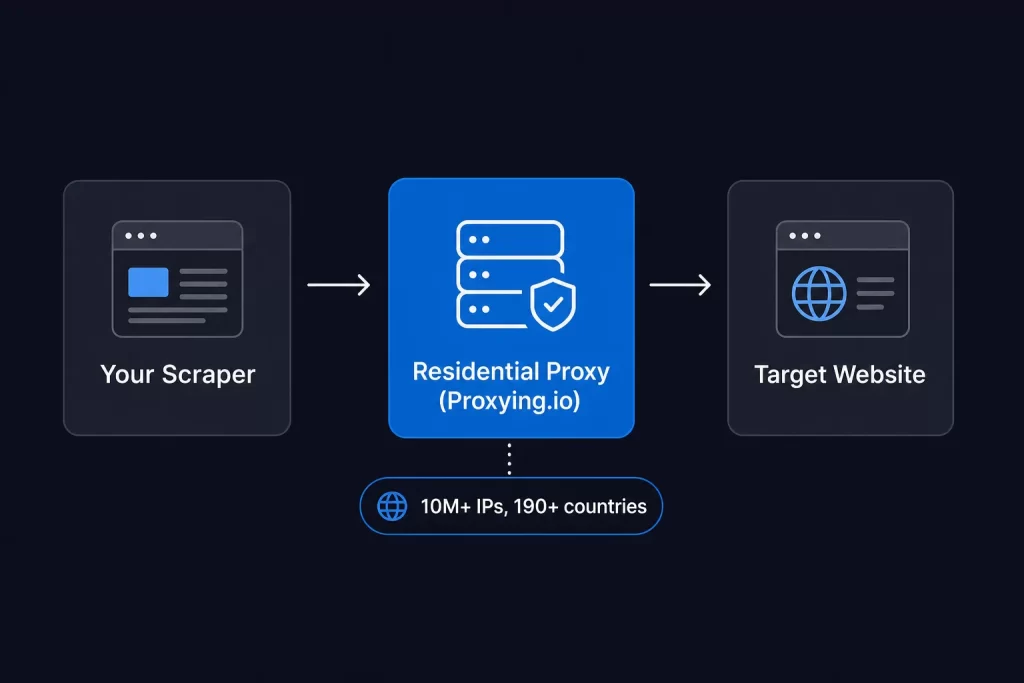
Once your scraper starts hitting real sites at any kind of scale, proxy infrastructure becomes the deciding factor between a scraper that works and one that gets blocked every other request. Proxying provides access to 10M+ residential IPs across 190+ countries – the kind of IP diversity that makes your traffic indistinguishable from organic users.
The setup with requests takes about two minutes: swap in the proxy endpoint with your credentials, and your existing scraper routes through a rotating residential IP pool automatically. Pay-as-you-go at $1.50/GB means you’re only paying for what you actually use – no subscriptions, no commitments. There’s a free 100 MB trial (by joining Discord or Telegram) to test it against whatever site you’re targeting before committing.
The requests library makes adding one straightforward:
import requests
proxy = "http://username:password@proxy-host:port"
proxies = {
    "http": proxy,
    "https": proxy,
}
response = requests.get(url, proxies=proxies, headers=headers)
For rotation, maintain a pool and cycle through it:
import requests
import random
proxy_list = [
    "http://user:pass@proxy1:port",
    "http://user:pass@proxy2:port",
    "http://user:pass@proxy3:port",
]
def get_with_proxy(url, headers):
    proxy = random.choice(proxy_list)
    return requests.get(url, proxies={"http": proxy, "https": proxy}, headers=headers)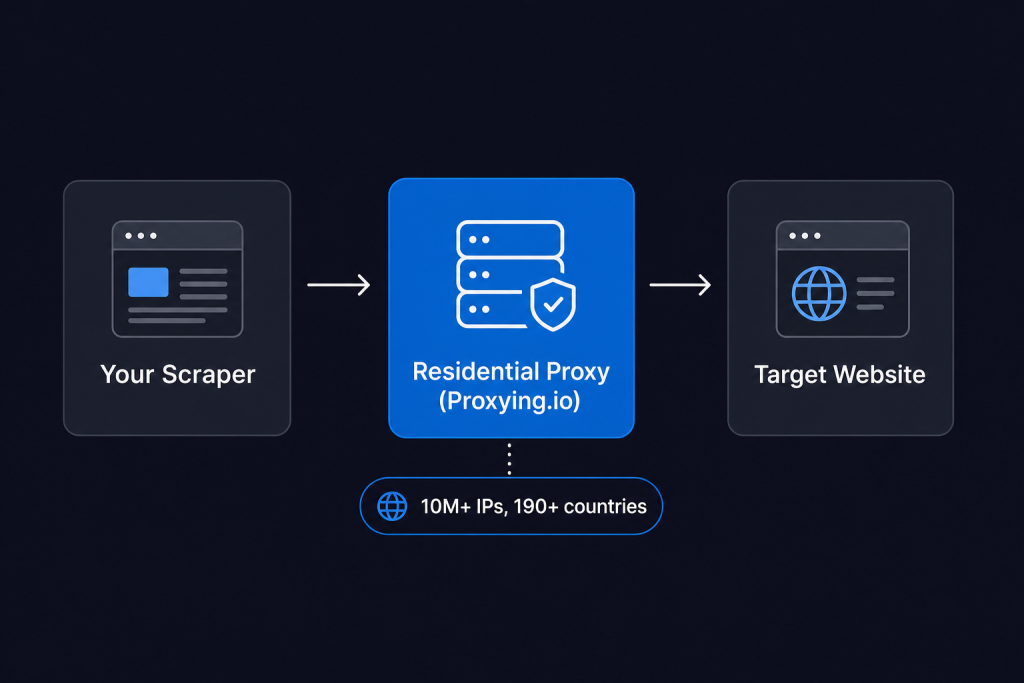
Residential vs Datacenter Proxies
The proxy type matters as much as using proxies at all.
Datacenter proxies come from cloud servers. They’re fast and cheap, but they’re also easy for sites to identify – the IP ranges are well-known, and tools like MaxMind flag them as datacenter traffic instantly.
Residential proxies use IPs assigned to real home internet connections by ISPs. To a website’s detection system, traffic from a residential IP looks indistinguishable from a real user. That’s why residential proxies have a dramatically higher success rate on protected sites – and why serious scrapers use them.
ISP proxies sit between the two: datacenter speed with residential-grade IP legitimacy. A reasonable middle ground when cost is a concern.
For reference, the difference between residential and datacenter proxies comes down to how the IP is classified. A residential IP is assigned by an ISP to a household; a datacenter IP is assigned by AWS or similar to a server. Sites can look this up.
Scaling Up: When to Switch to Scrapy
Once you need to scrape thousands or millions of pages reliably, a hand-rolled requests loop starts showing its limits. Scrapy is a full framework that handles the hard parts:
- Concurrent requests out of the box (not sequential)
- Automatic retry on failed requests
- Built-in middleware for proxies, cookies, and rate limiting
- Pipeline system for cleaning and storing data
- Spider structure for defining crawl logic cleanly
A basic Scrapy spider looks like this:
import scrapy
class BookSpider(scrapy.Spider):
    name = "books"
    start_urls = ["https://books.toscrape.com"]
    def parse(self, response):
        for article in response.css("article.product_pod"):
            yield {
                "title": article.css("h3 a::attr(title)").get(),
                "price": article.css("p.price_color::text").get(),
            }
        next_page = response.css("li.next a::attr(href)").get()
        if next_page:
yield response.follow(next_page, self.parse)Run it with scrapy crawl books -o books.json. Scrapy handles concurrency, retries, and output formatting automatically.
For a full walkthrough, the Scrapy Getting Started guide covers installation, project structure, and middleware configuration in depth. You can also pair Google Sheets with your scraper for lightweight storage – the Google Sheets web scraping guide shows exactly how.
Respecting robots.txt and Terms of Service
robots.txt is a file sites use to communicate crawling rules. It specifies which paths scrapers should and shouldn’t access. You can check it at https://example.com/robots.txt.
requests doesn’t enforce robots.txt automatically. Scrapy respects it by default. If you’re using requests, check it manually and don’t scrape paths marked Disallow for your use case.
Beyond robots.txt, read the site’s Terms of Service. Some explicitly prohibit scraping. Others are silent on it. Scraping personal data, behind-login content, or anything you’d resell without authorization is where legal risk rises sharply.
The practical rule: scrape public data, don’t hammer servers, don’t bypass authentication, and don’t scrape at a rate that degrades the site’s performance for real users.
Debugging Common Errors
AttributeError: ‘NoneType’ object has no attribute ‘get_text’ Your selector didn’t find the element. Check that it exists in the HTML, that the class name is correct, and that the data isn’t loaded by JavaScript after the initial HTML.
ConnectionError or Timeout The server is unreachable, rate-limiting you, or your proxy is down. Add error handling with try/except requests.exceptions.RequestException.
403 Forbidden The server is rejecting your request. Try adding more realistic headers. If it persists, the site is IP-blocking you – rotate your IP.
429 Too Many Requests You’re making requests faster than the site allows. Increase your delay, add randomization, and rotate proxies so each IP sends fewer requests.
Data looks wrong or empty. The site probably changed its HTML structure. Re-inspect the element in a browser and update your selectors. Site redesign; scrapers need maintenance.


