


Quick Read
Walmart does not notify you when high-demand items restock. Their built-in alerts arrive late – if at all. The practical solution is a Python polling script that checks a product page’s availability status on a schedule and sends an instant notification when it flips from “Out of Stock” to “Add to Cart.” The catch: Walmart aggressively blocks repeated requests from single IPs using Akamai Bot Manager. Rotating residential proxies solve this by making each check look like a different real user. For a no-code path, tools like PageCrawl and Visualping handle this without writing a line of Python. This guide covers both.
Why Walmart Restocks Are Hard to Catch
A PS5 Pro bundle restocks at 6:47 am on a Wednesday. By 7:15 am, it is sold out. Walmart announced nothing.
This is not an edge case. It is the default behavior for any high-demand item on Walmart: gaming consoles, limited electronics, sought-after toys, and popular collectibles. Inventory appears on the site without warning, moves in minutes, and Walmart’s built-in “Get In-Stock Alert” email either never arrives or shows up hours after the last unit sold.
Community trackers on Reddit and Discord help, but only if someone notices the restock and posts about it in time. That is a human in the loop, which means delays, missed drops, and no coverage during off-hours.
Automating the check removes all of that. Instead of watching the page, your script watches it for you.
No-Code Solutions
Not every monitoring use case requires writing Python. If you want something running in the next five minutes without touching a command line, these tools handle Walmart restock tracking end-to-end:
| Tool | Check frequency (free) | Notification channels | Notes |
|---|---|---|---|
| PageCrawl | Every hour | Telegram, Slack, Discord, web push | Every 2 min on paid plans |
| Visualping | Every 5 min (limited) | Email, Slack, Teams | Good UI for non-technical users |
| UptimeRobot | Varies | Free up to 50 pages |
The setup for any of these is the same: find the Walmart product page URL, paste it in, pick a notification channel, and you’re done. PageCrawl recognizes Walmart’s availability states automatically (“Add to Cart,” “Out of stock,” “Get In-Stock Alert”), so you don’t need to configure anything manually.
The trade-off is control. No-code tools check on their own schedule (typically 1-15 minutes on free plans), use their own proxy infrastructure, and cannot do regional inventory targeting or multi-location checks. For casual monitoring of a product that sells out over hours, they’re more than enough. For high-demand drops that clear in minutes – gaming consoles, limited collectibles – the Python route with sub-minute polling and instant Telegram alerts gives you the edge. We also have a separate guide on monitoring Pokémon Center releases that covers similar patterns if that’s your use case.
How Walmart’s Product Pages Signal Availability
Before writing any monitoring code, you need to understand what you are actually looking for.
A Walmart product page has a few distinct availability states:
| Status text | Meaning |
|---|---|
| Add to Cart | In stock, can be purchased |
| Out of stock | Not available at all |
| Get In-Stock Alert | OOS, Walmart’s own notification prompt |
| Check nearby stores | Online OOS, may be in stores |
| Pickup not available | Shipping may still work |
The most reliable trigger for a restock monitor is detecting the transition from any unavailable state to the presence of an Add to Cart button. That single signal, Add to Cart appearing in the page HTML, is what every meaningful monitoring tool watches for.
The product URL structure is consistent: https://www.walmart.com/ip/[Product-Name]/[item-id]. The item ID is the only unique part. For any product you want to monitor, grab the full URL from the product page.
The Problem: Walmart Actively Blocks Scrapers
Here is where most first attempts stall.
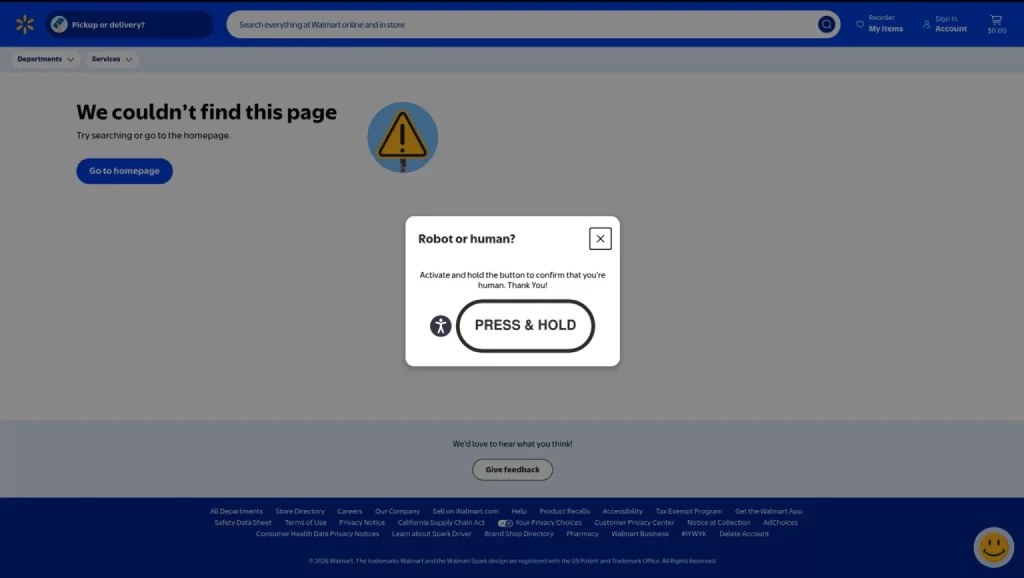
Run a basic requests.get() against a Walmart product page and you will likely get back a CAPTCHA page rather than the actual HTML:
Robot or human?
Activate and hold the button to confirm that you’re human.
Walmart uses Akamai Bot Manager – one of the more aggressive bot detection systems in e-commerce. It checks multiple signals simultaneously: request rate from a single IP, User-Agent headers, browser fingerprinting (via JavaScript challenges), TLS fingerprint, and whether the incoming IP is datacenter-registered.
The detection layers stack on each other:
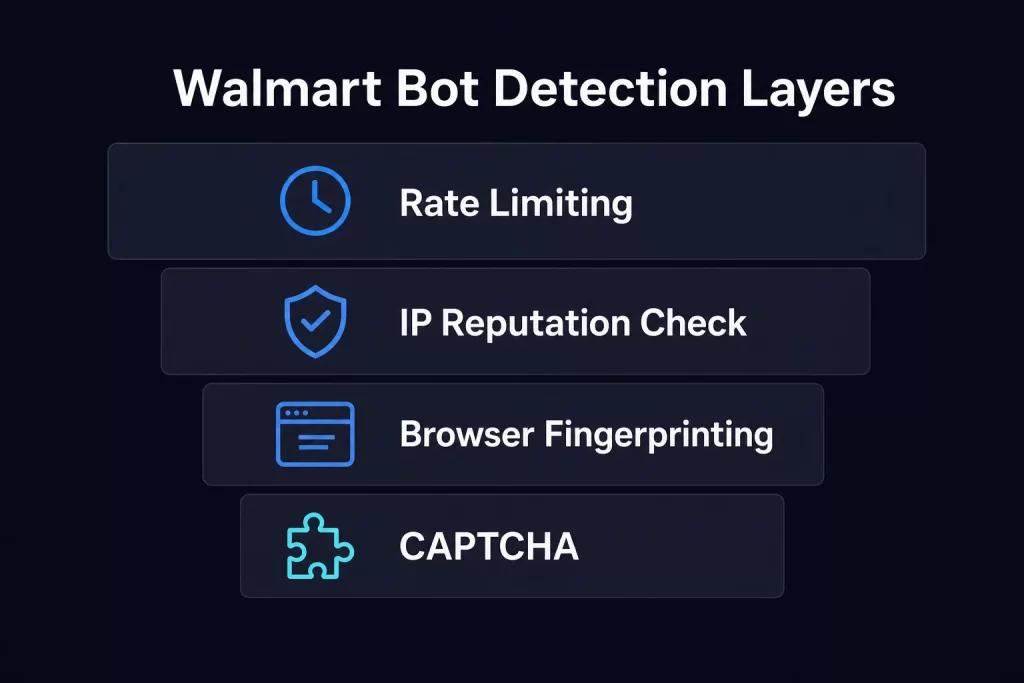
Datacenter IPs fail the first check immediately. A residential IP with the right headers passes the first two checks. The third layer, browser fingerprinting, only triggers for JavaScript-rendered sessions, not simple HTTP requests. For a restock monitor that only needs to check availability text, the first two layers are all you need to handle.
The community agrees. From a thread in r/DataHoarder on Walmart scraping:
“Walmart is aggressive with blocking and cheap/free proxies get flagged almost instantly. Get proper residential proxies.”
This is the real constraint. The monitoring logic is simple; getting the page is the challenge. If you want a deeper look at why free proxies are unsafe for this kind of work, that guide covers the risks in detail.
Setting Up Your Python Environment
Start with a clean environment and install the required packages:
python -m pip install requests beautifulsoup4 python-dotenv- requests – sends HTTP requests to Walmart’s product pages
- beautifulsoup4 – parses the returned HTML to find availability text
- python-dotenv – loads proxy credentials from a .env file rather than hardcoding them
Create a .env file in your project directory:
PROXY_USERNAME=your_username
PROXY_PASSWORD=your_password
PROXY_HOST=residential.proxying.io
PROXY_PORT=8080This keeps credentials out of your source code. This is very important if you push this to GitHub. If you are new to Python scraping in general, the beginner’s guide to building a web scraper in Python covers the full setup from scratch.
Writing the Core Monitoring Script
Here is a working Python script that polls a Walmart product page, checks availability, and sends an alert when the item comes back in stock.
import logging
import time
from requests import Session
from requests.adapters import HTTPAdapter
from urllib3.util.retry import Retry
logging.basicConfig(
    level=logging.INFO,
    format="%(asctime)s %(levelname)s %(message)s",
)
session = Session()
retry = Retry(
    total=3,
    backoff_factor=1,
    status_forcelist=[429, 500, 502, 503, 504],
    allowed_methods=["GET"],
)
adapter = HTTPAdapter(max_retries=retry)
session.mount("https://", adapter)
session.mount("http://", adapter)
def check_availability(api_url: str) -> bool:
    """
    Expects JSON like:
    {
        "available": true
    }
    """
    response = session.get(api_url, timeout=15)
    response.raise_for_status()
    data = response.json()
    return bool(data.get("available", False))
def send_alert(name: str, url: str):
    logging.warning("%s is now available! %s", name, url)
def monitor(name: str, api_url: str, interval: int = 60):
    previous = False
    logging.info("Monitoring %s", name)
    try:
        while True:
            try:
                current = check_availability(api_url)
                if current and not previous:
                    send_alert(name, api_url)
                logging.info(
                    "%s: %s",
                    name,
                    "IN STOCK" if current else "OUT OF STOCK",
                )
                previous = current
            except Exception as exc:
                logging.exception("Check failed: %s", exc)
            time.sleep(interval)
   except KeyboardInterrupt:
        logging.info("Stopped.")
if __name__ == "__main__":
    monitor(
       name="Example Product",
        api_url="https://example.com/api/product-status",
        interval=60,
)Here’s what all this means:
- session(): Reuses HTTP connections across requests, reducing overhead and improving performance compared to creating a new connection for every check.
- retry: Automatically retries transient failures (such as timeouts or temporary server errors) with exponential backoff, making the monitor more resilient to network issues.
- logging: Replaces print() statements with structured log messages that include timestamps and severity levels, making it easier to monitor and troubleshoot the script.
- check_availability(): Sends a GET request to the configured endpoint, validates the response, parses the returned data, and returns a boolean indicating whether the item is available.
- send_alert(): Centralizes notification logic. In the example it logs an alert, but this function can be extended to send emails, SMS messages, or push notifications.
- monitor(): Continuously checks the product status at the configured interval. It keeps track of the previous availability state and only triggers an alert when the status changes from unavailable to available, preventing duplicate notifications.
- try/except KeyboardInterrupt: Allows the script to exit cleanly when interrupted (for example, by pressing Ctrl+C) instead of displaying a traceback.
- interval=60: Controls how frequently the monitor checks for availability. Increase the interval to reduce request frequency or decrease it for more frequent checks, subject to the service’s usage policies.
- load_dotenv(): Loads configuration values from a local .env file into environment variables, keeping sensitive information like proxy credentials out of the source code.
- Environment variable validation: Checks that all required proxy settings (PROXY_USERNAME, PROXY_PASSWORD, PROXY_HOST, and PROXY_PORT) are present before the script starts. If any are missing, the script raises an error immediately instead of attempting requests with an invalid proxy configuration, making configuration issues much easier to diagnose.
- proxies: Constructs the proxy URL from the validated environment variables and configures the requests session to route all HTTP and HTTPS traffic through the proxy.
Adding HTTPS and SOCKS5 Proxy Support
The script above uses HTTP proxies. Proxying residential proxies support HTTPS and SOCKS5 as well. Switching protocols only requires changing the proxy URL scheme.
Here is how to configure each:
HTTPS proxy:
proxies = {
    "http": f"https://{PROXY_USER}:{PROXY_PASS}@{PROXY_HOST}:{PROXY_PORT}",
    "https": f"https://{PROXY_USER}:{PROXY_PASS}@{PROXY_HOST}:{PROXY_PORT}",
}SOCKS5 proxy (requires pip install “requests[socks]”):
proxies = {
    "http": f"socks5://{PROXY_USER}:{PROXY_PASS}@{PROXY_HOST}:{PROXY_PORT}",
    "https": f"socks5://{PROXY_USER}:{PROXY_PASS}@{PROXY_HOST}:{PROXY_PORT}",
}SOCKS5 with UDP/TCP support is particularly useful if you are monitoring multiple products in parallel and want to maintain separate sessions per product. For most single-product monitoring setups, HTTPS proxies are sufficient. The SOCKS vs HTTPS comparison guide explains the protocol differences in more detail if you want to go deeper.
Authenticated proxies are important here. Free or shared proxies fail Walmart’s IP reputation check. Authentication ensures you are using a pool of high-quality, opt-in residential IPs – not flagged datacenter ranges.
Why Proxy Type Matters for Walmart
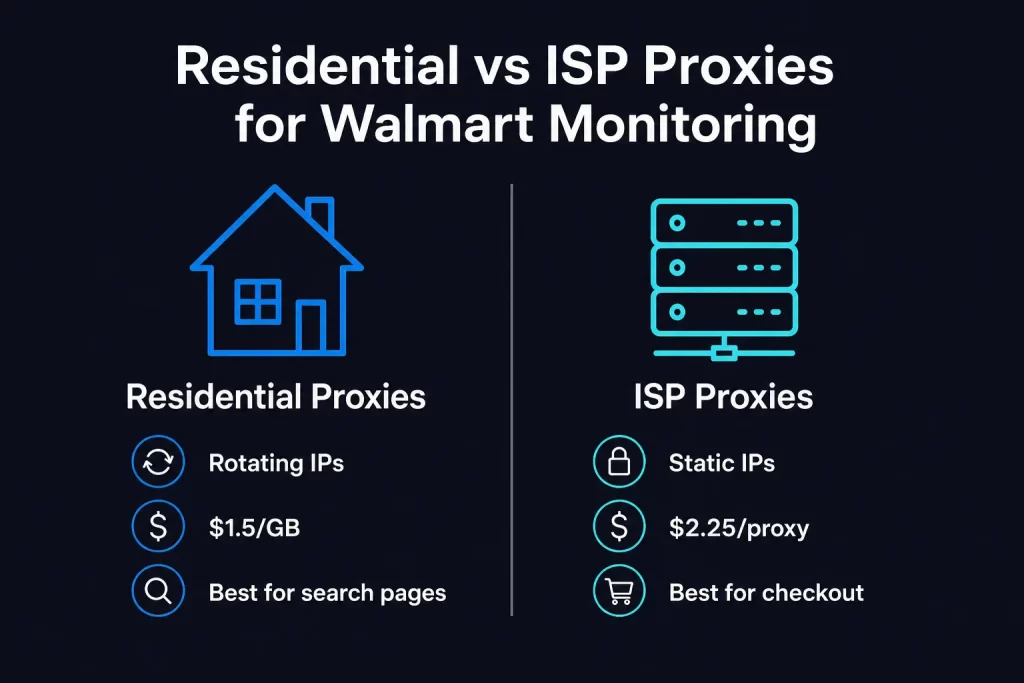
Not all proxies work equally well. Here is the practical breakdown:
| Proxy type | Price | IP behavior | Best for |
|---|---|---|---|
| Datacenter | Cheapest | Fixed IP, datacenter ASN | Will not work on Walmart |
| Residential (rotating) | $1.5/GB | New IP per request | Product page polling, search monitoring |
| ISP (static) | $2.25/proxy | Fixed residential IP from real ISPs (AT&T etc.) | Regional inventory checks, consistent session |
| Mobile | Most expensive | Carrier-grade IPs | Not needed for most Walmart monitoring |
For a standard restock monitor, residential proxies are the right call. At $1.5/GB with rotating IPs, you get a fresh residential IP on every request, which is exactly what bypasses Walmart’s per-IP rate limits. A 60-second polling interval on a single product uses roughly 0.5-2 MB of bandwidth per hour – well under $0.01 per hour in proxy costs. Proxying offers 100 MB free on joining Discord or Telegram, so you can test your full script before committing to bandwidth.
ISP proxies make more sense when you need a consistent IP identity: for example, if your monitoring script is logged into a Walmart account (for Walmart+ early access tracking) or performing regional inventory lookups that tie to a specific geographic location. See the comparison between dedicated vs shared IPs for more on when the static option earns its keep.
For more detail on when to use each, the ISP vs. Residential Proxies guide covers the trade-offs in depth.
Sending Notifications: Telegram Is Faster Than Email
Email is too slow for high-demand restocks. A Telegram bot delivers alerts in under a second after your script detects availability.
First, create a Telegram bot via BotFather and get your bot token and chat ID.
Install the library:
pip install python-telegram-botReplace the send_alert() function:
import asyncio
import telegram
TELEGRAM_TOKEN = os.getenv("TELEGRAM_TOKEN")
TELEGRAM_CHAT_ID = os.getenv("TELEGRAM_CHAT_ID")
async def send_telegram_alert(product_name: str, product_url: str):
    """Send an instant Telegram message when item restocks."""
    bot = telegram.Bot(token=TELEGRAM_TOKEN)
    message = (
        f"RESTOCK ALERT\n\n"
        f"{product_name} is back in stock on Walmart!\n\n"
        f"{product_url}"
    )
    await bot.send_message(chat_id=TELEGRAM_CHAT_ID, text=message)
def send_alert(product_url: str, product_name: str):
asyncio.run(send_telegram_alert(product_name, product_url))Add TELEGRAM_TOKEN and TELEGRAM_CHAT_ID to your .env file. The bot sends a message the moment your script detects the availability change – before community Discord channels have time to post.
Monitoring Multiple Products
Most use cases involve watching more than one item. A simple loop works, but it is slow – each check blocks the loop while waiting for the response.
Use concurrent.futures to check products in parallel:
import time
import logging
from concurrent.futures import ThreadPoolExecutor, as_completed
logging.basicConfig(
    level=logging.INFO,
    format="%(asctime)s %(levelname)s %(message)s",
)
PRODUCTS = [
    {
        "id": "ps5_pro",
        "name": "PS5 Pro Console",
        "url": "https://example.com/product/ps5-pro",
    },
    {
        "id": "xbox_series_x",
        "name": "Xbox Series X",
        "url": "https://example.com/product/xbox-series-x",
    },
    {
        "id": "switch_oled",
        "name": "Nintendo Switch OLED",
        "url": "https://example.com/product/switch-oled",
    },
]
def check_availability(url: str) -> bool:
    """
    Replace this with your authorized availability check.
    Returns:
        True  -> available
        False -> unavailable
    """
    # Placeholder logic
    return False
def send_alert(product_url: str, product_name: str):
    """
    Notification handler.
    Replace with email, Discord, Telegram, etc.
    """
    logging.warning(
        "ALERT: %s is available: %s",
        product_name,
        product_url,
    )
def check_product(product: dict) -> dict:
    """
    Checks one product and returns a standard result object.
    """
    try:
        available = check_availability(product["url"])
        return {
            "id": product["id"],
            "name": product["name"],
            "url": product["url"],
            "available": available,
            "error": None,
        }
    except Exception as exc:
        return {
            "id": product["id"],
            "name": product["name"],
            "url": product["url"],
            "available": False,
            "error": str(exc),
        }
def monitor_all(products: list, interval: int = 60, workers: int = 5):
    """
    Monitor multiple products concurrently.
    """
    previous_states = {
        product["id"]: False
        for product in products
    }
    logging.info(
        "Monitoring %d products every %ds",
        len(products),
        interval,
    )
    with ThreadPoolExecutor(max_workers=workers) as executor:
        while True:
            futures = [
                executor.submit(check_product, product)
                for product in products
            ]
            for future in as_completed(futures):
                result = future.result()
                product_id = result["id"]
                name = result["name"]
                available = result["available"]
                if result["error"]:
                    logging.error(
                        "%s check failed: %s",
                        name,
                        result["error"],
                    )
                    continue
                if available and not previous_states[product_id]:
                    send_alert(
                        result["url"],
                        name,
                    )
                status = (
                    "IN STOCK"
                    if available
                    else "OUT OF STOCK"
                )
                logging.info(
                    "%s: %s",
                    name,
                    status,
                )
                previous_states[product_id] = available
            time.sleep(interval)
if __name__ == "__main__":
    monitor_all(
        PRODUCTS,
        interval=60,
        workers=5,
)This script could be simpler but this version does not break the entire operation if one product throws an error.
With max_workers set to 5, five product checks run simultaneously rather than sequentially. For a list of 10 products, this cuts your effective check time from 10x the request latency to roughly 2x.
Each thread gets its own request through the proxy pool. With rotating residential proxies on a per-request basis, each parallel check uses a different IP – no single IP is making multiple requests in rapid succession. For a deeper look at how scraping e-commerce websites with Python scales beyond restock monitoring, that guide covers larger-scale patterns including pagination and rate-limit handling.
How the Full Monitoring System Fits Together
Here is how the complete pipeline works:
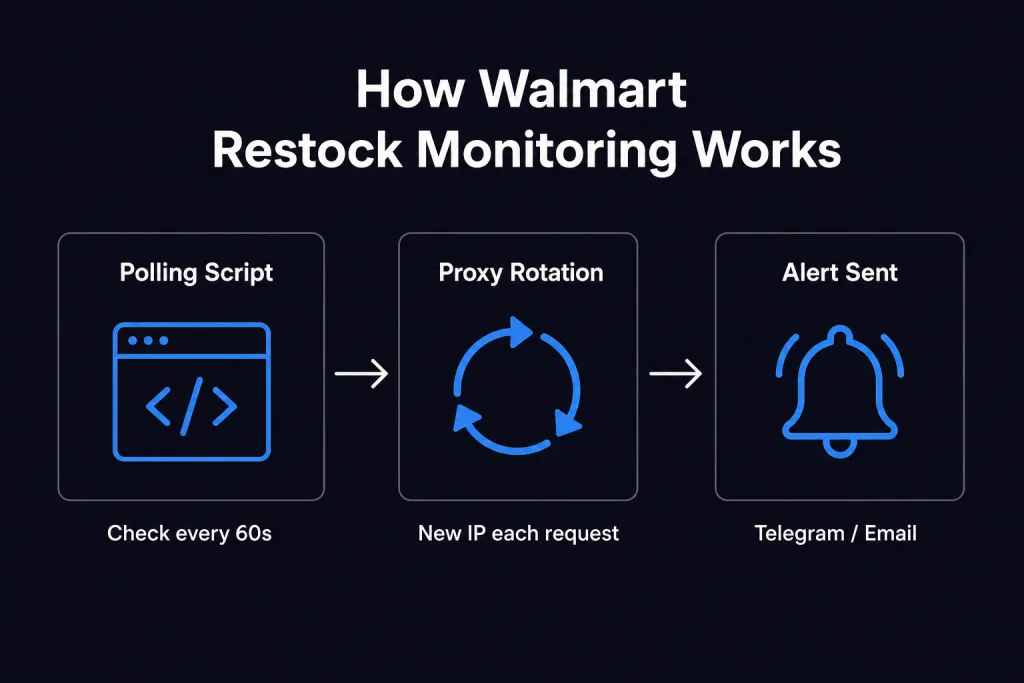
Your script runs in a loop. Each iteration, it fires an HTTP request through a different residential IP. Walmart receives a request that looks like a regular user in a regular browser. The response contains the current page HTML. BeautifulSoup parses it, checks for “Add to Cart,” and either logs the status or fires an alert.
The proxy rotation is invisible from Walmart’s perspective – each request appears to be a new visitor. Without it, a tight polling interval from a single IP would trigger rate limiting within minutes. This same pattern applies beyond Walmart: the guide on how Proxying helps with Amazon and eBay monitoring shows how identical architecture handles other major retailers.
Troubleshooting Common Issues
Getting CAPTCHA responses (Robot or human?)
Your proxy is either a datacenter IP or has been flagged. Switch to a different proxy provider or use fresh residential IPs. Confirm your User-Agent header is set to a real modern browser string. Avoid User-Agents from older Chrome versions (below 110) – they are commonly associated with scraping tools. If CAPTCHAs persist even with good residential IPs, the top CAPTCHA solving services guide covers the available bypass options.
HTTP 429 – Too Many Requests
You are hitting Walmart’s rate limit from a single IP. Increase your polling interval, reduce max_workers in the parallel monitor, or verify your proxy is actually rotating IPs between requests. Add exponential backoff:
import time
def check_with_backoff(url: str, max_retries: int = 3) -> bool:
    """Retry with exponential backoff on rate limit responses."""
    for attempt in range(max_retries):
        try:
            response = requests.get(url, headers=headers, proxies=proxies, timeout=15)
            if response.status_code == 429:
                wait = 2 ** attempt  # 1s, 2s, 4s
                print(f"Rate limited. Waiting {wait}s before retry...")
                time.sleep(wait)
                continue
            response.raise_for_status()
            soup = BeautifulSoup(response.content, "html.parser")
            return "add to cart" in soup.get_text().lower()
        except requests.RequestException as e:
            print(f"Request error on attempt {attempt + 1}: {e}")
return FalseThe Python requests retry guide goes deeper on retry strategies including session-level configuration and jitter.
SSL/HTTPS certificate errors
Some proxy endpoints require you to set verify=False when using HTTPS. This is not ideal from a security standpoint, but it resolves TLS handshake failures with certain proxy configurations:
response = requests.get(url, headers=headers, proxies=proxies, timeout=15, verify=False)If you see this in production, check whether your proxy provider offers a certificate bundle, or switch to HTTP for internal monitoring use cases where you control the environment.
Proxy authentication failures (407 errors)
Double-check your username, password, host, and port in the .env file. Proxy credentials are case-sensitive. If you recently changed your proxy password in the dashboard, update the .env file and restart the script. The proxy error guide has a full breakdown of common error codes and their fixes.
requests.exceptions.ProxyError or connection timeouts
Your proxy host or port may be incorrect. Verify the endpoint format in your proxy provider’s dashboard. Some residential proxy services use a different port for SOCKS5 vs. HTTP – confirm you are using the right one for your chosen protocol. If you want to verify a proxy is working before running the full monitor, the how to test proxies guide covers quick validation with cURL and Python.


