


Proxies are a critical part of many networked workflows, including web scraping, security testing, geo-specific content access, and privacy protection. But a proxy is only useful if it works and behaves the way you expect.
This guide shows how to test proxies so you can spot dead endpoints, slow nodes, misconfigured authentication, and privacy leaks before they impact your project.
What to Test in Proxies
You should test a proxy’s functionality, speed, and anonymity to ensure it works as intended for its specific use case, such as web scraping.
This involves checking that it routes traffic correctly, hides your real IP, is fast enough, and is not blocked or flagged by target websites.
Key Aspects to Test
Functions and Connectivity
- What: Check that the proxy is active and can successfully connect to the internet.
- Why: A non-functional proxy will cause failed requests, leading to a waste of time and resources.
Speed and Performance
- What: Measure the response time (latency) to ensure it is fast enough for your needs.
- Why: Slow proxies can negatively impact user experience, data collection, and overall productivity.
Reliability and Stability
- What: Check for a stable connection that doesn’t frequently drop or fail.
- Why: Unreliable proxies lead to interruptions and can make large-scale operations fail.
Anonymity and Security
- What: Verify that the proxy is successfully hiding your identity and location and that there are no data leaks
- Why: The primary reason for using a proxy is often privacy and security. A leak can expose your actual IP address, which may result in account bans.
Reputation and Blacklists
- What: Check if the proxy’s IP address has a bad reputation or is already on a blacklist.
- Why: A proxy with a bad history will likely be blocked by many websites, regardless of its speed or other features.
How to Check if a Proxy is Working
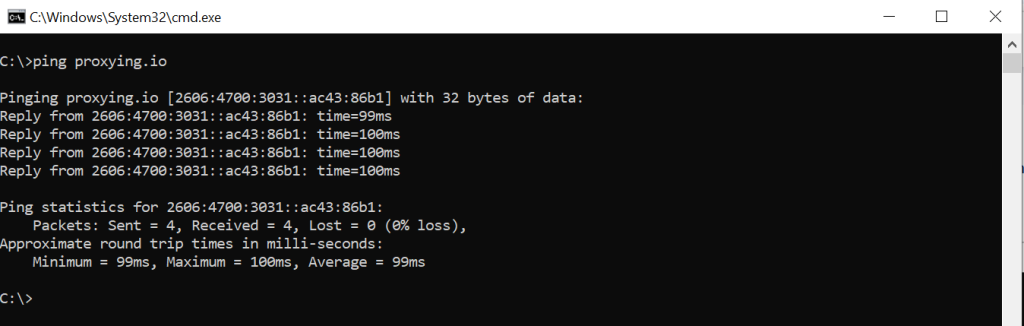
To perform a proxy server test via Windows and macOS, you need to ping a host. Open the terminal and enter the following command:
ping <proxy_host>
For example, to test Proxying Residential Proxies:
ping proxying.ioIt will give a response with some basic metrics, such as response time, indicating a functioning proxy.
Quick Manual Checks
Connectiviting Using cURL
Test a simple HTTP GET through an HTTP proxy:
curl -x http://PROXY_HOST:PROXY_PORT https://httpbin.org/get -I --max-time 10For an authenticated proxy:
curl --socks5 socks5://username:password@proxy_ip:port "https://www.proxying.io/"You will be looking for a 200 (or expected) status, reasonable latency, and no cURL connection errors.
Check Your Outward IP and Headers
httpbin.org and ifconfig.me are great test endpoints. Use httpbin to inspect headers:
curl -x http://PROXY_HOST:PROXY_PORT https://httpbin.org/headers
curl -x http://PROXY_HOST:PROXY_PORT https://httpbin.org/ipInspect the JSON: if origin contains your local IP, the proxy is leaking your address. Look for X-Forwarded-For and Via headers that may reveal the client.
Test HTTPS
For HTTPS through an HTTP proxy, verify that CONNECT works:
curl -x http://PROXY_HOST:PROXY_PORT https://www.google.com -I --max-time 10If the request times out and the TLS handshake fails, the proxy may not support CONNECT properly.
Programmatic Testing with Python
Below is a compact script to test basic connectivity, IP detection, and response time.
import requests, time
proxy = 'http://username:password@PROXY_HOST:PROXY_PORT'
proxies = {'http': proxy, 'https': proxy}
def test_proxy(url='https://httpbin.org/get'):
try:
  t0 = time.time()
  r = requests.get(url, proxies=proxies, timeout=10)
  t = time.time() - t0
return {
  'status_code': r.status_code,
  'elapsed': round(t, 2),
  'headers': dict(r.headers),
  body_sample': r.text[:300]
  } Except Exception as e:
    return {'error': str(e)}
if __name__ == '__main__':
print(test_proxy())So,
- Proxy = ‘http://username:password@PROXY_HOST:PROXY_PORT’: This sets up the proxy configuration for both HTTP and HTTPS traffic.
- Replace
- username: Your proxy username.
- Password: Your proxy password.
- Proxy_HOST: The proxy server’s hostname or IP.
- Proxy_PORT: The proxy’s port (like 8080 or 3128).
Function: test_proxy()
def test_proxy(url='https://httpbin.org/get'):This function checks if the proxy works by sending a GET request to the given URL.
If no URL is passed, it uses the default httpbin.org, which is great for testing HTTP requests.
Try Block
- t0=time.time(): captures the start time.
- Requests.get(): sends a GET request through the specified proxy.
- timeout=10: stops the request if it takes more than ten seconds.
- t = time.time – t0: calculates how long the request look.
Returning the Results
The dictionary summarizes the response:
- status_code: HTTP response code.
- Elapsed: Total time taken for the request.
- headers: Response headers (metadata returned by the server).
- body_sample: First 300 characters of the response body for preview.
Except Block
If anything goes wrong (like a timeout, authentication error, or bad proxy), the function returns a dictionary with the error message.
Automated Multi-Check Script
Key checks to automate for a proxy list:
- TCP connects to proxy IP: port.
- Make an HTTP GET to a header dump endpoint to verify anonymity.
- Measure latency (average and variance).
- Validate geolocation via an IP-geolocation API or ipinfo.io.
- Test HTTPS sites for successful TLS handshakes.
- Handle and report authentication failures separately.
- Retry with exponential backoff for intermittent failures.
If you run high-volume scraping, run these checks periodically and rotate our proxies that fall below thresholds.
Interpreting Results & Thresholds
- Connectivity failures: Immediate removal or quarantine for manual inspection.
- High latency (>1s): May still be useful for non-time-sensitive tasks; avoid for interactive or real-time workflows.
- IP leakage/header leaks: Unacceptable for privacy/anonymity use cases; or delete or fix the configuration
Hidemy.name
It is a privacy-focused provider that offers both VPN and proxy testing. It can detect the proxy type, precise location, speed, and anonymity level. Its proxy checker provides a list of proxies automatically collected from numerous websites all over the internet, including private databases. Proxies are sorted out by their protocol types, such as HTTP, HTTPS, and SOCKS.
Best Web Scraper APIs in 2026
Conclusion
Testing proxies is vital to ensure they perform reliably, maintain anonymity, and deliver the speed needed for tasks like web scraping, security testing, or accessing geo-restricted content. Regular checks using tools like ping, cURL, or automated Python scripts help detect dead endpoints, misconfigurations, and IP leaks before they disrupt operations.


