

If you’ve never scraped anything before, “Amazon review scraper” probably sounds more intimidating than it needs to be. It isn’t. By the end of this guide, you’ll understand what one actually does, how to build a simple one yourself, and how to keep it running without getting blocked halfway through.
No prior scraping experience required. We’ll explain each term the first time it shows up, and every piece of code below is something you can copy, run, and actually understand, not just paste and hope.
What Is an Amazon Review Scraper
An Amazon review scraper is a small program that visits a product page, reads the reviews on it, and saves them somewhere useful, like a spreadsheet or a database, instead of you copying and pasting each one by hand.
That’s really the whole idea. Think of it as a very fast, very patient assistant who never gets bored scrolling through page 14 of reviews.
Once the data is out of the webpage and into a structured format, you can do things with it that would be painful manually:
- Sort reviews by rating or date
- Search thousands of them for a specific complaint
- Feed them into a spreadsheet, a dashboard, or an AI model
Before you write any code, it helps to know two terms you’ll see everywhere in this space:
ASIN: Amazon’s 10-character product ID (something like B08N5WRWNW). You’ll find it in the product URL or in the “Product information” section of the listing.
Pagination: the mechanism that splits reviews across multiple pages instead of loading all of them at once. Your scraper needs to know how to move from page to page on its own.
One honest note before we go further: Amazon reviews are still someone else’s content. We’ll cover what that means for you in the legal section below, but it’s worth keeping in the back of your mind from the start.
Why Bother Scraping Amazon Reviews?
You don’t need a specific reason to be curious, but if you’re wondering whether this is worth the effort, here’s who typically finds it useful:
- Sellers and product teams, who read reviews to find recurring complaints before they become returns
- Marketers, who mine reviews for the exact words customers use, which usually beats guesswork in ad copy
- Researchers and students, who need review text as a dataset for sentiment analysis or other projects
- Shoppers doing serious research, who want to filter out fake-sounding five-star reviews and see what real buyers actually said
If none of those describe you exactly, that’s fine too. The skills in this guide (requesting a page, reading its data, saving it somewhere) are the foundation for scraping almost anything, not just Amazon.
Before You Start: What You’ll Need
Nothing fancy. Here’s the beginner checklist:
- Python installed on your computer (3.9 or newer is fine). If you’ve never installed it, python.org has a straightforward installer for your OS.
- Two Python libraries: requests (to fetch pages) and BeautifulSoup4 (to read the HTML). Install both with one line:
pip install requests beautifulsoup4- A text editor, even a basic one. VS Code is a popular free option if you don’t already have a preference.
- A little patience, since your first scraper will probably break at least once, and that’s completely normal, not a sign you did something wrong.

Two Ways to Get Amazon Review Data
Before jumping into code, it’s worth knowing there are two paths, and picking the right one saves you time.
| Build Your Own Scraper | Use a Ready-Made Scraper API | |
|---|---|---|
| Best for | Learning, small one-off projects | Ongoing or large-scale data needs |
| Setup time | An afternoon or two | Minutes |
| Who maintains it | You, whenever Amazon changes its layout | The API provider |
| Cost | Free, aside from proxies | Monthly subscription |
| Coding required | Yes | Minimal to none |
This guide focuses on building your own, since that’s the best way to actually understand what’s happening. But if you later need to pull data from thousands of products a day, a managed API is usually the more practical choice, and worth knowing about as an option rather than something to feel bad about not building yourself.
Step-by-Step: Scraping Amazon Reviews with Python
Let’s build a simple scraper together. Each step adds one small piece, so nothing here should feel like a leap.
Step 1: Find the Product’s ASIN
Open the product page on Amazon and look at the URL. You’ll see a segment that looks like /dp/B08N5WRWNW/. That 10-character code is the ASIN, and it’s what lets you construct the review page URL directly:
https://www.amazon.com/product-reviews/B08N5WRWNWThat dedicated /product-reviews/ URL is cleaner to scrape than the main product page, since it’s built specifically to list reviews rather than product details, images, and recommendations.
Step 2: Fetch the Page
Here’s the most basic version, just requesting the page and printing what comes back:
import requests
headers = {
    "User-Agent": "Mozilla/5.0 (Windows NT 10.0; Win64; x64) AppleWebKit/537.36"
}
url = "https://www.amazon.com/product-reviews/B08N5WRWNW"
response = requests.get(url, headers=headers)
print(response.status_code)That headers dictionary matters more than it looks. Without a User-Agent telling Amazon this is a browser, plenty of sites reject the request outright. It’s a small thing beginners often skip, then wonder why they’re getting blocked immediately.
Step 3: Pull Out the Review Data
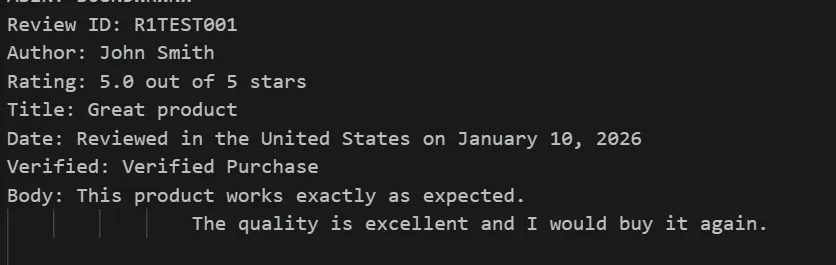
Once you have the page’s HTML, BeautifulSoup lets you search through it for the pieces you actually want:
from bs4 import BeautifulSoup
soup = BeautifulSoup(response.text, "html.parser")
reviews = soup.find_all("div", {"data-hook": "review"})
for review in reviews:
    rating = review.find("i", {"data-hook": "review-star-rating"})
    title = review.find("a", {"data-hook": "review-title"})
    body = review.find("span", {"data-hook": "review-body"})
    print(rating.text.strip() if rating else "N/A")
    print(title.text.strip() if title else "N/A")
    print(body.text.strip() if body else "N/A")
print("---")The data-hook attributes are how Amazon’s own front-end code labels each piece of a review internally, and they’re a reliable way to target the right element. If a future layout change breaks this, that attribute is usually the first thing worth re-checking.
Step 4: Handle Pagination
One page of reviews is rarely enough. This loop moves through multiple pages until it stops finding new ones:
import time
all_reviews = []
page = 1
while True:
    url = f"https://www.amazon.com/product-reviews/B08N5WRWNW?pageNumber={page}"
    response = requests.get(url, headers=headers)
    soup = BeautifulSoup(response.text, "html.parser")
    reviews = soup.find_all("div", {"data-hook": "review"})
    if not reviews:
        break
    all_reviews.extend(reviews)
    page += 1
time.sleep(2)That time.sleep(2) is doing more work than it looks like. It pauses two seconds between requests so your scraper behaves more like a human clicking “next page” and less like a bot hammering the server as fast as possible. Skip it and you’ll get blocked far sooner.
Adding Proxies So You Don’t Get Blocked
Here’s the part beginners usually hit without warning: send enough requests from the same IP address in a short window, and Amazon stops answering them. Not maliciously, it’s just standard anti-bot behavior most large sites use.
A proxy routes your request through a different IP address, so instead of every request coming from your one connection, you can spread them out. If you’re only scraping a handful of reviews once, you may never hit this wall. If you’re scraping regularly or at any real volume, you will.
There are a few proxy types worth knowing:
- Residential proxies use IP addresses tied to real home internet connections, which makes them the hardest for a site to flag as automated traffic. Best choice if you’re scraping often or at scale.
- ISP proxies blend real-connection legitimacy with datacenter-level speed, a solid middle ground once you’re past the learning stage.
- Datacenter proxies are the fastest and cheapest option, and perfectly fine for light, occasional scraping where getting flagged occasionally isn’t a big deal.
Not sure which fits your project? Our ISP vs datacenter proxies comparison breaks down the tradeoff in plain terms.
Here’s how to plug a proxy into the requests library. All five variations below use the same basic pattern; just swap the scheme and credentials.
HTTP proxy:
import requests
proxies = {
    "http": "http://proxy_host:port",
}
response = requests.get("https://www.amazon.com/product-reviews/B08N5WRWNW", proxies=proxies, headers=headers)HTTPS proxy:
proxies = {
    "https": "http://proxy_host:port",
}
response = requests.get("https://www.amazon.com/product-reviews/B08N5WRWNW", proxies=proxies, headers=headers)SOCKS4 proxy:
proxies = {
    "http": "socks4://proxy_host:port",
    "https": "socks4://proxy_host:port",
}
response = requests.get("https://www.amazon.com/product-reviews/B08N5WRWNW", proxies=proxies, headers=headers)SOCKS5 proxy:
proxies = {
    "http": "socks5://proxy_host:port",
    "https": "socks5://proxy_host:port",
}
response = requests.get("https://www.amazon.com/product-reviews/B08N5WRWNW", proxies=proxies, headers=headers)Authenticated proxy:
proxies = {
    "http": "http://username:password@proxy_host:port",
    "https": "http://username:password@proxy_host:port",
}
response = requests.get("https://www.amazon.com/product-reviews/B08N5WRWNW", proxies=proxies, headers=headers)Two small notes if this is your first time touching proxies in Python: SOCKS4 and SOCKS5 require one extra install, pip install requests[socks], or you’ll get an error the moment you try to use them. And if you’re rotating through many proxies rather than using one fixed address, our guide on IP rotation in web scraping explains how to cycle through a pool instead of hardcoding a single host.

Cleaning and Exporting Your Data to CSV
Raw scraped text is usually messier than it looks at first glance. A quick cleanup pass before export saves you headaches later:
import csv
with open("amazon_reviews.csv", "w", newline="", encoding="utf-8") as f:
    writer = csv.writer(f)
    writer.writerow(["rating", "title", "body"])
    for review in all_reviews:
        rating = review.find("i", {"data-hook": "review-star-rating"})
        title = review.find("a", {"data-hook": "review-title"})
        body = review.find("span", {"data-hook": "review-body"})
        writer.writerow([
            rating.text.strip() if rating else "",
            title.text.strip() if title else "",
            body.text.strip().replace("\n", " ") if body else "",
])That .replace(“\n”, ” “) on the review body matters more than it seems. Review text often contains line breaks that would otherwise split a single review across multiple CSV rows and quietly corrupt your file. Open the CSV in Excel, Google Sheets, or a notebook once it’s done, and you have a clean dataset to actually work with.
Is It Legal to Scrape Amazon Reviews?
Short answer: it depends, but a few principles hold up consistently.
Amazon’s Conditions of Use prohibit automated data collection, and the site actively defends against it with bot-detection systems. That doesn’t automatically make scraping illegal everywhere, but it does mean you’re operating outside what the platform explicitly permits.
A few things that generally reduce risk:
- Scraping data that’s publicly visible without logging in, rather than anything behind a login wall
- Keeping your request rate reasonable instead of hammering the site as fast as your code allows
- Using the data internally (research, your own product analysis) rather than republishing review text wholesale
- Dropping any personal information, like reviewer names, if your project doesn’t actually need it, especially given GDPR and similar privacy regulations
None of this is legal advice, and if scraping is core to a commercial project rather than a personal experiment, it’s worth a real conversation with a lawyer rather than a blog post.
Troubleshooting Common Beginner Mistakes
Almost everyone hits one of these on their first attempt. Here’s how to recognize and fix each one.
Getting a 503 or an empty response immediately. Usually means your User-Agent header is missing or looks obviously non-browser. Double-check that the headers dictionary is actually being passed into your request.
The script works for a few pages, then stops. Classic rate-limiting. You’re likely moving faster than time.sleep(2) allows for, or you’ve hit a request cap from a single IP. This is exactly the problem proxies solve.
‘find()’ keeps returning ‘None’. Amazon occasionally tweaks its HTML structure. Open the page in your browser, right-click a review, choose Inspect, and confirm the data-hook values still match what your code is searching for.
CSV file looks scrambled when opened. Almost always unescaped line breaks or commas inside review text. Make sure you’re using Python’s built-in csv module (as shown above) rather than manually joining strings with commas, since the module handles escaping for you automatically.
Proxy connection just hangs. Confirm the host and port are correct, and the proxy is actually live before assuming your scraping code is the problem. A quick proxy testing pass rules this out in under a minute.


