

Web scraping is a practical way to collect information from websites without manually copying data from each page. With web scraping with PHP, you can send requests to webpages, extract useful information from their HTML, and organize the results for further use.
PHP offers several tools that make web scraping straightforward, including HTTP clients and HTML parsing libraries. In this guide, you’ll learn how to build a basic PHP scraper, collect data from multiple pages, store scraped information, use proxies with Guzzle, and handle common scraping problems. We’ll also compare PHP with Python and cover key legal considerations before you start a scraping project.
What Is Web Scraping With PHP?
Web scraping with PHP is the process of using PHP code to automatically collect information from websites. Instead of manually opening pages and copying data, a PHP script can send a request to a webpage, receive its HTML, find the information you need, and extract it into a structured format.
A basic PHP web crawler typically follows four steps: request a webpage, parse its HTML, select specific elements, and save the extracted data. For example, you can use PHP to collect product names and prices, property listings, article titles, or other publicly available information. The collected data can then be stored in formats such as CSV or JSON, or saved directly to a database for further processing.
Why Use PHP for Web Scraping?
PHP is a practical choice for web scraping, especially if you already use it to build websites or web applications. You can add scraping functionality to an existing PHP project without introducing a completely different programming language or development environment.
PHP also has libraries such as Guzzle for sending HTTP requests and DomCrawler for working with HTML. These tools make it possible to retrieve webpages, find specific elements, and extract the information you need. PHP also works well with databases such as MySQL, making it easier to store and manage scraped data.
Another advantage is that PHP can handle both small scraping scripts and larger automated tasks. You can use it to collect product prices, monitor public website changes, gather research data, or build a PHP site crawler that processes multiple pages. For larger projects, you can also combine PHP with proxies, scheduling, databases, and other tools to create a more reliable scraping workflow.
PHP Web Scraping Libraries and Tools You Need
Before you start web scraping with PHP, you need a few basic tools to send requests, process HTML, and manage your project. You don’t need a large setup for a simple scraper.
Guzzle
Guzzle is a PHP HTTP client used to send requests to websites and receive their responses. It supports features such as headers, timeouts, redirects, authentication, and proxy configuration.
For example, a basic request looks like this:
$response = $client->request('GET', 'https://example.com');
$html = $response->getBody()->getContents();The returned HTML can then be passed to an HTML parser for extraction.
Symfony DomCrawler
Symfony DomCrawler helps you navigate and extract information from HTML documents. You can use CSS selectors to target specific elements, such as headings, links, product names, or prices.
For example:
$crawler->filter('h1')->text();This selects an <h1> element and returns its text.
Composer
Composer is PHP’s dependency manager. It makes it easier to install and manage the libraries used by your scraper.
You can install the main packages with:
composer require guzzlehttp/guzzle symfony/dom-crawler symfony/css-selectorAfter installation, Composer creates an autoloader that you can include in your PHP script:
require 'vendor/autoload.php';With Guzzle, DomCrawler, Composer, and PHP installed, you have the basic tools needed to start building a PHP web scraper.
Preparations for Web Scraping With PHP
Before writing your scraper, take a few minutes to understand the website and decide exactly what data you want to collect. This makes the scraping process easier and helps you avoid unnecessary requests.
First, identify the information you need. For example, a product scraper may need the product name, price, availability, and URL. Then open the target webpage in your browser and inspect its HTML. You can right-click an element and select Inspect to see its HTML structure and identify useful CSS classes, IDs, or other selectors.
Next, check whether the website allows automated access and review its terms and crawling instructions. Your scraper should only collect information you are permitted to access and should not attempt to bypass authentication or security controls.
Finally, start with a single webpage before moving to multiple pages. Make sure your scraper can correctly retrieve and extract the required data first. Once the basic process works, you can add pagination, error handling, data storage, delays, and other features.
How to Scrape a Website With PHP
Now that the basic tools are ready, you can build a simple PHP scraper. In this example, we’ll use Guzzle to request a webpage and Symfony DomCrawler to find and extract information from its HTML.
The process is straightforward: send a request, retrieve the HTML, parse the page, select the elements you need, and then display or save the extracted data.
Step 1: Install the Required Libraries
If you haven’t already installed the required packages, open your terminal in your PHP project folder and run:
composer require guzzlehttp/guzzle symfony/dom-crawler symfony/css-selectorComposer will download Guzzle, DomCrawler, and the CSS Selector component along with their dependencies.
Once the installation is complete, you should see a vendor folder in your project. This folder contains the libraries your scraper needs.
Step 2: Create a PHP File
Create a new file named scraper.php.
At the beginning of the file, load Composer’s autoloader and import the classes you’ll use:
<?php
require 'vendor/autoload.php';
use GuzzleHttp\Client;
use Symfony\Component\DomCrawler\Crawler;The autoload.php file allows PHP to load the installed libraries automatically. The Client class will handle HTTP requests, while Crawler will help you work with the webpage’s HTML.
Step 3: Create a Guzzle Client
Next, create a Guzzle client:
$client = new Client([
'timeout' => 10,
]);The timeout option tells Guzzle how long it should wait for a response before stopping the request.
Setting a reasonable timeout is important because a website may be slow or temporarily unavailable. Without a timeout, your script could wait longer than necessary.
Step 4: Send a Request to the Website
Use the Guzzle client to send a GET request:
$response = $client->request(
'GET',
'https://example.com'
);The URL in this example is a placeholder. Replace it with the publicly accessible webpage you want to scrape.
The response returned by Guzzle contains information from the server, including the webpage’s HTML.
Step 5: Get the HTML Response
Next, retrieve the HTML from the response:
$html = $response->getBody()->getContents();The $html variable now contains the webpage’s HTML source.
This is the content that you will pass to the HTML parser so you can find the specific information you want.
Step 6: Create an HTML Crawler
Now pass the HTML to Symfony DomCrawler:
$crawler = new Crawler($html);The crawler allows you to search through the HTML using CSS selectors.
For example, if the webpage contains:
<h2>Product One</h2>
<h2>Product Two</h2>
<h2>Product Three</h2>You can select all of these elements with:
$crawler->filter('h2');Step 7: Extract the Data
To extract the text from each <h2> element, use the each() method:
$crawler->filter('h2')->each(function ($node) {
echo $node->text() . PHP_EOL;
});The scraper will process each matching element and print its text.
The output would look like:
- Product One
- Product Two
- Product Three
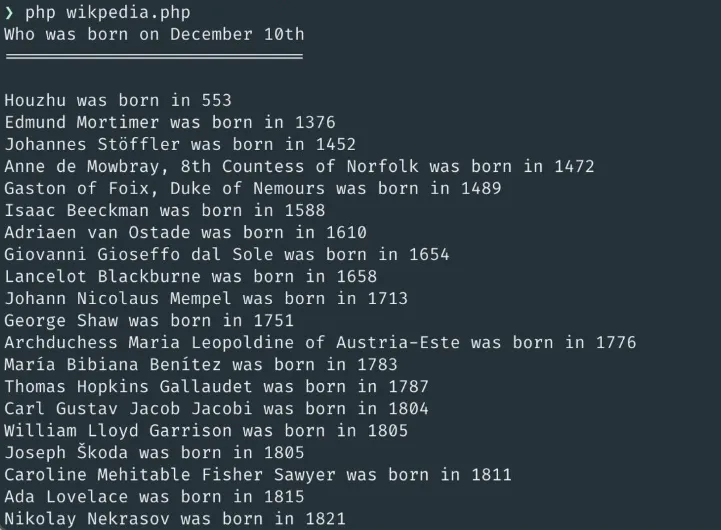
This is the basic idea behind PHP scrape website workflows: identify an HTML element, select it with a CSS selector, and extract its contents.
Step 8: Extract Links and Other Attributes
You aren’t limited to extracting text. You can also retrieve HTML attributes.
For example, consider this link:
<a href="/products/headphones">Wireless Headphones</a>You can extract the link URL with:
$crawler->filter('a')->each(function ($node) {
echo $node->attr('href') . PHP_EOL;
});You can extract the visible text separately:
$crawler->filter('a')->each(function ($node) {
echo $node->text() . PHP_EOL;
});This is useful when building a PHP web crawler that needs to discover and process links on a website.
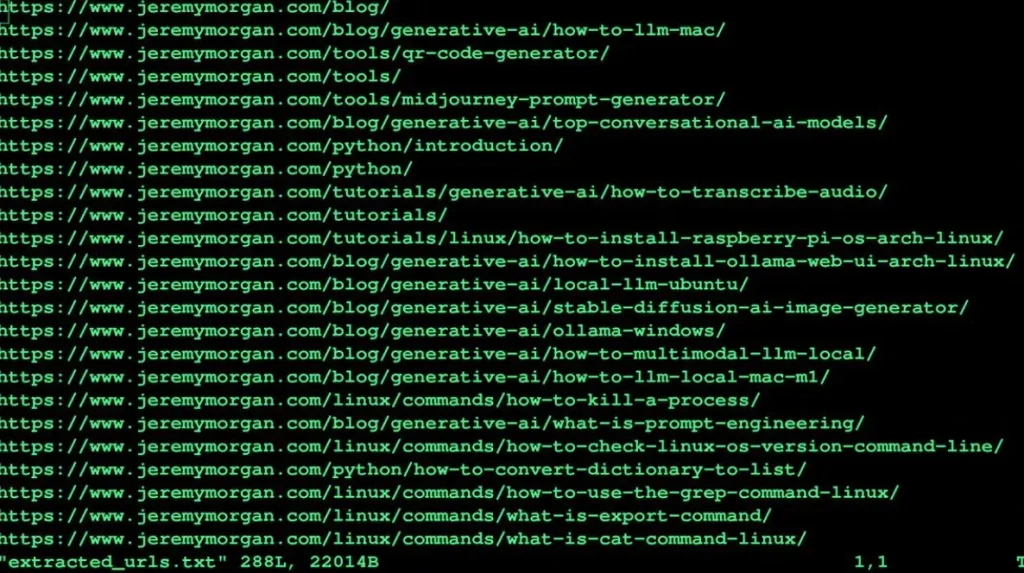
Step 9: Extract Multiple Fields
For a real scraping project, you will usually need more than one piece of information.
Suppose a page contains products with this structure:
<div class="product">
<h2 class="product-name">Wireless Headphones</h2>
<span class="price">$49.99</span>
</div>You can extract both values:
$crawler->filter('.product')->each(function ($node) {
$name = $node->filter('.product-name')->text();
$price = $node->filter('.price')->text();
echo "Product: " . $name . PHP_EOL;
echo "Price: " . $price . PHP_EOL;
});The output would be:
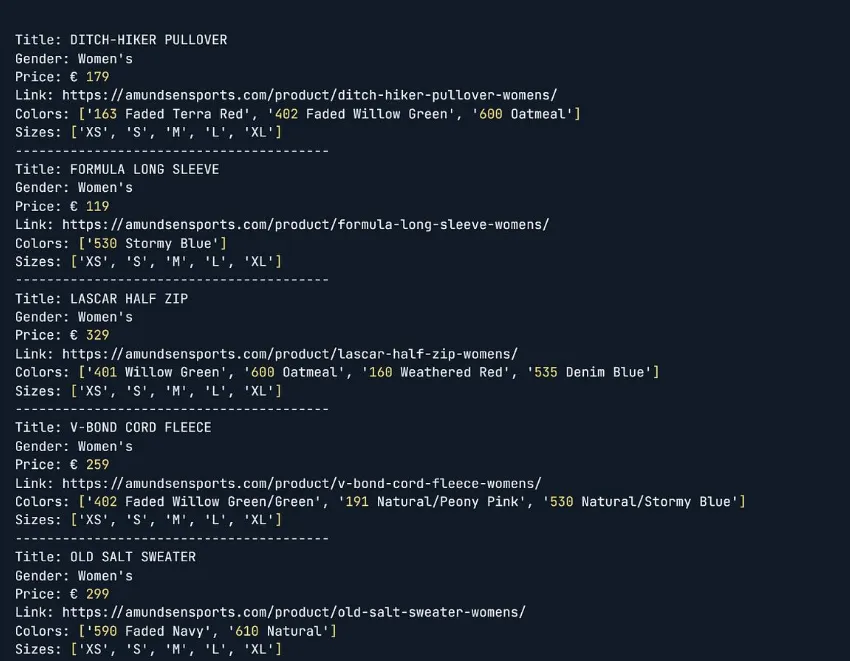
The important part here is that you first select the parent .product element and then search inside it for the specific fields.
This approach is useful when a page contains many products with the same HTML structure.
Step 10: Add Basic Error Handling
A request can fail because of a timeout, connection problem, or server error. Instead of allowing the entire script to stop unexpectedly, you can catch the exception:
try {
$response = $client->request(
'GET',
'https://example.com'
);
$html = $response->getBody()->getContents();
} catch (\Exception $e) {
echo "Request failed: " . $e->getMessage();
}This gives your scraper a basic way to report request failures.
Step 11: Put Everything Together
Once the individual steps are understood, you can combine them into one simple scraper:
<?php
require 'vendor/autoload.php';
use GuzzleHttp\Client;
use Symfony\Component\DomCrawler\Crawler;
// Create the HTTP client
$client = new Client([
    'timeout' => 10,
]);
try {
// Send a request to the webpage
$response = $client->request(
'GET',
'https://example.com'
);
// Get the HTML
$html = $response->getBody()->getContents();
// Create the HTML crawler
$crawler = new Crawler($html);
// Find and display all h2 elements
$crawler->filter('h2')->each(function ($node) {
echo $node->text() . PHP_EOL;
});
} catch (\Exception $e) {
// Display an error if the request fails
echo "Request failed: " . $e->getMessage();
}Run the script from your terminal:
php scraper.phpIf the webpage contains matching <h2> elements, their text will be displayed in the terminal.

The complete workflow is:
Send request -> Get HTML -> Parse HTML -> Select elements -> Extract data -> Display or store data
Once this basic scraper works, you can expand it to handle multiple pages, pagination, structured data, databases, and proxies.
How to Scrape Multiple Pages With PHP?
Scraping one webpage is useful for testing, but many projects require data from dozens, hundreds, or even thousands of pages. PHP can handle this by processing a list of URLs one at a time and applying the same extraction logic to each page.
A simple approach is to store the URLs in an array and use a foreach loop to process them:
$urls = [
'https://example.com/page1',
'https://example.com/page2',
'https://example.com/page3'
];
foreach ($urls as $url) {
$response = $client->request('GET', $url);
$html = $response->getBody()->getContents();
$crawler = new Crawler($html);
$crawler->filter('h2')->each(function ($node) {
echo $node->text() . PHP_EOL;
});
}For a larger PHP web crawler, you can also collect links from one page and add new URLs to a queue. This allows the scraper to discover additional pages instead of requiring every URL to be entered manually.
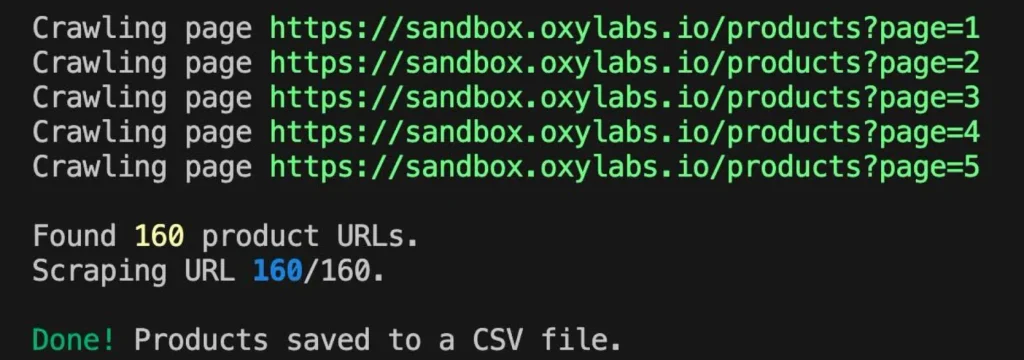
When scraping multiple pages, you should also control how frequently requests are sent. Sending a large number of requests in a very short period can overload a website and may result in errors or blocked requests. Adding reasonable delays, handling failed requests, setting timeouts, and avoiding duplicate URLs can make the crawler more reliable.
For larger projects, you can combine PHP with a database to keep track of processed URLs and scraped records. If your use case involves collecting data across different locations or distributing requests, you can also use proxies as part of the scraping setup. Proxying provides proxies for web scraping in these workflows.
How to Store and Manage Scraped Data?
Once your scraper extracts information, you need a reliable way to store it. The best option depends on how much data you are collecting and what you plan to do with it later.
Store Data in CSV
CSV is a simple option for small scraping projects. It can be opened in spreadsheet applications and is easy to share or process with other tools.
For example:
$file = fopen('products.csv', 'w');
fputcsv($file, ['Product', 'Price']);
fputcsv($file, ['Wireless Headphones', '$49.99']);
fputcsv($file, ['Keyboard', '$39.99']);
fclose($file);This creates a products.csv file containing the product names and prices.
Store Data in JSON
JSON is useful when the scraped information will be used by another application or API.
$data = [
[
'product' => 'Wireless Headphones',
'price' => '$49.99'
],
[
'product' => 'Keyboard',
'price' => '$39.99'
]
];
file_put_contents(
'products.json',
json_encode($data, JSON_PRETTY_PRINT)
);The resulting file can be easily read by PHP and other programming languages.
Store Data in a Database
For larger scraping projects, a database such as MySQL is usually more practical than keeping everything in individual files. A database allows you to search, update, filter, and organize large amounts of scraped information.
For example, a product table could contain:
| Field | Example |
|---|---|
| Product name | Wireless Headphones |
| Price | $49.99 |
| URL | Product page URL |
| Availability | In Stock |
| Scraped at | 2026-10-05 |
Adding a timestamp is particularly useful when you need to track how information changes over time. For example, a price-monitoring system can compare today’s price with previous records and identify changes.
For larger commercial scraping projects, organizing the data properly from the beginning also makes it easier to connect your scraper with other applications, dashboards, or APIs.
How to Use a Proxy With Guzzle in PHP?
A proxy can route your scraper’s requests through a different IP address instead of sending every request directly from your own network. This can be useful for web scraping projects that need to collect publicly available data from different locations or distribute requests across multiple IP addresses.
Guzzle supports proxy configuration directly through its client options. You can provide the proxy address when creating the client:
use GuzzleHttp\Client;
$client = new Client([
'proxy' => 'http://username:password@proxy.proxying.com:8080',
'timeout' => 10,
]);
The scraper can then make requests through the configured proxy as usual:
$response = $client->request(
'GET',
'https://example.com'
);
$html = $response->getBody()->getContents();If your proxy does not require authentication, you can use a simpler address:
$client = new Client([
'proxy' => 'http://proxy.proxying.com:8080',
]);Guzzle can also be configured to use a SOCKS proxy when your environment and required dependencies support it:
$client = new Client([
'proxy' => 'socks5://username:password@proxy.proxying.com:1080',
]);For web scraping projects that require proxies, you can explore Proxies for Web Scraping from Proxying.
A proxy does not automatically make scraping acceptable or prevent all errors. You should still respect the target website’s terms, avoid excessive request rates, and only collect information you are authorized to access. For larger scraping workflows, combining proxies with proper request handling, delays, retries, and error management can make the scraper more reliable.
5 Common Web Scraping Problems in PHP [And How to Solve Them]
Even a simple PHP scraper can run into problems when a website has dynamic content, changing HTML, request limits, or temporary connection issues. Knowing the most common problems makes it easier to troubleshoot your scraper.
1. The Data Is Missing From the HTML
Sometimes the information you see in your browser is not included in the HTML returned by a normal HTTP request. This commonly happens when a website loads content dynamically with JavaScript.
Solution: Check the raw HTML returned by Guzzle. If the required information is not there, a basic HTTP client may not be enough. Depending on the website, you may need browser automation or an available API that provides the required data.
2. The Website Returns an HTTP Error
Your request may return an error such as 403 Forbidden, 404 Not Found, or 429 Too Many Requests.
These errors can have different causes. A page may not exist, access may be restricted, or the website may be receiving requests too frequently.
Solution: Check the HTTP status code and handle failed requests properly. Use reasonable request rates and avoid repeatedly requesting a page after receiving an error.
3. The Website’s HTML Changes
A scraper depends on the structure of the webpage. If a website changes a class name or moves an element to another part of the HTML, your existing selector may stop working.
For example, a scraper using:
$crawler->filter('.price');may stop finding the price if the website changes that class.
Solution: Use reliable selectors where possible and test your scraper regularly. It is also useful to validate extracted data so that an HTML change does not silently produce incorrect results.
4. Requests Time Out
A webpage may take too long to respond because of network problems, server load, or other temporary issues.
You can set a timeout in Guzzle:
$client = new Client([
    'timeout' => 10,
]);
You can also catch request exceptions:
try {
$response = $client->request('GET', $url);
} catch (\Exception $e) {
echo "Request failed: " . $e->getMessage();
}This allows your scraper to handle failed requests instead of stopping unexpectedly.
5. The Scraper Collects Duplicate or Incomplete Data
When scraping multiple pages, the same URL may be processed more than once. A request can also fail partway through a large scraping job, leaving you with incomplete results.
Solution: Keep track of processed URLs, check that required fields were successfully extracted, and save data as the scraper runs instead of waiting until the entire process finishes.
For larger projects, a database can help you track URLs, scraping status, timestamps, and previously collected records. This makes it easier to restart a scraper without processing the same pages repeatedly.
PHP Web Scraping vs Python Web Scraping: What’s the Difference?
Both PHP and Python can be used to scrape websites, but they are commonly used in different types of projects. PHP is particularly convenient when scraping is part of an existing PHP website or application, while Python has a large ecosystem dedicated to web scraping, automation, and data analysis.
| Feature | PHP | Python |
|---|---|---|
| HTTP requests | Guzzle and other libraries | Requests and other libraries |
| HTML parsing | DomCrawler and others | BeautifulSoup and others |
| Scraping frameworks | Several options | Extensive options, including Scrapy |
| Data analysis | Available, but more limited | Strong ecosystem |
| Database integration | Excellent | Excellent |
| Existing web application integration | Excellent | Good |
| Learning curve | Beginner-friendly | Beginner-friendly |
| Large-scale scraping | Possible | Widely used |
When Should You Use PHP?
PHP makes sense when your existing application is already built with PHP. You can use libraries such as Guzzle and DomCrawler without adding another language to your technology stack.
For example, a PHP-based e-commerce application could scrape publicly available product information and store it in the same database used by the application.
When Should You Use Python?
Python is often a better choice when web scraping is the main focus of the project, particularly when you need advanced crawling, data processing, automation, or analysis. Libraries and frameworks such as Requests, BeautifulSoup, and Scrapy provide many options for different scraping requirements.
If you want to explore the Python approach, Proxying also has guides such as Getting Started with Scrapy Python for Fast, Scalable Web Scraping and How to Build a Web Scraper in Python.
Ultimately, neither language is universally better. PHP is a strong choice for PHP-based applications, while Python can be more suitable for dedicated scraping and data-analysis projects. The right choice depends on your existing technology stack and the complexity of your scraping task.
Is Web Scraping Legal?
Web scraping is not automatically legal or illegal. The answer depends on factors such as the website, the type of information collected, how the information is used, applicable laws, contracts, and the jurisdiction involved.
Before starting a scraping project, consider the following:
- Check the website’s terms: Some websites specify conditions regarding automated access and data collection.
- Check access restrictions: Don’t attempt to access private areas, bypass authentication, or circumvent security controls.
- Consider the type of data: Public business information is different from private or sensitive personal information.
- Respect technical signals and limits: Review crawling instructions and avoid excessive request rates that could negatively affect the website.
- Consider copyright and database rights: Even publicly accessible information may be subject to legal restrictions depending on how you collect, reproduce, and use it.
- For commercial projects: especially those involving large-scale collection, sensitive information, or data redistribution, getting appropriate legal advice is sensible.


