

eBay data scraping is the process of automatically collecting publicly available information from eBay listings instead of gathering it manually. Businesses use scraping tools and scripts to extract product details from search results, category pages, and individual product listings in a structured format.
The information collected can include product titles, prices, seller names, ratings, reviews, shipping costs, item availability, product images, specifications, and more. This data helps businesses monitor competitors, analyze market trends, optimize pricing strategies, and build product databases.
Compared to manual research, scraping eBay product data is much faster, more accurate, and easier to scale. Whether you need data from a few listings or thousands of products, automation makes it possible to collect fresh information consistently while reducing the time and effort required.
Why Businesses Scrape eBay Product Data
Every day, thousands of products are listed, updated, and sold on eBay. This constant flow of information makes the platform a valuable source of market intelligence for retailers, brands, researchers, and e-commerce businesses. By collecting product data automatically, businesses can identify trends faster and make better decisions based on information.
Monitor Competitor Pricing
Pricing changes frequently on eBay as sellers compete for buyers. Businesses use scraped data to monitor competitor prices, compare listings, and adjust their own pricing strategies. Keeping track of price fluctuations helps sellers stay competitive without constantly checking listings manually.
Conduct Market Research
Market research becomes much easier when you have access to thousands of product listings. Businesses can identify which categories are growing, discover popular products, analyze seasonal demand, and understand customer preferences. These insights support better purchasing, inventory, and marketing decisions.
Analyze Seller Performance
Seller information can reveal valuable insights about the competitive landscape. Businesses often analyze seller ratings, review counts, shipping options, and product catalogs to identify top-performing sellers, benchmark customer service, and discover new competitors entering the market.
Power E-commerce Analytics
Reliable data is the foundation of e-commerce analytics. By scraping eBay product data, businesses can generate reports, monitor pricing trends over time, forecast demand, and uncover opportunities that would be difficult to spot through manual research alone. These insights help teams make faster, data-driven decisions while staying ahead in a competitive marketplace.
What Data Can You Extract from eBay?
One of the biggest advantages of eBay web scraping is the variety of information available on every listing. Whether you’re analyzing a single product or collecting thousands of listings, the extracted data can provide valuable insights into pricing, inventory, customer demand, and seller activity.
The exact field you collect depends on your scraping goals, but most businesses focus on the following types of data
| Data Field | Why It Matters |
| Product title | Identifies the item and helps with product categorization. |
| Product URL | Provides a direct link to the listing for future reference. |
| Price | Tracks competitor pricing and market trends. |
| Seller name | Identifies who is selling the product. |
| Seller rating | Measures seller reputation and customer trust. |
| Product condition | Distinguishes between new, used, refurbished, or open-box items. |
| Product descriptions | Contains detailed information about features and specifications |
| Product Images | Useful for catalog management and visual comparisons. |
| Shipping cost | Helps calculate the total purchase cost. |
| Shipping location | Identifies where the item is being shipped from. |
| Availability | Indicates whether the product is currently available or sold out. |
| Number of reviews | Shows how much customer feedback a product has received. |
| Product rating | Reflects customer satisfaction with the item. |
| Item specifies | Includes brand, model, color, size, material, and other product attributes. |
| Listing type | Shows whether the item is an auction or a fixed-price listing. |
Collecting this information at scale makes scraping eBay product data valuable for businesses that need accurate, up-to-date market intelligence. Instead of reviewing listings one by one, companies can organize structured data into dashboards, databases, or analytics platforms to monitor trends, compare competitors, and make informed business decisions.
Challenges of eBay Data Scraping
While eBay data scraping offers valuable insights, collecting data consistently isn’t always straightforward. Like many large e-commerce platforms, eBay has measures in place to protect its website from automated traffic. Without the right approach, scraping jobs can become slow, incomplete, or even blocked.
Rate Limiting
Sending too many requests in a short period can trigger rate limits. When this happens, eBay may temporarily restrict your requests, making it difficult to collect data at scale.
IP Blocking
Repeated requests from the same IP address can appear suspicious. As a result, your IP may be temporarily or permanently blocked, interrupting your scraping workflow and reducing data accuracy.
CAPTCHAs
eBay may display CAPTCHA challenges when it detects unusual traffic patterns. These verification checks are designed to stop bots and can prevent automated scripts from accessing product pages until the challenge is completed.
Dynamic Content
Some product information is loaded dynamically through JavaScript rather than being included in the initial HTML response. Basic scraping scripts may miss this content unless they use a browser automation tool or JavaScript rendering.
Website Updates
Like most modern websites, eBay regularly updates its layout and page structure. Even small HTML changes can break existing scraping scripts, requiring developers to update selectors and parsing logic to keep data extraction running smoothly.
Localized Listings
Product prices, shipping options, currency, and even search results can vary depending on the visitor’s location. If you’re collecting data for multiple regions, you’ll need a way to access localized versions of eBay to ensure the information is accurate.
Although these challenges can seem overwhelming, they can be managed with the right tools and best practices. Using reliable proxies, rotating IP addresses, carefully managing request rates, and regularly maintaining your scraper can significantly improve the success rate of scraping eBay product data.
How to Scrape eBay Product Data Using Python
Once you understand the challenges, you’re ready to start collecting data. Python is one of the most popular languages for web scraping thanks to its simple syntax and extensive ecosystem of libraries. In this example, we’ll use Playwright to retrieve a webpage and BeautifulSoup to parse the HTML and extract product information.
Note: Before scraping eBay, review its Terms of Service and make sure your data collection complies with applicable laws and website policies.
Install the Required Libraries
If you have Python installed on your machine, then install the libraries you’ll use in this tutorial. If not, follow this guide to see the installation steps.
After installing Python, open your terminal or command prompt and run:
pip install playwright beautifulsoup4 lxmlAfter the installation is complete, download the Chromium browser that Playwright uses to automate web pages:
Here is what each library does:
- Playwright – automates a real Chromium browser, allowing your scraper to load JavaScript pages and interact with websites like a human user.
- BeautifulSoup4 – Parses HTML and makes it easy to locate specific elements using CSS selectors. It’s lightweight and ideal for extracting data from pages after they’ve been rendered. If you’re wondering how it compares to a full web scraping framework, see our guide on “Scrapy vs BeautifulSoup” to understand when each tool is the better choice.
- lxml – Speeds up HTML parsing and improves performance.
After installing these packages, you’re ready to write your first scraping script.
Launch a Browser and Open an eBay Product Page
Now that you’ve installed the required libraries, it’s time to launch the browser with Playwright and navigate to an eBay page.
If you are scraping multiple pages or running large-scale data collection, it’s also a good idea to route your requests through an eBay proxy. This helps distribute traffic across different IP addresses and reduces the likelihood of rate limits or access bans.
The following example opens an eBay product page using Playwright and configures a rotating residential proxy.
from playwright.sync_api import sync_playwright
URL = "https://www.ebay.com/itm/283987164379"
PROXY = {
    "server": "http://proxy.proxying.io:8080",
    "username": "YOUR_USERNAME",
    "password": "YOUR_PASSWORD",
}
with sync_playwright() as p:
    browser = p.chromium.launch(
        headless=False,
        proxy=PROXY,
        args=[
            "--disable-blink-features=AutomationControlled",
        ],
    )
    context = browser.new_context(
        user_agent="Mozilla/5.0 (Windows NT 10.0; Win64; x64) AppleWebKit/537.36 (KHTML, like Gecko) Chrome/138.0.0.0 Safari/537.36",
        viewport={"width": 1920, "height": 1080},
        locale="en-US",
    )
    page = context.new_page()
    page.add_init_script("""
        Object.defineProperty(navigator, 'webdriver', {
            get: () => undefined,
        });
    """)
    page.goto(
        URL,
        wait_until="domcontentloaded",
        timeout=60000
    )
    print(page.title())
browser.close()If the request is successful, the script will print the title of the product page to the terminal. Seeing the product title confirms that Playwright successfully loaded the page and that you’re ready to begin extracting data.
Parse the HTML and Extract Product Data
Once the page has loaded successfully, the next step is to parse its HTML and extract the information you’re interested in. While Playwright is responsible for rendering the page, BeautifulSoup makes it easy to search the HTML and retrieve specific elements such as product title, price, seller information, shipping details, and item specifics.
First, retrieve the page’s HTML content and create a BeautifulSoup object.
from bs4 import BeautifulSoup
html = page.content()
soup = BeautifulSoup(html, "lxml")
Now you can begin extracting the data using CSS selectors.
import json
# Product Title
title = soup.select_one("h1")
title = title.get_text(strip=True) if title else None
# Product Price
price = None
price_selectors = [
    ".x-price-primary span",
    ".display-price",
    ".x-price-section span"
]
for selector in price_selectors:
    element = soup.select_one(selector)
    if element:
        price = element.get_text(strip=True)
        break
# Seller
seller = None
seller_selectors = [
    '[data-testid="ux-seller-section"] a',
    ".ux-seller-section a",
    ".x-sellercard-atf__info__about-seller a",
    ".ux-seller-section__item a",
]
for selector in seller_selectors:
    element = soup.select_one(selector)
    if element:
        seller = element.get_text(strip=True)
        break
# Condition
condition = soup.select_one(".x-item-condition-text")
condition = (
    condition.get_text(" ", strip=True)
    if condition
    else None
)
# Shipping Information
shipping = soup.select_one(".ux-labels-values--shipping")
shipping = (
    shipping.get_text(" ", strip=True)
    if shipping
    else None
)
# Item Specifics
item_specifics = {}
rows = soup.select(".ux-layout-section-evo__row")
for row in rows:
    labels = row.select(".ux-labels-values__labels")
    values = row.select(".ux-labels-values__values")
    if labels and values:
        key = labels[0].get_text(" ", strip=True).replace(":", "")
        value = values[0].get_text(" ", strip=True)
item_specifics[key] = valueAfter running the script, you’ll have structured data containing the most important details from the product listings. Using CSS selectors keeps the scraper readable and makes it easier to update if eBay changes its page layout in the future.
Save the Extracted Data as JSON
Now that you’ve extracted the product information, the final step is to organize it into a structured format and save it for future use. JSON is one of the most common formats for scraped data because it’s lightweight, easy to read, and compatible with databases, analytics tools, and web applications.
product = {
    "title": title,
    "price": price,
    "seller": seller,
    "condition": condition,
    "shipping": shipping,
    "item_specifics": item_specifics
}
print(json.dumps(product, indent=4, ensure_ascii=False))
with open("ebay_product_data.json", "w", encoding="utf-8") as file:
    json.dump(product, file, indent=4, ensure_ascii=False)
print("\nData saved to ebay_product_data.json")Create a dictionary containing all the extracted fields, then write it to a JSON file
After running the script, you’ll have a file named ebay_product_data.json containing all of the information extracted from the eBay listing.
Saving your data in JSON makes it easy to process later with Python, upload it to cloud storage, import it into a database, or convert it into other formats such as CSV or Excel. As your eBay data scraping projects grow, storing data in a structured format also simplifies analysis, reporting, and integration with automated workflows.
Full working Code
from playwright.sync_api import sync_playwright
from bs4 import BeautifulSoup
import json
# -----------------------------------
# Configuration
# -----------------------------------
URL = "https://www.ebay.com/itm/283987164379"
PROXY = {
    "server": "http://proxy.proxying.io:8080",
    "username": "R5m4P4R4",
    "password": "gCKDbwh6l9",
}
# -----------------------------------
# Launch Browser
# -----------------------------------
with sync_playwright() as p:
    browser = p.chromium.launch(
        headless=False,
        proxy=PROXY,
        args=[
            "--disable-blink-features=AutomationControlled"
       ]

   )
    context = browser.new_context(
        viewport={"width": 1920, "height": 1080},
        locale="en-US",
        user_agent=(
            "Mozilla/5.0 (Windows NT 10.0; Win64; x64) "
            "AppleWebKit/537.36 (KHTML, like Gecko) "
            "Chrome/138.0.0.0 Safari/537.36"
        ),
    )
    page = context.new_page()
    page.add_init_script("""
        Object.defineProperty(navigator, 'webdriver', {
            get: () => undefined
        });
    """)
    page.goto(
        URL,
        wait_until="domcontentloaded",
        timeout=60000
    )
    page.wait_for_timeout(5000)
    print("=" * 60)
    print("Page Title:")
    print(page.title())

   print("=" * 60)
    html = page.content()
    # Save HTML (optional)
    with open("ebay_page.html", "w", encoding="utf-8") as f:
        f.write(html)
    soup = BeautifulSoup(html, "lxml")
    # -----------------------------------
    # Product Title
    # -----------------------------------
    title = soup.select_one("h1")
    title = title.get_text(strip=True) if title else None
    # -----------------------------------
    # Price
    # -----------------------------------
    price = None
    price_selectors = [
        ".x-price-primary span",
        ".display-price",
        ".x-price-section span",
        "[itemprop='price']",
    ]
    for selector in price_selectors:
        element = soup.select_one(selector)
        if element:
            price = element.get_text(strip=True)
            break
    # -----------------------------------
    # Seller
    # -----------------------------------
    seller = None
    seller_selectors = [
        '[data-testid="ux-seller-section"] a',
        ".ux-seller-section a",
        ".x-sellercard-atf__info__about-seller a",
        ".ux-seller-section__item a",
        ".x-sellercard-atf__info__seller a",
    ]
    for selector in seller_selectors:
        element = soup.select_one(selector)
        if element:
            seller = element.get_text(strip=True)
            break
    # -----------------------------------
    # Condition
    # -----------------------------------
    condition = soup.select_one(".x-item-condition-text")
    if condition:
        condition = condition.get_text(" ", strip=True)
    # -----------------------------------
    # Shipping
    # -----------------------------------
    shipping = soup.select_one(".ux-labels-values--shipping")
    if shipping:
        shipping = shipping.get_text(" ", strip=True)
    # -----------------------------------
    # Item Specifics
    # -----------------------------------
    item_specifics = {}
    rows = soup.select(".ux-layout-section-evo__row")
    for row in rows:
        labels = row.select(".ux-labels-values__labels")
        values = row.select(".ux-labels-values__values")
        if labels and values:
            key = labels[0].get_text(" ", strip=True).replace(":", "")
            value = values[0].get_text(" ", strip=True)
            item_specifics[key] = value
    # -----------------------------------
    # Final JSON
    # -----------------------------------
    product = {
        "title": title,
        "price": price,
        "seller": seller,
        "condition": condition,
       "shipping": shipping,
        "item_specifics": item_specifics,
    }
    print("\nProduct Data")
    print(json.dumps(product, indent=4, ensure_ascii=False))
    with open(
        "ebay_product_data.json",
        "w",
        encoding="utf-8",
    ) as f:
        json.dump(product, f, indent=4, ensure_ascii=False)
    print("\nSaved to ebay_product_data.json")
    browser.close()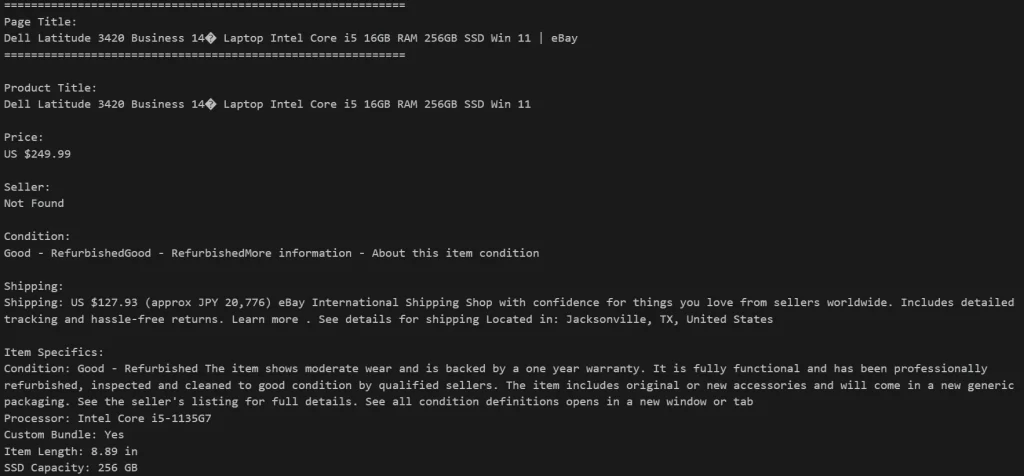
Best Practices for eBay Data Scraping
Scraping eBay at scale requires more than just extracting data. Following a few best practices can improve reliability, reduce interruptions, and help keep your scraper running smoothly.
Use Rotating Residential Proxies
Sending all requests from a single IP address increases the chances of being blocked. Rotating residential proxies distribute requests across multiple IPs, making your traffic appear more like real users and improving success rates.
Add Request Delays
Avoid sending requests back-to-back. Adding short, random delays between page visits helps mimic human browsing behavior and reduces the risk of triggering rate limits.
Monitor Website Changes
eBay regularly updates its page structure. If your scraper suddenly stops finding product details, inspect the HTML and update your CSS selectors accordingly.
Handle Errors Gracefully
Network issues, timeouts, and temporary blocks are common when scraping websites. Implement retries and exception handling so your scraper can recover automatically instead of stopping completely.
Store Structured Data
Save your scraped data in formats such as JSON or CSV. Structured data is easier to analyze, import into databases, and integrate with reporting or automation workflows.
Respect Website Policies
Always review eBay’s Terms of Service and ensure your data collection complies with applicable laws and regulations. Responsible scraping practices help minimize unnecessary load on the website while keeping your projects sustainable.
Common Use Cases
The following are some of the most common use cases for eBay Data scraping
Price Monitoring
Track product prices across thousands of listings to identify pricing trends, compare competitors, and adjust your own pricing strategy in real time.
Competitor Research
Collect information about competing sellers, including product listings, pricing, inventory, and customer ratings, to better understand the market.
Market Research
Analyze product demand, popular categories, and seasonal trends using large volumes of eBay listing data to make more informed business decisions.
Inventory Monitoring
Monitor product availability and receive updates when items are restocked, sold out, or newly listed on the marketplace.
Product Catalog Creation
Extract product titles, specifications, images, and descriptions to build searchable product catalogs or enrich existing databases.
Pokémon Card Monitoring
Track Pokémon card listings, prices, and availability to monitor new listings, identify price changes, and stay ahead of high-demand releases. Combined with Pokémon proxies, automated monitoring helps collectors and retailers react quickly to limited-edition drops and fast-selling cards.


