


I rebuilt the same scraper three times last year. Not because I wanted to, but because the target site kept shuffling its div classes every few weeks and my CSS selectors kept snapping in half.
That’s what pushed me toward Gemini web scraping in the first place. Not hype. Maintenance fatigue. A model that reads a page the way a person does, instead of hunting for div.product-card > span.price-2xl, stops caring when the class name changes to span.price-2xl-v3. Below is the setup I actually run, including where a proxy still has to be in the loop, because Gemini does not solve everything.
Why Use Gemini for Web Scraping
Traditional scrapers are brittle by design. You write a selector, it works, and then a frontend team ships a redesign and your pipeline goes quiet at 3am. Nobody notices until the dashboard’s been empty for two days.
Gemini web scraping sidesteps a chunk of that. You describe what you want in plain language, hand it a page, and it extracts the data based on meaning rather than a fixed DOM path. Move a price from a table into a card component and the extraction still works, because the model is reading “this is the price,” not “this is the third td in the fourth tr.”
It’s not magic, though. You still need a plan for JavaScript-heavy pages, sites behind anti-bot defenses, and the token costs of feeding a model an entire page of HTML. That’s the rest of this guide.
The URL Context Tool: Letting Gemini Fetch Pages Itself
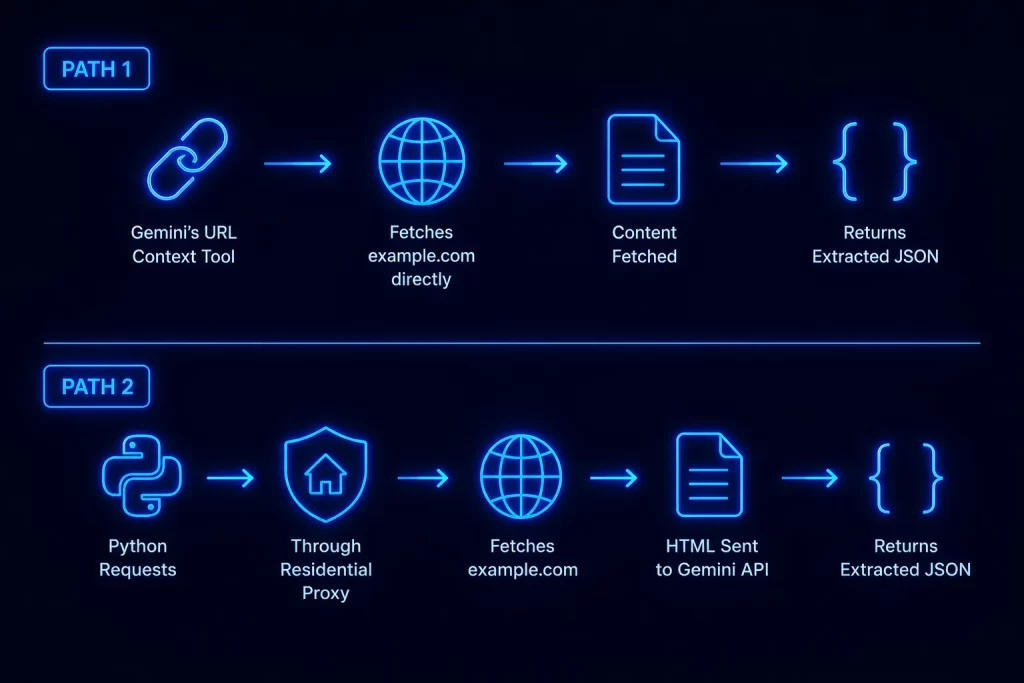
Newer Gemini models can fetch a URL on their own through a built-in tool called URL Context. You pass a URL, Gemini retrieves the page (checking Google’s cache first, then falling back to a live fetch), and it works with the content directly. No requests, no BeautifulSoup, no parsing logic on your end.
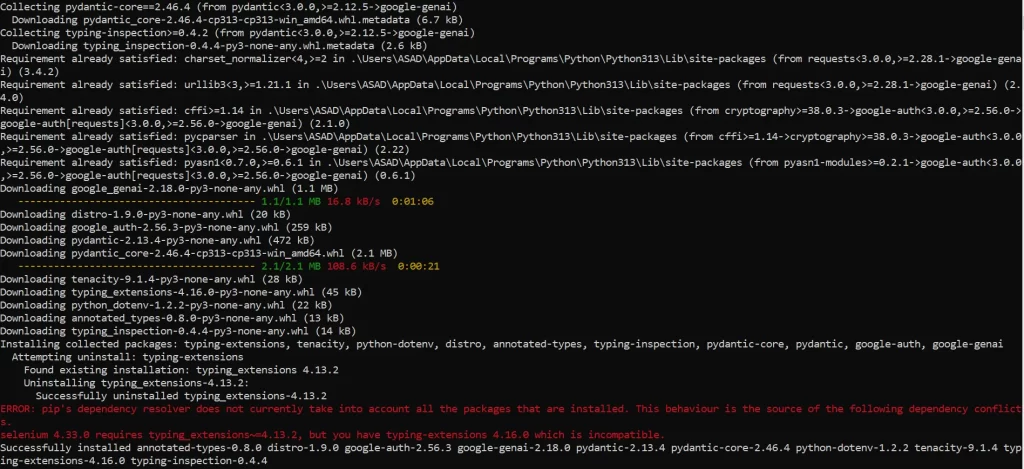
pip install google-genai python-dotenvThat single command pulls in the official Gemini SDK plus a small helper for loading your API key from a .env file, which is where it belongs. Never hardcode an API key into a script you might commit to a repo.
from google import genai
from google.genai import types
import os
from dotenv import load_dotenv
load_dotenv()
client = genai.Client(api_key=os.environ["GEMINI_API_KEY"]) #Get your API from https://ai.google.dev/gemini-api/docs/api-key
response = client.models.generate_content(
    model="gemini-2.5-flash",
    contents="Extract the product name, price, and stock status from this page as JSON: https://example.com/product/42",
    config=types.GenerateContentConfig(
        tools=[{"url_context": {}}]
    ),
)
print(response.text)The tools=[{“url_context”: {}}] line is what turns the feature on. Without it, Gemini treats the URL in your prompt as plain text and tries to guess at content instead of fetching anything. With it, the model retrieves the actual page before answering, and you get real extracted data back instead of a hallucinated guess dressed up to look plausible.
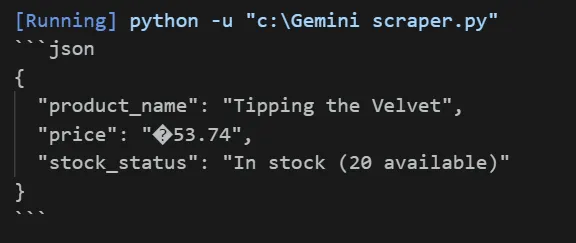
This is genuinely the fastest path for public pages with no login wall and no aggressive bot detection. I use it constantly for quick one-off pulls. But it has real limits, and pretending otherwise is how people end up debugging a scraper that was never going to work this way.
When You Still Need To Fetch HTML Yourself
URL Context cannot see behind a login. It cannot render heavy client-side JavaScript the way a headless browser can, and it will not get past Cloudflare or similar defenses built specifically to stop automated fetches. If your target site checks any of those boxes, you’re back to fetching HTML manually and handing the cleaned result to Gemini.
This is also exactly where a proxy becomes non-negotiable rather than optional. A datacenter IP hitting the same endpoint fifty times a minute gets flagged fast. Residential and ISP IPs blend in with normal traffic in a way a naked server request never will.
| Approach | Handles JS Rendering | Handles Anti-Bot Defenses | Setup Effort |
|---|---|---|---|
| URL Context tool | No | No | Minimal, one config flag |
| Manual fetch (requests) | No | Only with a proxy | Low |
| Manual fetch + headless browser | Yes | Only with a proxy | Moderate |
If your target sits in that middle row or bottom row, keep reading. This is the part of Gemini web scraping people skip past and then get stuck on later.
Setting Up Your Python Environment
Isolate this project in its own virtual environment. Skipping this step is how you end up with a requirements.txt that silently breaks a different project six months from now.
python -m venv venv
source venv/bin/activate
pip install google-genai python-dotenv requests beautifulsoup4On Windows, swap the activation line for venv\Scripts\activate.
beautifulsoup4 is the piece that lets you strip and clean raw HTML before it ever reaches Gemini, which matters more than it sounds like it should.
Configuring the Gemini API Client
Grab an API key from Google AI Studio and drop it in a .env file, never in the script itself.
GEMINI_API_KEY=your_key_here
from google import genai
import os
from dotenv import load_dotenv
load_dotenv()
client = genai.Client(api_key=os.environ["GEMINI_API_KEY"])Three lines, and you’re authenticated for every call after this. If you’re building anything beyond a weekend script, this is also the point to decide which model you’re standardizing on. Flash models are cheaper and faster for high-volume extraction; Pro models handle messier, longer pages more reliably. Pick based on your actual traffic, not on whichever one is trending that week.
Fetching and Cleaning HTML Before You Send It
Sending raw HTML straight into a prompt is the single fastest way to burn through your token budget for no reason. A typical page carries megabytes of <script> tags, inline styles, and tracking noise that Gemini doesn’t need and will happily charge you to read anyway.
import requests
from bs4 import BeautifulSoup
url = "https://example.com/listings"
response = requests.get(url, timeout=15)
soup = BeautifulSoup(response.text, "html.parser")
for tag in soup(["script", "style", "noscript", "svg"]):
    tag.decompose()
cleaned_html = str(soup.body)That loop strips out the tags that add weight without adding meaning. script and style are the big ones, but noscript and svg blocks pile up fast on modern sites too. What’s left, cleaned_html, is a fraction of the original size and costs a fraction as much to process.
Scraping Through a Proxy
Once a target starts blocking, rate-limiting, or serving a CAPTCHA wall instead of real content, the fix isn’t in your Gemini prompt. It’s in how you’re fetching the page. Route the requests call through a proxy and the target sees traffic that looks like a normal visitor instead of a script hammering the same IP over and over.
Here’s the same fetch from above, now routed through each proxy type.
HTTP proxy:
proxies = {
    "http": "http://proxy_host:port",
    "https": "http://proxy_host:port",
}
response = requests.get(url, proxies=proxies, timeout=15)HTTPS proxy:
proxies = {
    "https": "https://proxy_host:port",
}
response = requests.get(url, proxies=proxies, timeout=15)SOCKS4 proxy (install requests[socks] first):
proxies = {
    "http": "socks4://proxy_host:port",
    "https": "socks4://proxy_host:port",
}
response = requests.get(url, proxies=proxies, timeout=15)SOCKS5 proxy:
proxies = {
    "http": "socks5://proxy_host:port",
    "https": "socks5://proxy_host:port",
}
response = requests.get(url, proxies=proxies, timeout=15)Authenticated proxy:
proxies = {
    "http": "http://username:password@proxy_host:port",
    "https": "http://username:password@proxy_host:port",
}
response = requests.get(url, proxies=proxies, timeout=15)The proxies dict is just Python’s requests library reading credentials embedded in the URL itself. That’s the standard format for Residential Proxies and ISP Proxies, both of which need a valid username and password before they’ll forward a single request.
For targets that block on IP reputation alone, rotating through a pool rather than hammering one IP repeatedly makes a real difference. This is where IP rotation does the heavy lifting, and it’s worth reading up on before you scale a scraper past a handful of requests a minute.
Extracting Structured Data With Gemini
With clean HTML in hand, or a URL Context call already returning content, the extraction step is the same either way. Be specific about the shape you want back. Vague prompts get vague output.
prompt = f"""
Extract the following fields as valid JSON, and nothing else:
- product_name (string)
- price (number, no currency symbol)
- in_stock (boolean)
HTML content:
{cleaned_html}
"""
response = client.models.generate_content(
    model="gemini-2.5-flash",
    contents=prompt,
)
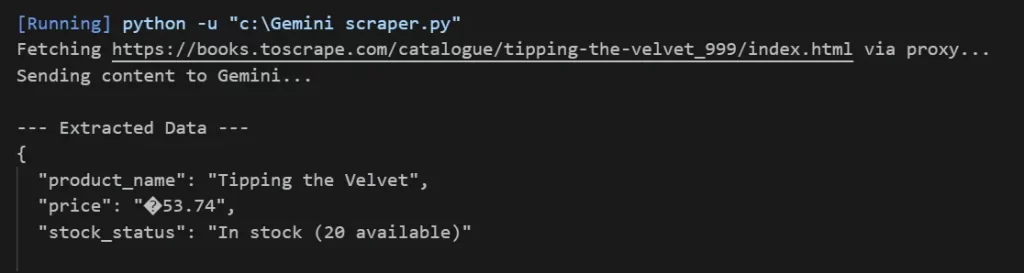
print(response.text)Notice the prompt says “valid JSON, and nothing else.” Skip that line and you’ll sometimes get a friendly paragraph wrapped around your JSON, which breaks any script trying to parse the output automatically. Models are helpful by default. You have to explicitly ask them not to be.
A Minimal Gemini Scraper, Start To Finish
Here’s the whole thing stitched together, proxy included, ready to adapt.
import os

mport requests
from bs4 import BeautifulSoup
from google import genai
from dotenv import load_dotenv
load_dotenv()
client = genai.Client(api_key=os.environ["GEMINI_API_KEY"])
proxies = {
    "http": "http://username:password@proxy_host:port",
    "https": "http://username:password@proxy_host:port",
}
url = "https://example.com/listings"
response = requests.get(url, proxies=proxies, timeout=15)
soup = BeautifulSoup(response.text, "html.parser")
for tag in soup(["script", "style", "noscript", "svg"]):
    tag.decompose()
cleaned_html = str(soup.body)
prompt = f"""
Extract product_name, price, and in_stock as valid JSON, nothing else.
HTML content:
{cleaned_html}
"""
result = client.models.generate_content(
    model="gemini-2.5-flash",
    contents=prompt,
)
print(result.text)Twenty-something lines, and it fetches through a proxy, strips the noise, and hands Gemini exactly what it needs. Swap the proxy dict for a SOCKS5 config, or drop the proxy entirely and use the URL Context tool instead, depending on what the target throws at you.
Limitations, Costs, and Anti-Bot Defenses
Every page you send costs tokens, and HTML is verbose even after cleanup. At real scale, that adds up fast enough to matter. Strip aggressively, and consider extracting only the specific page section you actually need instead of the full body.
Gemini web scraping also does not bypass anti-bot systems on its own. It has no opinion about CAPTCHAs, no ability to solve a JavaScript challenge, and no built-in IP rotation. Those problems belong to your fetching layer, not your extraction layer, which is exactly why the proxy section above isn’t optional for a lot of real targets.
Rate limits apply on the Gemini API side too, separate from anything the target site enforces. Check your current tier’s limits in the Google AI documentation before you plan a scraper around a specific daily volume, since limits change and vary by model and account type.
Troubleshooting Common Issues
Authentication errors. A 401 or “API key not valid” response almost always means the key didn’t load. Print os.environ.get(“GEMINI_API_KEY”) right after load_dotenv() and confirm it’s not None before debugging anything else.
Malformed JSON in the response. If response.text occasionally comes back with markdown fences or stray commentary, tighten the prompt further, or parse defensively with a try/except around json.loads() rather than assuming every response is clean.
Proxy connection failures. A ConnectionError or ProxyError from requests usually means the host, port, or credentials are wrong, not that Gemini is misbehaving. Test the proxy on its own with a plain request to https://httpbin.org/ip before blaming the scraper logic.
Timeouts on JavaScript-heavy pages. If requests.get() returns a shell of a page with none of the actual content, the site is rendering client-side. Neither URL Context nor a plain requests call executes JavaScript. You’ll need a headless browser in front of your proxy for that case.
Empty or blocked responses. A 403 or a CAPTCHA page in your response body means the target flagged the request before it ever reached your parsing logic. Rotate IPs, slow down your request rate, and double-check that your proxy is actually being used and not silently falling back to a direct connection.
For deeper API behavior and current limits, the official Gemini API documentation is the source of truth. The requests library’s proxy documentation covers configuration details beyond what’s shown here.
We’ve also covered a similar setup in our guide to Claude web scraping with Python, if you want to compare how the two models handle extraction differently. And if Python scraping in general is new to you, our guide to Python web scraping is a good place to build the fundamentals first.


