

Images form an essential part of the web, whether it’s product photos, infographics, or social media content. But manually downloading hundreds of images from websites is tiring and time-consuming. That’s where web scraping images comes in.
In this blog, we’ll explain what image scraping is, how it works, and the tools and techniques you can use to collect images at scale, while staying ethical and compliant.
What is Image Scraping?
Image scraping is the technique of scraping images automatically, including image files on sites. It implies web page scanning, identifying the URLs of the images (e.g., files with suffixes .jpg, .png, .webp, etc.) using a web scraper, and downloading it to a local or cloud storage system.
Common use cases include:
- Scraping of product photos for E-commerce.
- Marketing research (competitor visual information)
- Machine learning sets (collecting training data)
- Archiving of social media
- Libraries of design and art tips: Art Libraries
How Image Scraping Works
In basic terms image scraping consists of the following steps:
- Ask the page with something such as requests, HTTPX, or cURL requests.
- Scrape the HTML searching tags of images for data parsing (<img src=”…”>).
- Find the URLs of images and may change relative paths to absolute ones.
- Save pictures on either the hard drive or in the cloud.
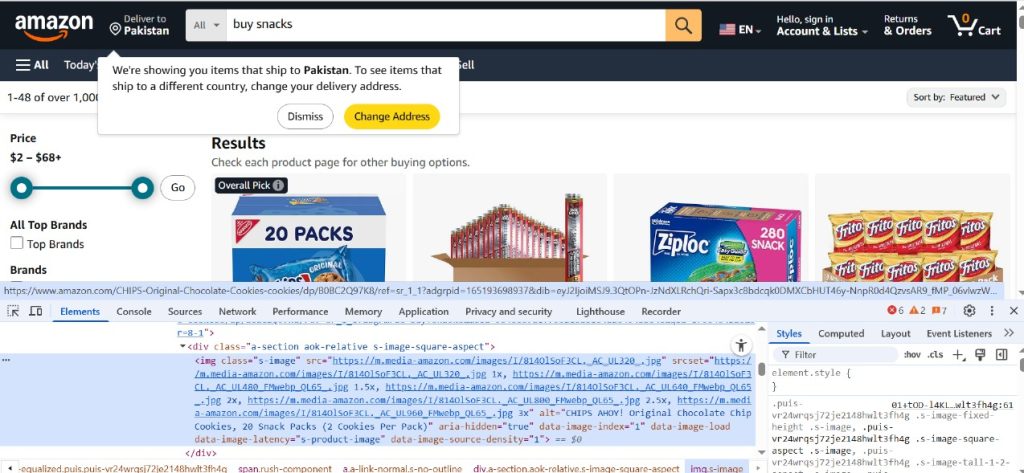
Let us examine the way this can be performed in Python.
Scraping Images with Python
Here’s a simple example using requests and BeautifulSoup:
import os
import requests
from bs4 import BeautifulSoup
from urllib.parse import urljoin
url = "https://example.com"
response = requests.get(url)
soup = BeautifulSoup(response.text, "html.parser")
# Create a folder to save images
os.makedirs("images", exist_ok=True)
# Extract and download images
for img_tag in soup.find_all("img"):
    img_url = urljoin(url, img_tag.get("src"))
    img_name = os.path.basename(img_url)
    img_data = requests.get(img_url).content
    with open(f"images/{img_name}", "wb") as f:
f.write(img_data)Note: Always check the website’s robots.txt file and terms of service before scraping.
Read more at our blog on Mastering Python Web Scraping
Tools for Image Scraping
Although Python is a good candidate as a language to script your solution, several tools and frameworks can save you time:
Scrapy
An efficient scraping middleware capable of crawling multiple pages and downloading images via pipelines. (Guide to setting up Scrapy)
pip install scrapyScrapy has a process, ImagesPipeline, that can automatically download and organize images.
Tip: Learn more about Scrapy vs. Beautiful Soup.
Selenium or Puppeteer
In the case of sites that render images dynamically through JavaScript, it is possible to render the page before scraping with browser automation libraries, such as Selenium (written in Python), or Puppeteer (written to work with Node.js).
Proxy Services
Websites will frequently shut down repeated requests from the same IP. To scrape images safely, it is possible to use residential or rotating proxies (like Proxying) and bypass IP and location restrictions.
Best Practices for Scraping Images
The best practices to make your image scraper both ethical and efficient include the following:
- Show appreciation to robots.txt and do not scrape unwanted ways.
- Use your requests slowly so as not to overload the servers.
- Put the same headers (e.g., user-agent) as in real use.
- Stay away from copyrighted content unless this act is permitted.
- Have metadata such as image origins, alt text, and page URLs.
- Avoid IP bans by use of proxy rotation.
When to Use Web Scraping vs. APIs
Some sites provide official APIs to retrieve an image (e.g., Unsplash, Pexels). In case of availability, exploit APIs; they are quicker, more dependable, and more ethical.
Nevertheless, when the websites do not provide APIs or restrict access, web scraping is the next alternative.
Conclusion
Image scraping can unleash insightful data and create efficiencies in your workflow, whether it is filling a data set, tracking your rivals, or filling a gallery. With a tool such as Python, BeautifulSoup, Selenium, or Scrapy, and with rotating proxies, you can be able to crawl visuals in large numbers ethically and in compliance.


